How a U.S. Medical Group Grew Traffic by 893% YoY
https://www.northeastmedicalgroup.org/
Stats
41.2K to 410.3K Monthly Visits
Industry
Health & Medical
Niche
Hospital
Reporting Date
June 2025
What if a single piece of content could transform your website's traffic almost overnight?
For Northeast Medical Group, a health network in the Northeast United States, one article was all it took to skyrocket their visibility in Google Ssearch.
The results?
A remarkable 893% increase in organic traffic year-over-year (YoY).

This SEO case study explores how Northeast Medical Group achieved this impressive growth. I'll also share some drawbacks of relying on a single piece of content as the cornerstone of your digital strategy.
By the end, you'll have a complete understanding of:
- Northeast Medical Group's SEO strategies
- How to apply these strategies to your own website
- Some critical considerations for long-term sustainable growth
Let’s get started.
In This Article
The Catalyst: How Northeast Medical Group Reached 410.3K Monthly Visits
TL;DR: Northeast Medical Group's organic growth was primarily driven by a single health article that now generates 84.4% of their site traffic. This was achieved by targeting long-tail keywords, establishing credibility through physician biography pages, and optimizing content structures to secure Google AI Overviews. Their local SEO strategy also helps patients find their 130+ practice locations.
While highly successful, the case study highlights the risks of relying on a single piece of content for traffic, recommending diversification and continuous content optimization for long-term sustainability.
1. Dominating SERPs With Long-Tail Keywords
Northeast Medical Group understands that in healthcare, people search for specific answers to their health concerns. Rather than focusing solely on broad medical topics, they created in-depth content addressing questions patients commonly ask.
Their most successful example is an article titled “What Is the Normal Range for Blood Sugar?“.
Published in July 2024, this single piece now generates over a quarter-million visits per month.
That’s equivalent to a staggering 84.4% of all site traffic.

What makes this article so successful?
It targets long-tail keywords—specific, longer search phrases that have lower search volume but higher conversion potential.
Website owners often overlook these keywords, preferring the “flashiness” of high-volume keywords and the traffic dreams they inspire. However, this isn’t always the best approach.
Short-tail keywords (keywords with 1–2 words) have extremely high competition, making them nearly impossible to rank for.
So, Northeast Medical Group, took another approach. They targeted the long-tail counterparts of popular health queries.
For example, instead of just targeting “blood sugar,” Northeast Medical Group's article targets specific queries like:
- “what is normal blood sugar”
- “high blood sugar level”
- “normal blood sugar levels.”
These specific queries match exactly what users are searching for, resulting in higher clickthrough rates and better engagement metrics.
Overall, this strategy to keyword targeting has paid off immensely.
This article alone ranks for an impressive 34.9K keywords, most of which are long-tail variations.
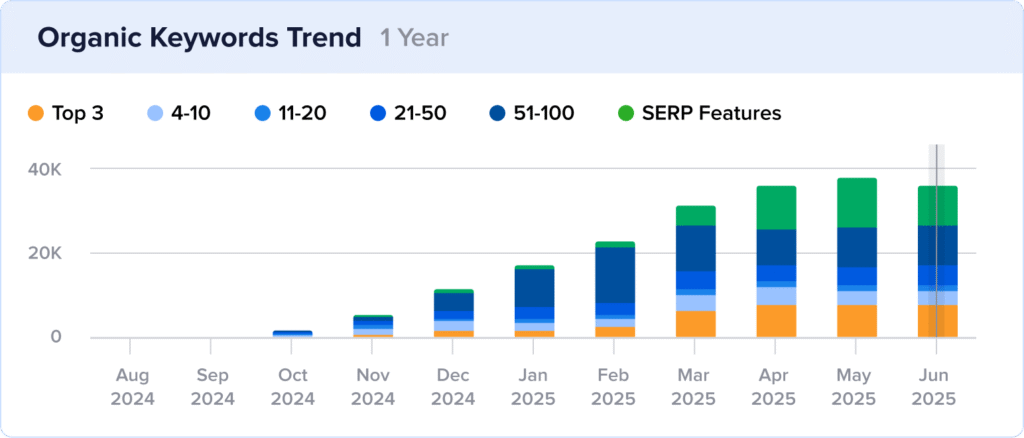
Now, here's the thing about long-tail keywords: While each individual long-tail keyword may have relatively low search volume, collectively they can drive massive traffic.
Plus, they often have less competition, making them easier to rank for.
Ultimately, long-tail keywords are one of the most overlooked heroes in SEO. But for Northeast Medical Group, they got it right.
Strategy Summary: Northeast Medical Group's article “What Is the Normal Range for Blood Sugar?” targets long-tail keywords, capturing significant traffic from highly targeted queries with less competition. This single article now generates over a quarter-million visits per month, accounting for 84.4% of all site traffic.
Why This Matters:
Long-tail keyword targeting offers significant advantages in competitive industries like healthcare, including:
- Higher Conversion Potential: Users searching with long-tail keywords typically have more specific intent and are further along in their journey, making them more likely to convert.
- Less Competition: Long-tail keywords are often less competitive than short, broad terms, making them easier to rank for.
- Better User Experience: Content that answers specific questions provides more value to users, improving engagement metrics.
- Collective Traffic Power: While individual long-tail keywords may have low search volume, ranking for thousands of them creates substantial cumulative traffic.
- Voice Search Optimization: Long-tail keywords often match natural language patterns used in voice searches, positioning your content for this growing search segment.
How to Implement a Long-Tail Keyword Strategy:
Want to replicate Northeast Medical Group's success with long-tail keywords?
Here's a simplified approach:
- Start with keyword research. Use tools like Answer the Public, People Also Ask boxes, or forums where your audience gathers to identify specific questions they're asking.
- Group related questions. Organize similar questions into topic clusters that can be addressed in a single comprehensive article.
- Create in-depth content. Develop thorough, authoritative content that fully answers these questions, incorporating expert insights and data.
- Use natural language. Write in a conversational tone that matches how people actually ask questions.
- Structure content for scannability. Use clear headings, bullet points, and tables to make information easy to find and digest. This will improve the readability of your article, boosting engagement.
Long-Tail Keyword Research Tools:
Did you know that you can do keyword research in WordPress?
All in One SEO (AIOSEO) makes this possible by connecting to your Semrush account.
After setting a focus keyword for your post or page, click on the “Get Additional Keyphrases” button.
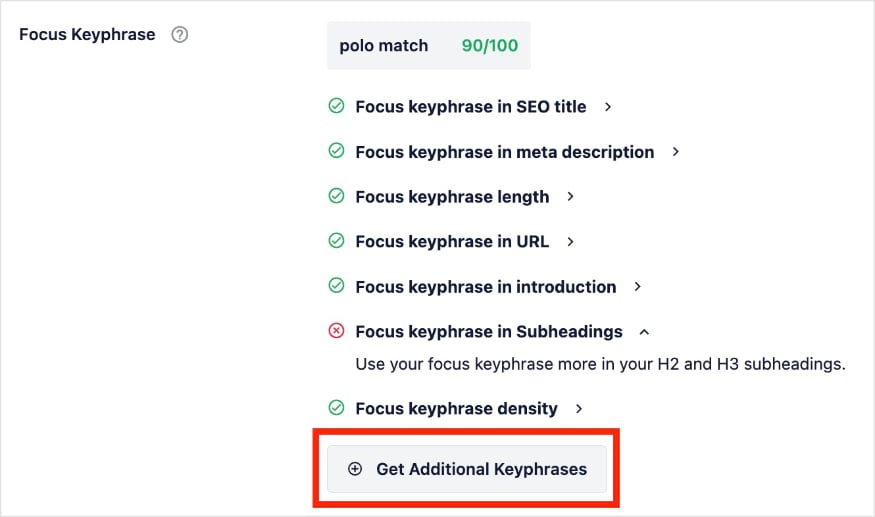
AIOSEO will extract related keywords from Semrush and present its findings directly in the WordPress editor. More often than not, these results will be long-tail.

Once you’ve found a keyword you’d like to target, just click “Add Keyphrase” and make your optimizations.
The TruSEO tool will check your on-page SEO for your new keyword and provide real-time feedback.
Now, let’s look at the second strategy Northeast Medical Group used to increase its visibility in Google.
2. Building Credibility as a YMYL Website
Northeast Medical Group operates in the healthcare sector, which falls under Google's “Your Money or Your Life” (YMYL) category.
For these topics, Google holds content to higher standards because inaccurate information could potentially impact readers' health, financial stability, or safety.
Understanding this challenge, Northeast Medical Group prioritizes establishing strong E-E-A-T signals throughout their content.
E-E-A-T stands for Experience, Expertise, Authoritativeness, and Trustworthiness. Google Search Quality Raters use this framework to assess content quality.
Their approach includes using real quotes from practicing physicians and featuring in-depth biography pages for each expert cited.
Here, we see how a quote from one of the Northeast Medical Group’s endocrinologists:

And if a user clicks the doctor’s name, they’ll arrive to a page like this:
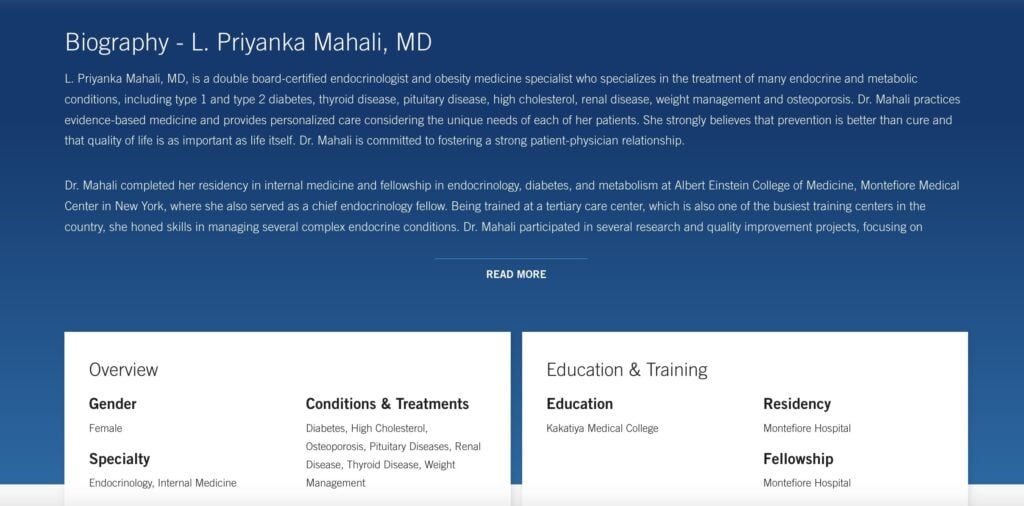
These biography pages include comprehensive information about the physician's background, specialties, education, training, and residency information.
This level of detail helps establish the contributor as a credible source for medical information, which in turn strengthens the credibility of any content that cites him or her.
By consistently implementing these credibility signals across their site, Northeast Medical Group has built trust with both users and search engines, contributing significantly to their organic traffic.
Strategy Summary: Northeast Medical Group established strong E-E-A-T signals by featuring quotes and detailed bios of practicing physicians, which is crucial for their “Your Money or Your Life” (YMYL) healthcare content. This focus on credibility contributed significantly to their overall 893% increase in organic traffic.
Why This Matters:
Strong E-E-A-T signals are crucial for healthcare websites and other YMYL topics for the following reasons:
- Higher Rankings: Google's algorithms prioritize content with strong E-E-A-T signals, especially for YMYL topics.
- User Trust: Visitors are more likely to trust and engage with content that clearly demonstrates expertise and credibility.
- Reduced Vulnerability to Algorithm Updates: Sites with strong E-E-A-T tend to be more resilient against Google's core algorithm updates.
- Competitive Advantage: Many websites fail to properly establish E-E-A-T, creating an opportunity for those who do it well.
- Lower Bounce Rates: Users are more likely to stay on your site when they perceive your content as trustworthy and authoritative.
How to Establish Google E-E-A-T:
Here's how to build credibility signals into your content:
- Feature real experts. Include quotes, insights, and contributions from genuine experts in your field.
- Create detailed author bios. Develop comprehensive biography pages for content authors and cited experts that highlight their credentials and expertise.
- Cite authoritative sources. Reference and link to respected organizations, academic institutions, and peer-reviewed research.
- Keep content updated. Regularly review and update your content to ensure information remains accurate and current.
- Showcase credentials prominently. Make it easy for users to verify the expertise behind your content by displaying relevant credentials.
For an in-depth explanation of each step, check out this Google E-E-A-T optimization tutorial.
Author Credibility Tools:
AIOSEO's Author SEO feature helps you establish and showcase author expertise directly within WordPress. You can easily create detailed author bios with credentials, expertise areas, and social profiles.
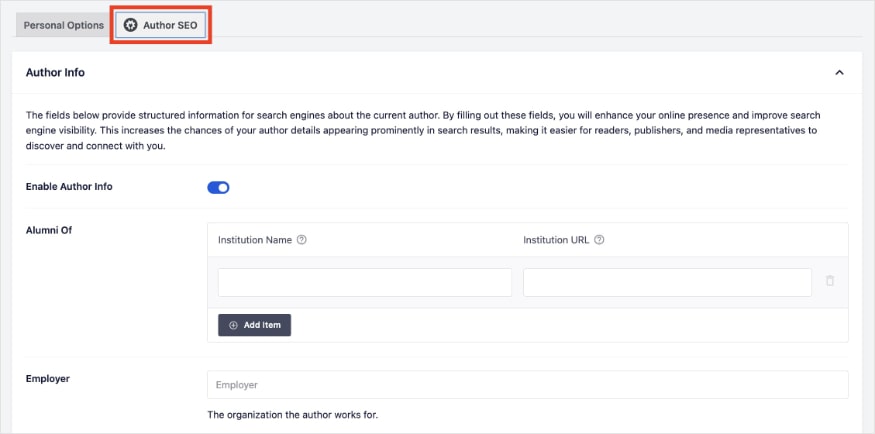
You also get complete control over where to display author information. You can choose small snippets on posts or create dedicated biography pages that go into greater detail.
Or, if you’re like us at AIOSEO, we use both!
3. Capturing Position Zero With AI Overviews
Northeast Medical Group has successfully positioned their content to appear in Google's AI Overviews—a relatively new SERP feature that provides AI-generated summaries at the top of search results.

Despite being generated by AI, Google cites sources used to create these summaries, meaning you can still get traffic from users.
And, for Northeast Medical Group, they’re getting 8.3K visits per month from this SERP feature alone.
Today, their blood sugar article ranks for all 2.5K AI Overview results. This positioning gives them tremendous visibility above traditional organic listings.

This success stems from several key factors:
- Their content provides clear, direct answers to specific questions.
- Information is structured in a logical, easy-to-follow format.
- Content is backed by credible sources and expert quotes.
- Key data points are presented in scannable formats like tables and lists.
By optimizing for AI Overviews, Northeast Medical Group has effectively secured “position zero” for thousands of queries, significantly increasing their visibility and clickthrough rates.
Strategy Summary: By providing clear, direct, and well-structured answers supported by credible sources, their content ranks in 2.5K AI Overviews. These search results, drive 8.3K visits per month from this prime “position zero” SERP feature.
Why This Matters:
Appearing in AI Overviews offers several significant advantages:
- Maximum Visibility: AI Overviews appear at the very top of search results, above all other listings.
- Perceived Authority: Being featured in AI Overviews signals to users that Google considers your content authoritative and trustworthy.
- Future-Proofing: As AI continues to play a larger role in search, optimizing for AI features positions your site for long-term success.
- Competitive Edge: Many websites haven't yet optimized for AI Overviews, creating an opportunity for early adopters.
To learn more about evolving search trends, see our take on AI in SEO.
How to Optimize for AI Overviews:
Follow these steps to increase your chances of appearing in AI Overviews:
- Create comprehensive content. Cover topics thoroughly, addressing all related questions and subtopics.
- Structure content clearly. Use descriptive headings, subheadings, and a logical content hierarchy.
- Provide direct answers. Start sections with clear, concise answers to specific questions before elaborating.
- Use structured data. Implement appropriate schema markup to help AI systems understand your content.
- Establish credibility signals. Include author expertise information, citations, and references to authoritative sources.
Content Optimization Tools:
AIOSEO's Schema Generator makes it easy to implement structured data that helps AI systems better understand your content.
With support for various schema types including FAQ, HowTo, and Article, you can provide the semantic context that helps Google's AI accurately interpret and feature your content.
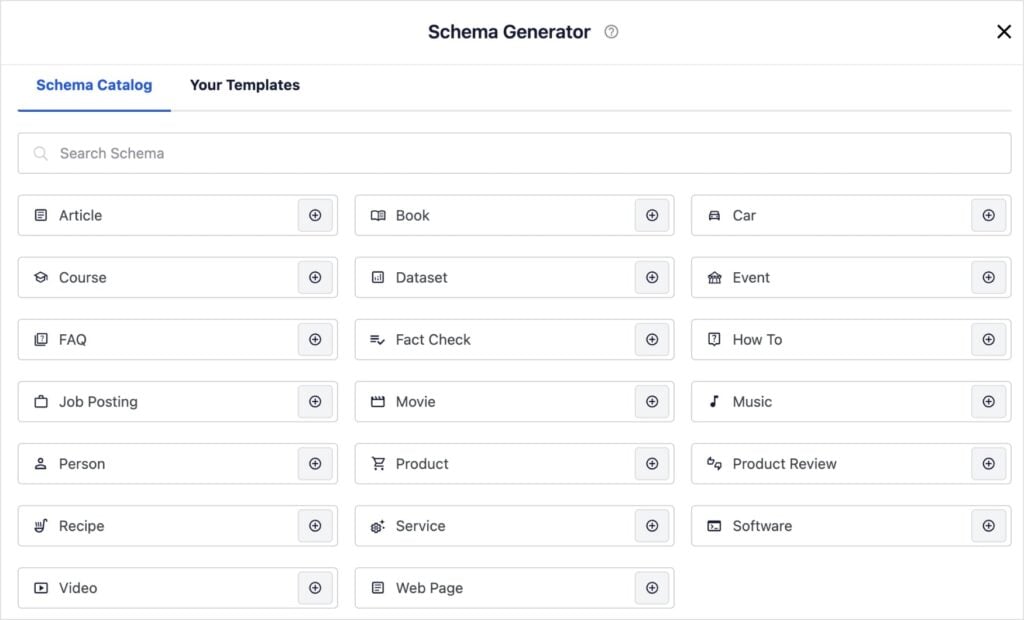
It’s literally as simple as clicking the “+” button next to your schema type of choice.
If additional elements are required, the plugin will prompt you to fill in some user-friendly fields. It’s quick and easy.
Another feature that can help you rank in AI Overviews is the new AI Content Generator.
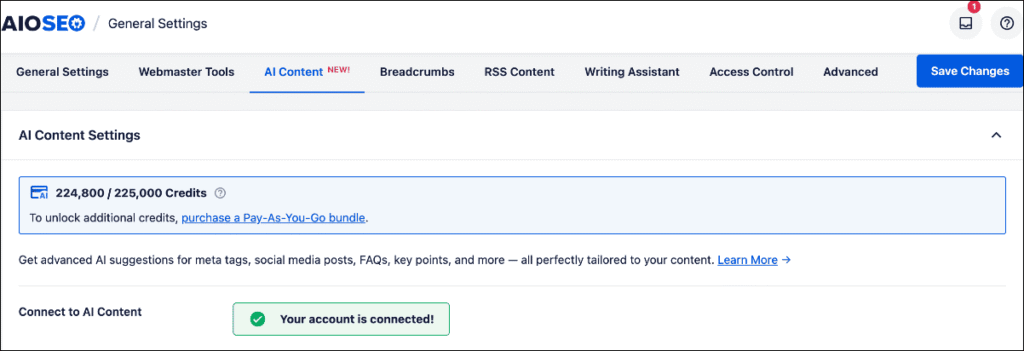
This tool creates different types of content (FAQs, social media posts, emails, etc.) that improves your SEO. And it does it automatically for you.
AI Content uses credits, allowing you to pick exactly where you want to focus your content creation efforts.
For example, in the screenshot below, I asked it to come up with FAQs for a blog post I was working on. The plugin gave me a list of relevant questions and answers that I could add to my post with the click of a button.

I also like the Key Points feature, which allows you to create TL;DR summaries. These snippets perform particularly well in AI Overview and featured snippets.
Standout SEO Wins
Beyond their core content strategy, Northeast Medical Group also excels in another critical area for healthcare providers:
Local SEO: Optimizing for Multiple Locations
Northeast Medical Group operates more than 130 practices across multiple states, making local SEO a crucial component of their digital strategy.
They've implemented a sophisticated multi-location approach that ensures patients can easily find the nearest practice location.

Once a user has found the location nearest to them, they can visit a dedicated landing page for that specific medical center.

Each location has unique content, including:
- Specific services offered at that location
- Local phone numbers and contact details
- Embedded Google Map with detailed directions
- Parking information
This approach has helped them rank in local search results across their service area, driving significant traffic from patients searching for nearby healthcare providers.
Strategy Summary: Northeast Medical Group effectively leverages local SEO for its more than 130 practices across multiple states. By creating dedicated, content-rich landing pages for each location, they ensure patients can easily find and access nearby healthcare providers, significantly contributing to their overall traffic growth.
Tool: AIOSEO's Local SEO feature is designed to help you business stand out in local search results. It has multi-location capabilities, allowing you to optimize the SEO settings of each location.
All you have to do is toggle the setting for “Multiple Locations” to “Yes.”
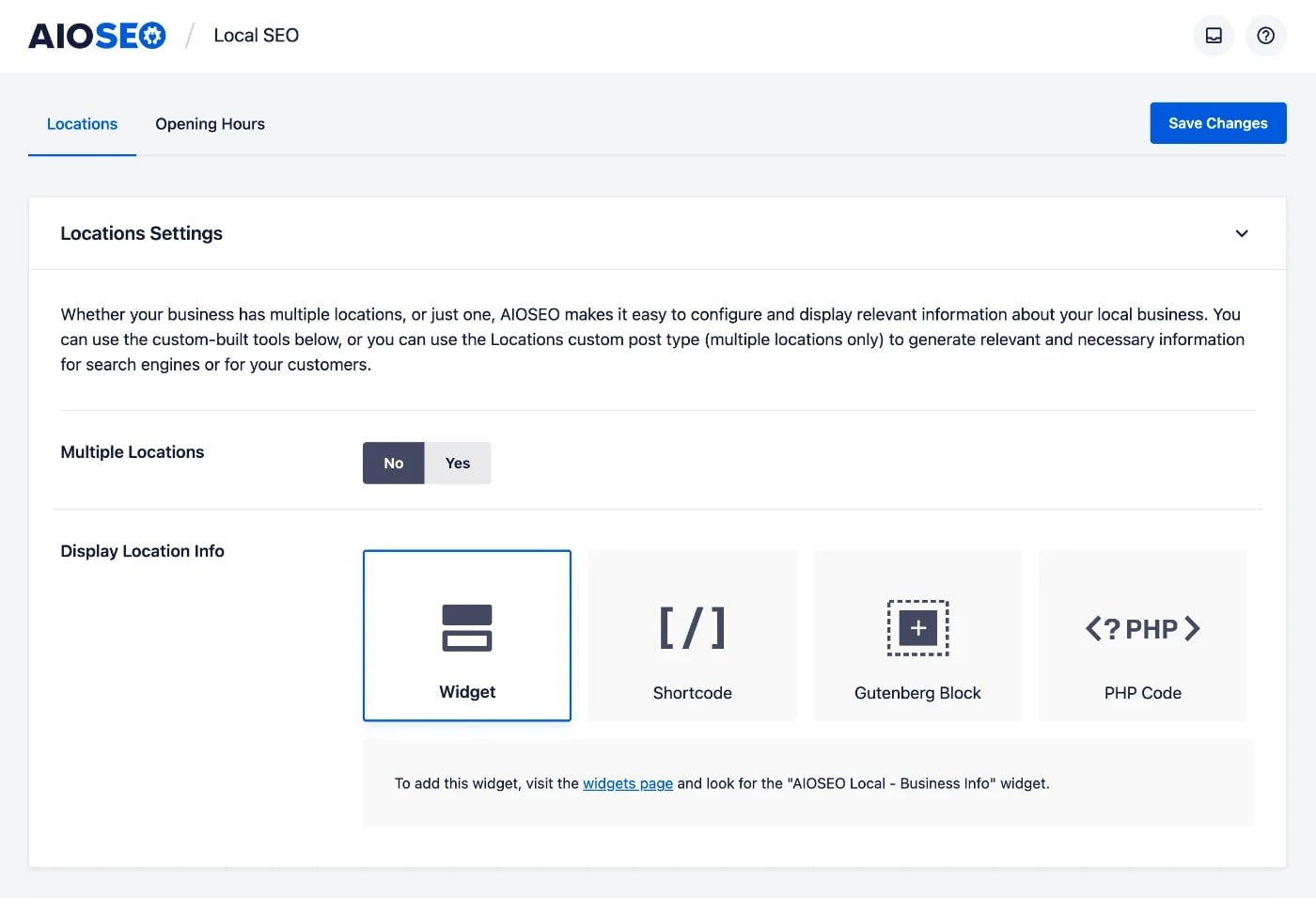
From here, AIOSEO will open the available local SEO settings for each location. It’s intuitive and can drastically improve your business’s visibility in local search.
Related reading: Local Business SEO for Multiple Locations
The Risks of a Single-Content Strategy
While Northeast Medical Group's success with their blood sugar article is impressive, it's important to acknowledge the potential risks of having a single piece of content drive the majority of your traffic.
Vulnerability to Algorithm Updates
When the lion’s share of your traffic comes from a single web page, you're extremely vulnerable to algorithm updates. If Google changes how it evaluates content in your niche, or if the competitive landscape shifts, you could lose a significant portion of your traffic overnight.
Northeast Medical Group would benefit from diversifying their content portfolio to create multiple traffic drivers across different topics and keyword clusters. This approach creates a more stable traffic foundation that can withstand changes to any single ranking factor.
Seasonal or Trending Fluctuations
Topics like blood sugar have relatively consistent search volume, but many topics experience seasonal fluctuations or trend-based changes in search interest. Relying on a single topic makes your traffic more susceptible to these natural variations.
A diversified content strategy helps smooth out these fluctuations by ensuring that when some topics experience lower search volume, others can compensate.
Recommendations for Long-Term Sustainability
For Northeast Medical Group and others looking to build on a single-content success, consider these approaches for long-term sustainability:
- Build content clusters. Use your successful article as the pillar for a broader content cluster, creating related articles that link back to the main piece.
- Replicate successful content. Analyze what made your content work, then apply those same principles to other topics relevant to your audience.
- Audit content regularly. Schedule quarterly content performance reviews to identify opportunities for updating existing content and creating new pieces.
- Diversify conversion paths. Ensure you have multiple paths for visitors to convert, not just through your top-performing content.
- Diversify traffic sources. Complement your organic search strategy with other channels like email, social media, and partnerships to reduce dependence on search algorithms.
Takeaways
At this stage, we've discovered the key strategies that contributed to Northeast Medical Group's success.
Now, it's time to transform these strategies into actionable to-dos for your website.
Top 3 Strategies to Emulate
- Target long-tail keywords with comprehensive content. Don't just chase high-volume keywords; create in-depth content that addresses specific questions your audience is asking. This approach can drive substantial cumulative traffic while facing less competition. Focus on creating the definitive resource on topics relevant to your audience, covering all related questions and subtopics.
- Establish strong E-E-A-T signals, especially for YMYL topics. Showcase real expertise by featuring credentialed experts, creating detailed author bios, and citing authoritative sources. For YMYL topics like health, finance, or safety, these credibility signals are essential for ranking well. Make expertise visible and verifiable to both users and search engines through comprehensive author pages and clear attribution.
- Optimize content structure for AI Overviews. Format your content to be easily understood by AI systems by using clear headings, providing direct answers to questions, and implementing proper schema markup. Create content that thoroughly covers topics with logical organization and scannable formats like lists and tables. This positions your content for maximum visibility in AI-generated SERP features.
Bottom 3 Strategies to Reconsider
- Allowing meta descriptions to exceed character limits. While Northeast Medical Group excels in many areas, some of their meta descriptions exceed Google's display limits, resulting in truncated snippets in search results. This reduces click-through potential and results in incomplete descriptions. To avoid this issue, use a SERP preview tool to ensure your metadata stay within the optimal 150-160 character range.
- Overlooking indexability issues on key URLs. Some important pages on Northeast Medical Group's site have indexability issues that prevent search engines from properly crawling and ranking them. This creates missed opportunities for valuable content to appear in search results. AIOSEO's SEO Audit Checklist can identify and help fix these issues, ensuring all your important content is accessible to search engines.
- Underutilizing schema markup. Despite their success, Northeast Medical Group misses opportunities to implement schema markup. Expanded schema implementation would enhance how search engines understand and represent their content. AIOSEO's Rich Snippet Schema makes it easy to implement various schema types without coding knowledge, helping search engines better understand your content's context and purpose.
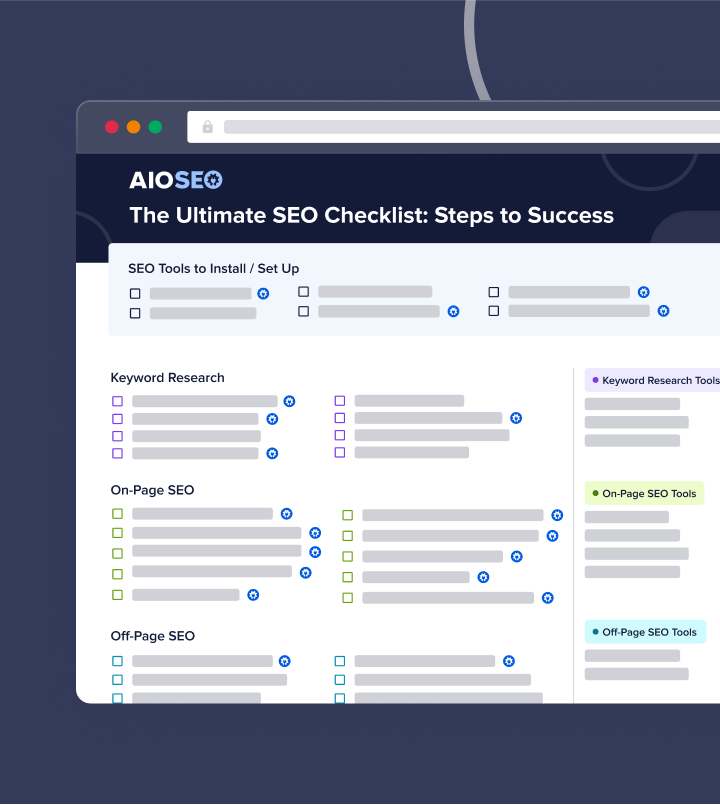
Steal Our Winning SEO Strategy: A Checklist for Your Website
Download A Free SEO Checklist
Access our comprehensive SEO Checklist with a single click. We'll deliver it straight to you, putting actionable items with SEO tools and tutorials right at your fingertips.
Enter your name and email to download a free SEO checklist.
Take Your SEO to the Next Level With AIOSEO
Northeast Medical Group's journey showcases that online success often boils down to SEO best practices.
With All in One SEO (AIOSEO), you can take control of your website's SEO and achieve real results. No SEO experience required.
AIOSEO is the original WordPress SEO plugin. With over 3 million active users and thousands of 5-star reviews, you can take on the SERPs with confidence and ease. Some customer-favorite tools include:
- Semrush Keyphrase Suggestions: Perform keyword research directly in the WordPress editor. AIOSEO connects with your Semrush account to generate and serve keyword ideas for your content.
- Author SEO: Create powerful author bios that showcase your experience and expertise. This addon aligns your content with Google E-E-A-T guidelines and builds trust with readers.
- Rich Snippets Schema: Win more rich results with AIOSEO’s user-friendly Schema Generator. Just pick the schema type you want, and we’ll format the structured data properly for Google.
- AI Content Generator: Supercharge your content creation workflows with AI-generated snippets. Choose from FAQs, Key Points, social media posts, emails, and more.
- SEO Audit Checklist: Easily spot critical SEO issues that could be hurting your rankings. You’ll get actionable insights to fix them, right from your WordPress dashboard.
- Local SEO: Boost your visibility in local searches and rank higher in Google Maps with this local SEO tool. It implements local business schema for you—no coding required.
- AI Title & Description Generator: Save time writing SEO titles and meta descriptions with the help of AI. With just a click of a button, you can generate unique metadata for any page on your website.
How a Local Barber Shop Grew Online Traffic by 2,275% in 3 Months
https://www.theshavecave.com/
Stats
30.6K to 726.7K Monthly Visits
Industry
Services
Niche
Health & Beauty
Reporting Date
May 2025
How does a local barber shop turn a simple blog post into a traffic-generating machine?
Meet The Shave Cave. A popular men's grooming center in St. Petersburg, Florida.
In 2025, this local staple skyrocketed website traffic by an astonishing 2,275% in just 3 months. This increase took their monthly organic visits from 30.6K to nearly three quarters of a million.
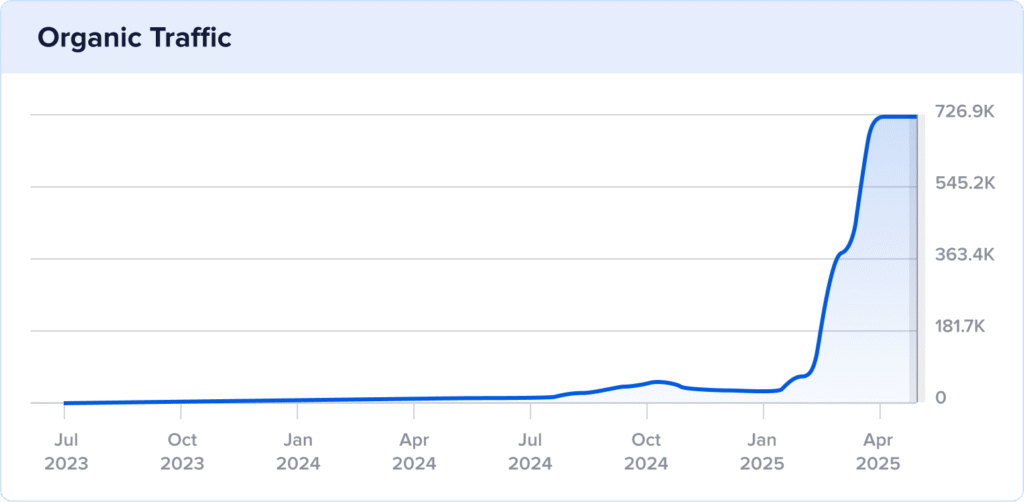
In this SEO case study, we'll explore the blog strategy that launched their organic success.
The good news?
It's super simple to do, and I'm going to share the tools and tutorials to help you replicate it.
In This Article
The Catalyst: How The Shave Cave Reached 726K Monthly Visits
TL;DR: The main driver of The Shave Cave's traffic growth was a single, keyword-optimized blog post on men's hairstyles. This page generates 90% of all site traffic due to strategic keyword targeting, in-depth topic coverage, and image SEO best practices. However, relying so heavily on one traffic-driving page is risky, as future algorithm changes or shifts in search trends could cause major drops in traffic.
1. A Single Blog Post Generates 90% of All Site Traffic
The Shave Cave's incredible traffic growth can largely be attributed to a single, high-impact blog post: “Top 25 Men's Hairstyles for 2025.”
This post alone accounts for an astonishing 90.16% of their total site traffic, showcasing the power of a well-crafted article in a targeted niche market.
At the heart of this success is the content's on-page SEO.
On-page SEO is the practice of optimizing your web pages to appear in search engine results pages (SERPs).
This post aligns with search intent, providing easy access to different hairstyles for men. To reach users searching for this information, The Shave Cave targeted the appropriate keywords in their content.
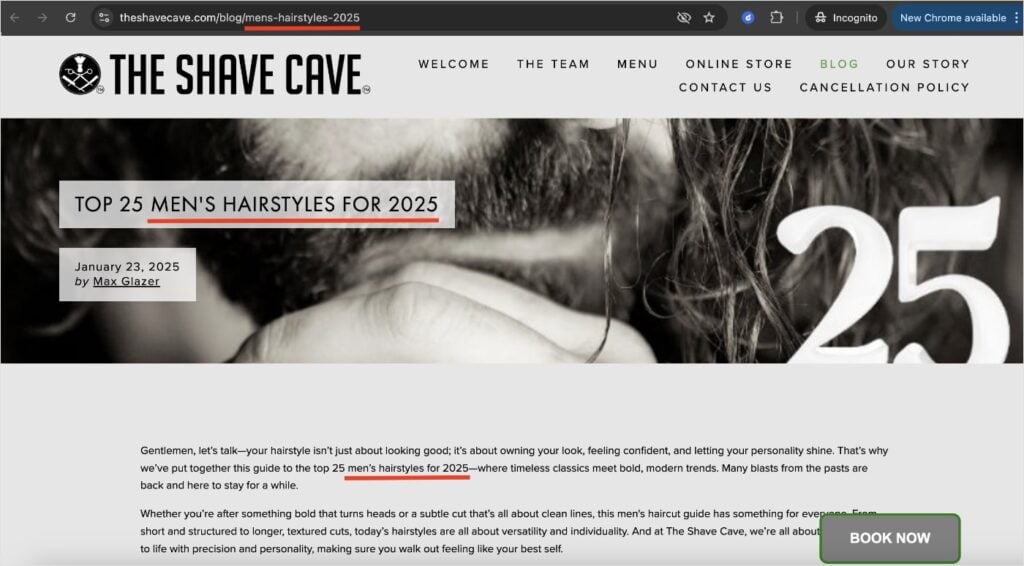
For example, the focus keywords “mens hairstyles” and “mens hairstyles 2025” appear in the following critical areas:
- H1: This is the main title of the article. It's typically the first thing users see when reaching a web page.
- Introduction: This section has a direct impact on bounce rates. Keep it engaging and use your primary keyword for best results.
- Subheadings: These headings organize the content, making it easier for users to navigate the page.
- URL: The URL slug includes the main keyword, providing another signal to search engines and making it clear and informative for users.
Here, you can see some of these optimizations in the blog post itself:
Furthermore, The Shave Cave understands the importance of using related keywords to enhance the article’s visibility.
Related keywords have the same search intent as your primary keyword. The address the same user and topic (or closely related topic) to expand coverage for a broader keyword net.
Some examples for The Shave Cave’s article include “mens hairstyle guide” and “top mens hairstyles.”
Ultimately, this helps them reach a wider audience without keyword stuffing.
The results?
Of The Shave Cave’s 88.8K keyword rankings, this blog ranks for 82.1K of them.
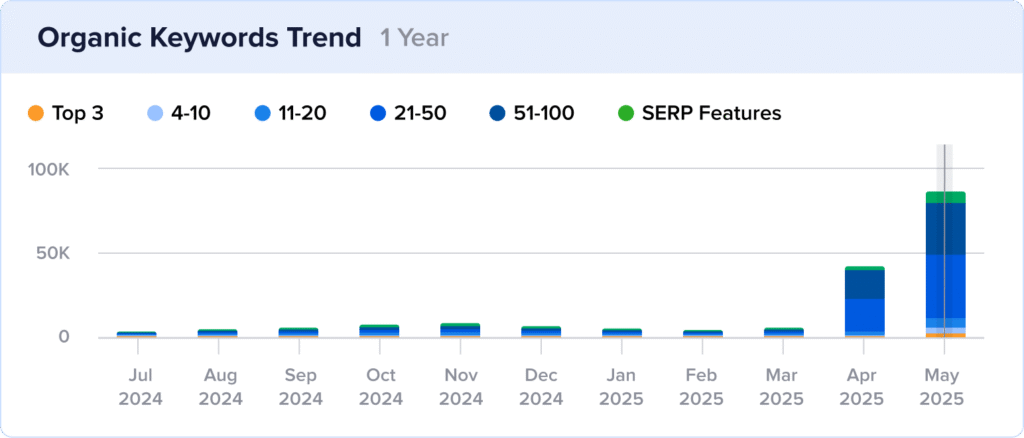
Furthermore, The Shave Cave blog contributes 100% of all keyword rankings.
Note: While these results highlight the effectiveness of The Shave Cave’s blogging strategy, there are important risks to consider. Relying on a single page or traffic source makes your website vulnerable. If an algorithm update hits, your traffic could drop overnight. For long-term growth and stability, it’s always safer to diversify your digital marketing strategy rather than focusing on a single channel or traffic source.
Why This Matters:
The Shave Cave's use of on-page SEO demonstrates a clear understanding of how important it is to target the right keywords. By optimizing for queries related to your business, you can increase your visibility to potential customers.
Their targeted approach has several benefits, including:
- Improved Rankings: The targeted placement of keywords boosts the blog post’s position in search results.
- Higher Engagement: Attracting users who find the content genuinely helpful reduces bounce rates and increases the likelihood of conversion.
- Traffic Sustainability: This SEO strategy ensures a steady stream of organic traffic without the ongoing costs associated with paid marketing tactics.
Overall, it’s a core SEO best practice that belongs in every website owner’s digital marketing arsenal.
How to Do On-Page SEO:
On-page SEO isn’t complicated or necessarily hard, but it does require a strategic approach.
Here’s a quick overview of the most important steps we cover in our on-page SEO guide:
- Perform keyword research.
- Select your focus keyword.
- Optimize your SEO title tag.
- Optimize your meta description.
- Include your keyword in image optimizations.
- Add internal and external links.
- Optimize your URL structure.
For a full explanation of each step (and more), check out the guide linked above the list. It’s very beginner-friendly and walks you through the entire on-page SEO process.
On-Page SEO Tools:
Using the right on-page SEO tools can make all the difference in your content’s visibility. Plus, they’re a huge time-saver when it comes to making sure you’ve optimized all the most important elements.
I recommend All in One SEO (AIOSEO) for WordPress site owners serious about improving their rankings. It’s packed with user-friendly features that help you optimize your content for search engines and users.
For on-page SEO, the TruSEO Analysis tool uses a checklist system to make optimizations a breeze.
You’ll get a Focus Keyphrase Checklist that lets you know when you’ve forgotten your primary keyword in critical areas.

This is really helpful for making quick updates that improve your SEO’s effectiveness. Plus, it’s built directly into the WordPress Editor, meaning you get real-time updates as you write.
Now, let’s see how The Shave Cave builds topical authority within its blog post.
2. Comprehensive Topic Coverage Boosts User Engagement
Another key to The Shave Cave’s success is their ability to create content that thoroughly covers the subject.
Their blog post, “Top 25 Men's Hairstyles for 2025,” does more than just list styles. It offers a rich user experience that covers all facets of the subject.

For example, each of the 25 hairstyles is complemented by:
- High-Quality Images: Each style uses a photo to illustrate the result while enhancing visual engagement.
- Detailed Descriptions: The author describes each style, the hair type it’s best suited for, and instructions for achieving the look. This approach ensures the information is useful and actionable.
- Internal Links: The Shave Cave links to other pages on its website, encouraging content discovery. Unfortunately, these hyperlinks don't stand out against the regular text. This makes it practically impossible for users to find them. (Search engines can, though. Still, I’d highly recommend The Shave Cave to change their hyperlink style to be easily visible.)
Ultimately, these strategies turn what could be a basic list into an engaging resource.
Why This Matters:
High-quality content is the top Google ranking factor in 2025. Because of this, The Shave Cave’s comprehensive content strategy is more relevant than ever.
By providing thorough, well-structured content, they achieve several benefits for their website:
- SEO Performance: Comprehensive and detailed content is favored by search engines, leading to improved rankings. This ensures that The Shave Cave's content is more visible to potential customers searching for men's grooming tips and styles.
- User Engagement and Retention: Offering high-quality images and detailed instructions enhances the user experience, keeping visitors engaged longer and encouraging them to explore additional content.
- Authority Building: Providing valuable information in an accessible format establishes The Shave Cave as a trusted authority in men's grooming. This credibility not only fosters customer loyalty but also encourages positive word-of-mouth and referral traffic.
Incorporating comprehensive topic coverage doesn’t just attract users; it turns them into repeat visitors and potential customers.
This strategy underscores the importance of quality content in building a successful digital presence in today's competitive market.
How to Build a Content Optimization Strategy:
This tutorial shows you how to design a content strategy that improves your rankings.
Here’s a quick overview of the process:
- Use content optimizations tools for SEO.
- Get to know your target audience.
- Set SEO goals that align with your business objectives.
- Perform keyword research.
- Use the on-page SEO techniques discussed in the previous strategy.
- Optimize your technical SEO (like loading times and site crawling).
- Analyze your SEO performance and adjust as necessary.
At its core, creating high-quality content is about knowing your audience and aligning your content to their needs. By doing this, you can simultaneously improve user engagement and keyword rankings.
Content Optimization Tools:
AIOSEO has an AI Writing Assistant that makes it easy to create in-depth, SEO-optimized content right in WordPress. This tool integrates with your SEOBoost account to provide content optimization suggestions directly in the Editor.
For example, the Overview tab shows you the average word count of top-ranking content along with the readability level. This can guide your writing without needing to manually analyze the top search results for your desired keyword.

I also really like how the Optimization Wizard provides additional keyword ideas related to your main topic. This is particularly helpful for ensuring comprehensive topic coverage and maximizing your page’s visibility in search results.

Overall, AI Writing Assistant streamlines the content creation process for writers of any level. It’s intuitive, effective, and provides real-time feedback.
3. Image SEO Increases Visibility in SERPs
In our previous section, we discussed how The Shave Cave uses images to improve engagement.
However, merely using images isn't enough if you want to maximize your website's search potential
Search engines can't “see” images like humans, so just putting them on your webite only takes of site visitors. (Obviously, this is hugely important, but you want to rank too, right?)
To accomodate the other half of the question (i.e., search engine crawlers), you need to make your images SEO-friendly.
This means optimizing them in a way that search engines can understand.
The Shave Cave does a good job of this by implementing the following image SEO best practices:
- Writing descriptive alt text that accurately describes the image
- Using keyword-rich image file names
- Adding relevant schema markup to posts and pages
Let’s look at a quick example.
Here’s an image of a style they call “long curly hair fade.”
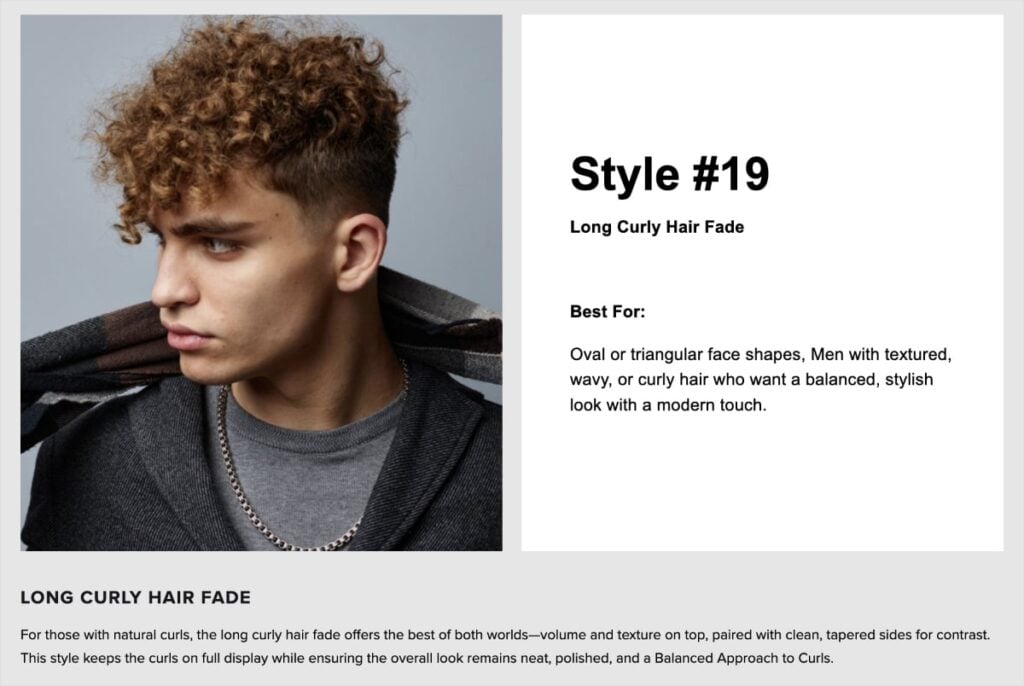
And here are image optimizations for it:
- Alt text: Long curly hair fade men.
- Image file name: Long-Curly-Hair-Fade-Men.jpeg
- Schema markup: Article schema with ImageObject attributes
These image optimizations have been pivotal in The Shave Cave’s visibility in search results.
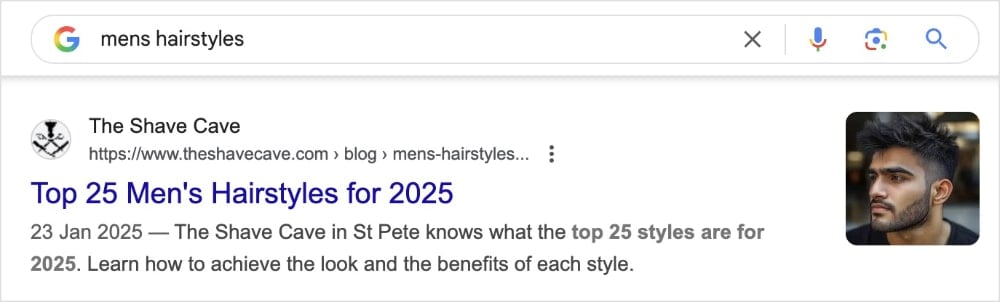
Not only have they earned them image snippets, which capture user attention…
… but they’ve also earned them rankings in Google’s Image Pack, which features image at the top of standard search results.
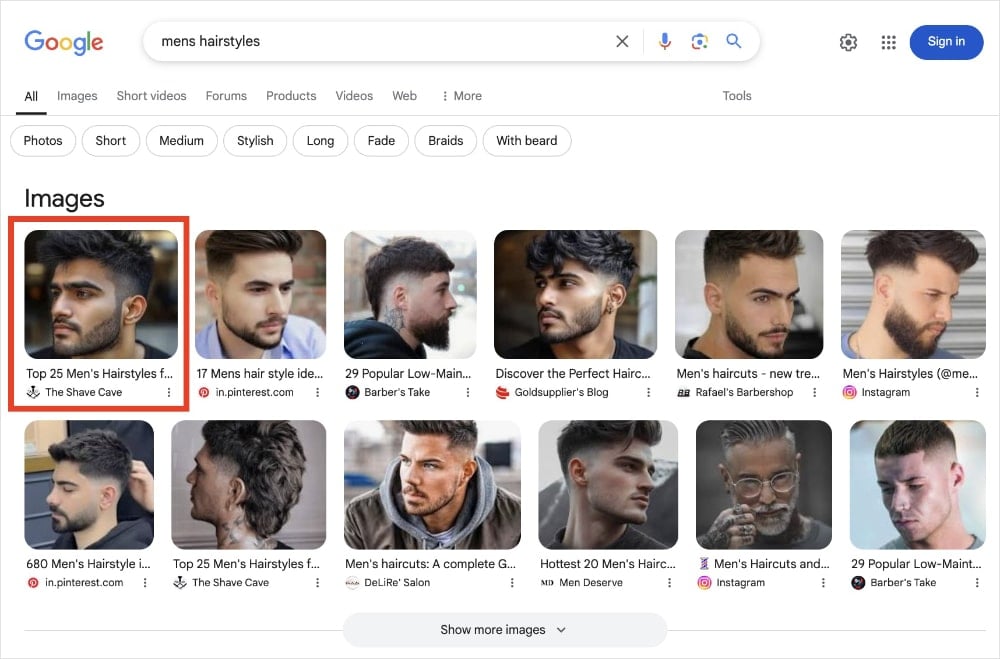
Both types of of SERP features are instrumental for driving clicks and organic traffic.
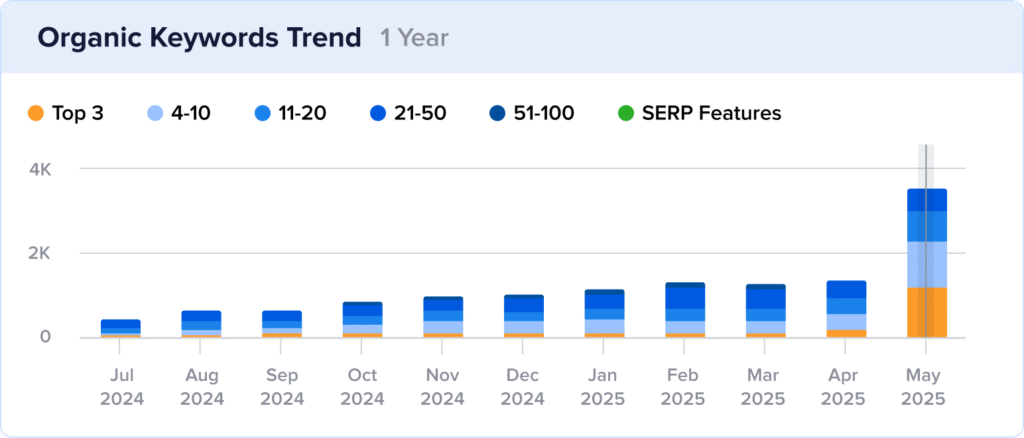
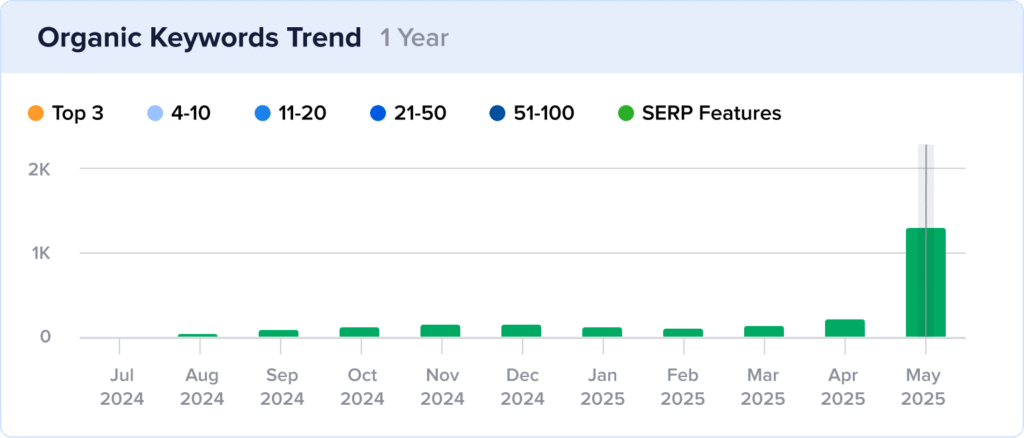
Overall, The Shave Cave earned 3.7K rankings with image snippets in May. (Notice how many are in the top 3 positions, too!)
And 1.5K rankings in the Image Pack, proving the efficacy of their image SEO.
Why This Matters:
With over 1 billion searches on Google Images every day, optimizing your images for search is non-negotiable in 2025. Here are some of its greatest advantages:
- Increased Visibility in SERPs: By appearing in image snippets and Google Image Packs, you capture prime SERP real estate. This can dramatically increase your clickthrough rates (CTR).
- Competitive Advantage: In visually intensive markets, being featured in SERP features can set you apart from competitors. High-ranking images across top positions highlight your brand's appeal, attracting more potential customers.
- Improved Accessibility: Including descriptive alt text not only improves search engine comprehension but also enhances accessibility for users with visual impairments. This commitment to an inclusive user experience builds trust and boosts user engagement.
Ultimately, image SEO is a win-win for everyone. Users get a better UX, search engines can more easily understand your content, and website owners can improve their visibility.
How to Do Image SEO:
Image SEO is pretty straightforward. You just need to know what to optimize and have a primary keyword in mind.
Let’s look at how to optimize image in WordPress:
- Write clear alt text that describes your image. Find a good balance of providing enough context without getting too detailed.
- Use SEO-friendly image file names. Instead of naming your image “image193383.jpg,” use something more descriptive, like “dog-food-for-puppies.”
- Include captions when helpful. Captions can provide additional context when explaining screenshots, graphs, etc. Use them wisely.
- Chose the right image format. There are several formats you can upload to WordPress. JPG is good for images with lots of colors, PNG is high-resolution, and GIF is for animations.
- Create an image sitemap. Sitemaps tell search engines when you update or publish new content. Use an image-specific one to share your latest images as soon as they’re on your site.
These are just 5 best practices, but for even more ideas, check out our image SEO tutorial. It has 18 tips for optimizing images for greater visibility.
Image SEO Tools:
Image SEO is necessary, but tedious.
The good news is that you can use SEO tools to streamline their optimizations.
AIOSEO is an image optimizer plugin that helps you make your images search-friendly automatically. It uses dynamic smart tags that you can customize for various image elements such as, your image titles, alt text, captions, and more.
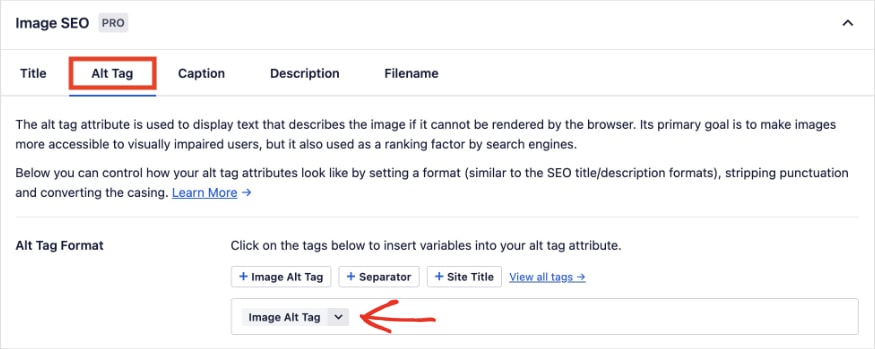
It’s a sure-fire way of guaranteeing no image is overlooked when creating content.
Plus, I like how you can make individual edits on each post or page, too. That means you can have the smart tags as a back up but are free to make edits for any image on your site.
Standout SEO Wins
In addition to the strategies above, there’s a final SEO win I’d like to highlight for The Shave Cave:
Topical Authority Earns AI Overviews
Google’s latest SERP feature, AI Overviews, have become the talk of SEOs and digital marketers. These search results use generative AI to answer a user’s query directly in SERPs.
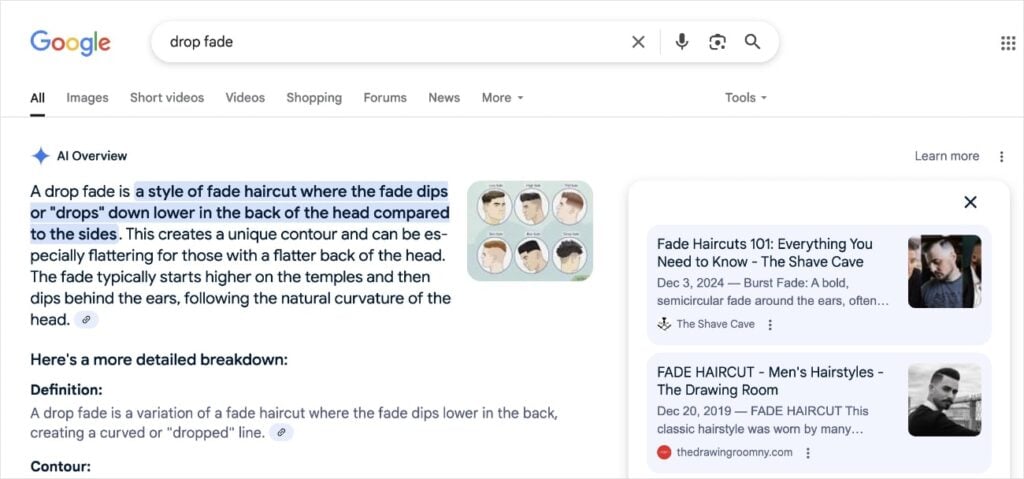
To the right of the AI Overview, users can view the resources used to generate the response. This is where your website can appear.
And for The Shave Cave, they’ve successfully tapped into this new SERP feature.
By May, they’ve already acquired approximately 276 rankings in AI Overviews.

So, how’d they get them?
While there are no concrete methods to getting any type of SERP feature, there are best practices for optimizing your content to appear in AI Overviews.
Here are just a few:
- Establish Topical Authority: The Shave Cave covers men's grooming topics thoroughly. It's clear what the website is about and they type of content and services they offer.
- Answer Popular Questions: They address specific user queries with clear, direct answers. This format is easy for Google to use in SERP features, including AI Overviews.
- Optimize for E-E-A-T: They demonstrate Experience, Expertise, Authoritativeness, and Trustworthiness with content that shows first-hand experience.
- Build Your Brand: The Shave Cave is present on several social media platforms and has over 700 Google reviews. Google wants to use trusted sources in AI Overviews, so creating a cohesive online presence is crucial.
To learn more about optimize your WordPress site for this type of SERP feature, check out this AI Overview Guide.
Tool: AIOSEO has several tools that can help you build topical authority and earn this coveted position in SERPs.
One of the standout features is Author SEO. This tool helps you build and showcase powerful author bios that align with the E-E-A-T framework.
You can also build your online presence using AIOSEO’s Social Media Integration. This feature allows you to connect all your favorite social media platforms to your WordPress site.
These tools, among others, are just the beginning of what All in One SEO offers to help you build authority in your niche and stand out in SERPs.
Takeaways
In our analysis of The Shave Cave, we've discovered the key strategies that drove their growth. Let's review how you can leverage these insights on your own website to improve your rankings and online sucesss.
Top 3 Strategies to Emulate
- Choose the right keywords to target. I wish every website owner understood the importance of keyword research. It really is the first step to a successful website. The Shave Cave shows how strategic keyword targeting—from primary to related keywords—can skyrocket search rankings. By integrating keywords naturally into your titles, subheadings, and copoy, you make it easier for search engines to serve your website for the appropriate queries. This means more visibility and targeted traffic for your site.
- Craft in-depth content that engages. Don’t just scratch the surface—dive deep into your topics! Addressing all facets of a subject provides a more comprehensive user experience and increases engagement metrics, like time on page. Search engines use this information to assess how userful visitors find your site, which can directly influence your rankings. It also helps build niche authority, helping you become a trusted resource in your industry.
- Enhance your visibility through image SEO. Never underestimate the power of a picture, especially in online content. Images optimized with clear alt text, meaningful file names, and schema markup can significantly boost your visibility in SERPs. Image results are more eye-catching than standard text listings, which translates to higher clickthrough rates and traffic. Images are an easy SEO win, you just have to remember to optimize them.
Bottom 3 Strategies to Reconsider
- Hiding internal links from visitors. Missing out on internal linking opportunities because users can't see them is a common but costly mistake. Ensure your links stand out with distinct styling, guiding visitors effortlessly to related content on your site. The AIOSEO Link Assistant is perfect for identifying and optimizing these links, making your site’s internal navigation a breeze.
- Using multiple H1s for a single page. Have you checked if your pages have a single, unique SEO title? Multiple titles can confuse search engines and dilute your SEO efforts. With the AIOSEO Headline Analyzer, you can refine each title, ensuring your pages are clear and appealing to both users and crawlers.
- Exceeding meta description character limits. When meta descriptions surpass 160 characters, Google will truncate them in search results. This diminishes their impact. Try to keep them descriptive yet concise enough to fit in SERPs. AIOSEO has a built-in SERP preview tool, so you can see your search listing before going live.
Steal Our Winning SEO Strategy: A Checklist for Your Website
Download A Free SEO Checklist
Access our comprehensive SEO Checklist with a single click. We'll deliver it straight to you, putting actionable items with SEO tools and tutorials right at your fingertips.
Enter your name and email to download a free SEO checklist.
Improve Your Content’s Visibility With AIOSEO
What if you could skip the trial and error and take a direct path to higher rankings?
With All in One SEO, you can replicate all of The Shave Cave's traffic-generating strategies in less time.
AIOSEO is the best SEO plugin for WordPress. It has over 3 million active users and thousands of 5-star reviews. You'll get powerful, user-friendly tools that help you improve your website’s SEO without coding or technical knowledge.
Some of our customer-favorite tools include:
- TruSEO Score: Level up your content and go beyond a simple pass or fail. TruSEO analyzes your on-page SEO, giving you actionable insights to maximize your content's reach.
- AI Writing Assistant: Connect your SEOBoost account to AIOSEO to get content optimization suggestions directly in the WordPress Editor. You’ll get real-time feedback to improve your content’s visibility in search engines.
- Image SEO: Turn on automatic image alt text and title attributes with a single click. You’ll save time from manual entries while helping users and search engines understand your images.
- Author SEO: Create powerful author bios that showcase your experience and expertise. This addon aligns your content with Google E-E-A-T guidelines and builds trust with readers.
- Social Media Integration: Seamlessly connect your favorite social media platforms to your site and share content with your audience. Available integrations include Facebook, Instagram, Twitter, LinkedIn, Pinterest, YouTube, and more.
- Link Assistant: Get link suggestions, edit anchor text, and add internal links to your content in just 1 click. Link Assistant helps you effortlessly build a better linking strategy.
- Headline Analyzer: Get more clicks with compelling and keyword-rich headlines. This tool analyzes your H1 tag and provides actionable tips to improve it.
How a Business Phone System Grew Traffic by 1,085% in 6 Months
https://aircall.io/
Stats
110.3K to 1.3M Monthly Visits
Industry
SaaS
Niche
Cloud Phone System
Reporting Date
April 2025
What kind of SEO strategy drives organic traffic from 110.3K to 1.3M visits in just 6 months?
For Aircall, it was a focused approach to content creation and targeting specific search queries. This business communication platform exploded traffic over a few months, reaching more than 10X the site visitors than usual.

In this SEO case study, we’ll take a deep dive into the content strategy and optimizations that fueled Aircall’s rapid ascent.
You'll learn how to apply these proven tactics to your own website and get WordPress tools that can empower your SEO efforts.
Let’s get started.
In This Article
The Catalyst: How Aircall Reached 1.3M Monthly Visits
TL;DR: Aircall achieved a phenomenal 1,085% organic traffic increase, growing from 110.3K to 1.3M monthly visits in 6 months. This growth was mainly fueled by creating highly targeted landing pages for U.S. area codes, which now generate 96% of organic traffic. They also boosted visibility in People Also Ask with FAQs and schema markup, and optimized for AI Overviews by focusing on readability and content quality.
1. Area Code Landing Pages Capture 96% of U.S. Traffic
Aircall understand that many of its customers need business phone numbers linked to specific area codes. To address this need and captured related search traffic, they launched a hyper-targeted content strategy.
Beginning in December 2024, Aircall started creating dedicated landing pages for specific U.S. area codes.
Each page serves as a comprehensive resource for that particular area code. It details the geographical regions the area code covers, addresses common FAQs, and outlines how users can acquire a phone number with that area code using Aircall's services.
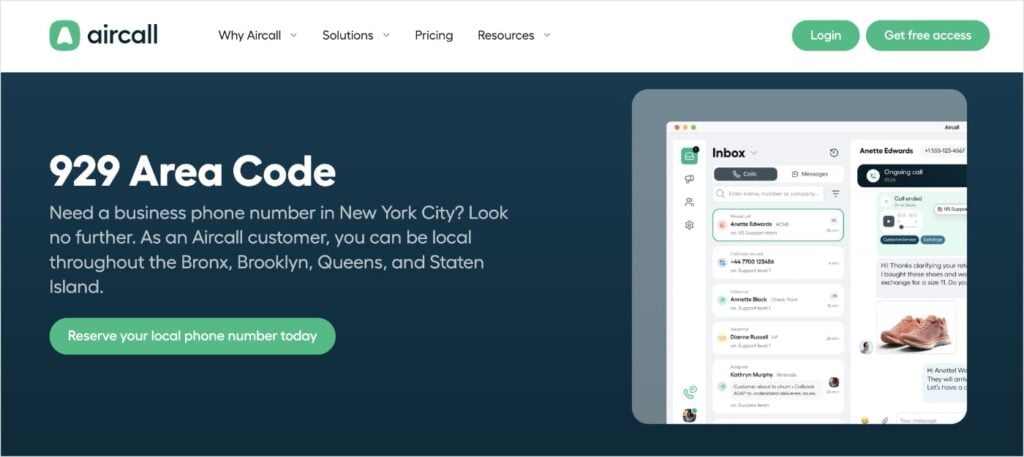
By April 2025, they had published around 70 of these area code pages.
The effect on rankings and traffic was immediate.
As I'm analyzing this site in April, area code landing pages generate 96% of all organic traffic from the United States.
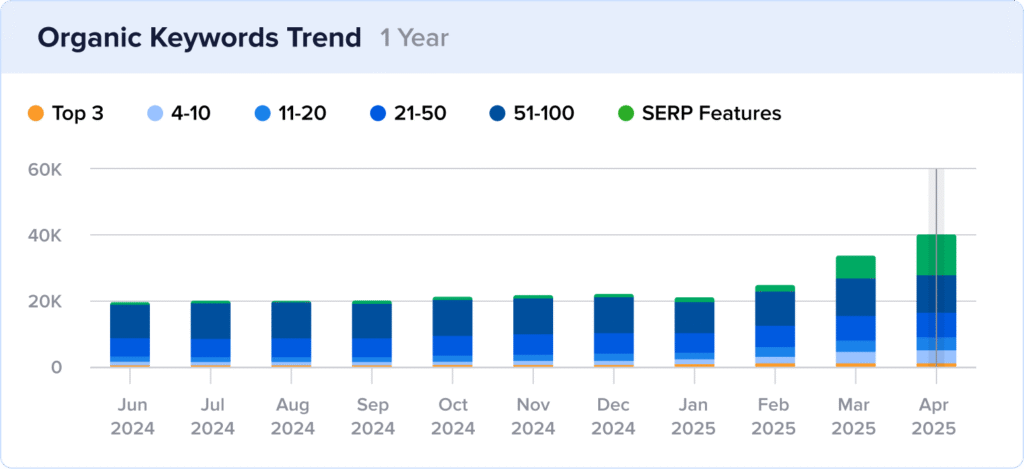
And these rankings didn't happen by chance — it's a direct result of how well these pages are optimized using on-page SEO.
On-page SEO is the practice of optimizing elements on a web page to help it rank higher in search results.
For these Aircall area code pages, strong on-page SEO was crucial for signaling to Google exactly what each page is about and that it's highly relevant for someone searching for information on a specific area code.
Key on-page SEO elements Aircall optimized include:
- Compelling Title Tags: Crafting unique and keyword-rich SEO titles for each page that appear in search results.
- Relevant Meta Descriptions: Writing engaging meta descriptions that summarize the page's content and encourage users to click from SERPs.
- Strategic Headings: Using headings and subheadings (H1, H2, etc.) to structure the content logically.
- Keyword Integration: Naturally incorporating the specific area code and related terms throughout the page's content, demonstrating relevance to search queries.
- Clear URL Slugs: Using clean, readable URL slugs that include the area code, making the web address informative for both users and search engines.
Here, we can see some of these optimizations for the 929 area code page:
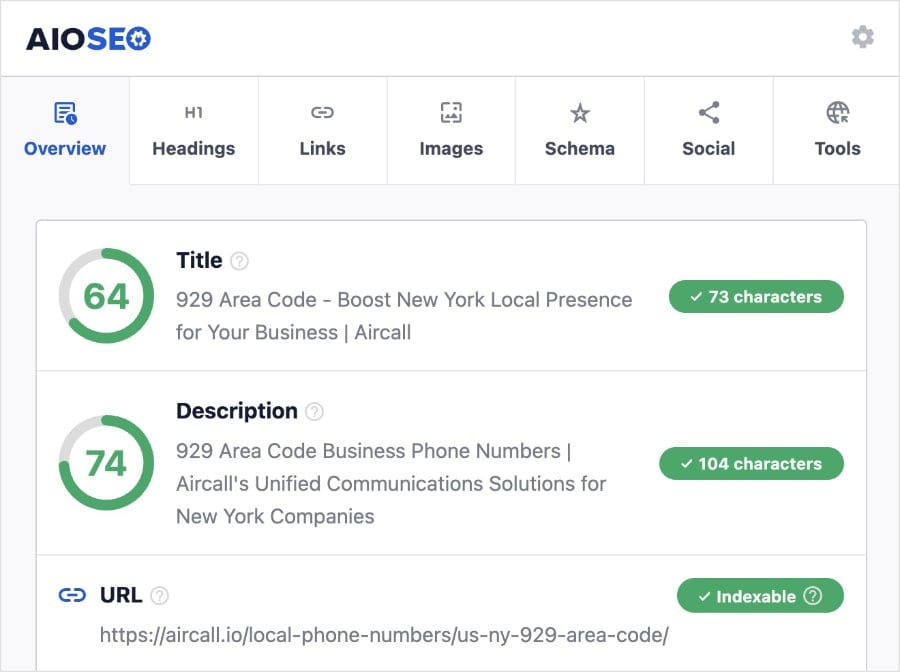
Note: The above screenshot was taken using the All in One SEO Analyzer by AIOSEO. This free Chrome extension provides a quick and user-friendly SEO analysis of any website.
By following these SEO best practices, Aircall made it easy for search engines to:
- Understand what their pages were about
- Rank them when users searched for relevant queries
Overall, this content strategy was the main driver of Aircall’s newfound visibility and organic success.
Why This Matters:
Aircall's area code page strategy illustrates the impact of highly targeted content:
- Niche Dominance: Creating dedicated pages for specific queries allows you to dominate search results for those particular topics.
- High-Intent Traffic: Users searching for specific area codes have a clear need and are often closer to making a decision, leading to more qualified traffic.
- Directly Meeting User Needs: By providing comprehensive information about a specific area code and a clear solution (getting a number), Aircall directly addresses user needs, improving user experience.
- Scalable Content Model: Once the framework for these pages was developed, Aircall could replicate the process for other area codes, rapidly expanding their content offering.
Aircall's success demonstrates how identifying specific search niches and creating tailored content is a highly effective strategy for driving traffic.
How to Create Targeted Landing Pages:
Want to achieve similar results with targeted landing pages? Here’s a strategic approach:
- Identify specific user needs. Pinpoint specific problems or question your audience has that you can address in your content.
- Conduct keyword research. Drill down into the exact keywords and phrases people use when searching for solutions related to those needs.
- Develop comprehensive, people-first content. Create individual pages that provide in-depth information and align with the search intent of each keyword.
- Explain your value proposition. On each page, clearly articulate how your product or service is the ideal solution for the specific need being addressed.
- Implement strong on-page SEO. Optimize each page for its focus keyword, including in titles, headings, content, and metadata.
- Have a clear call to action (CTA). Make it easy for users on these pages to take the next step, whether it's getting more information, signing up, or contacting you.
By focusing on creating high-quality, targeted landing pages, you can attract qualified traffic and improve conversion rates.
Recommended Reading: How to Find Low Competition Keywords That Drive Conversions
On-Page SEO Tools:
Creating great content and optimizing for search engines can feel like a tall order.
But with All in One SEO, the leading SEO plugin for WordPress, it's a walk in the park. AIOSEO has a built-in TruSEO tool that gives you real-time feedback on your on-page optimizations.
You’ll get a handy Focus Keyword Checklist that looks for your primary keyword in the most critical areas. If it’s missing, you’ll notice a red “X” and a prompt for how to make improvements.
This tool makes on-page SEO a breeze and helps increase the visibility of your content in search results.
Now, let’s look at another strategy Aircall used to stand out in SERPs.
2. FAQs & Schema Markup Triple People Also Ask Rankings
Aircall didn't stop at just creating comprehensive pages for each area code. They also made sure these pages provided quick answers to common questions their potential customers might have.
At the bottom of each area code page, Aircall includes a section dedicated to Frequently Asked Questions (FAQs).
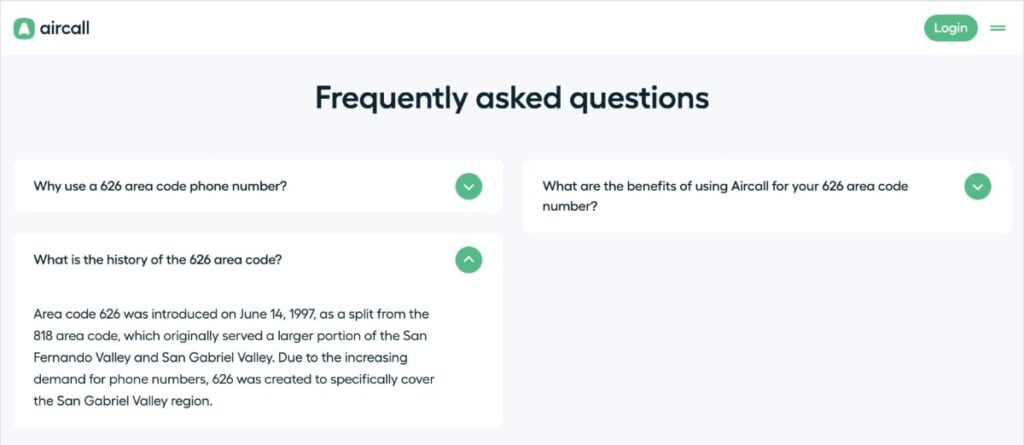
These questions are specific to that area code, like “What is the history of the [Area Code]?” or “Why use a [Area Code] phone number?”
Providing these FAQs directly on the page makes it easy for users to find answers without leaving the site.
To help search engines understand these questions and answers even better, Aircall uses FAQ schema markup.
Think of schema markup as a special language you add to your website's code that tells search engines exactly what kind of content is on the page. FAQ schema specifically tells Google, “Hey, this part is a question, and this part is the answer.”
This combination of user-friendly FAQs and schema markup led to a significant win for Aircall in Google's search results.
They saw a huge jump in their rankings in the People Also Ask (PAA) box.
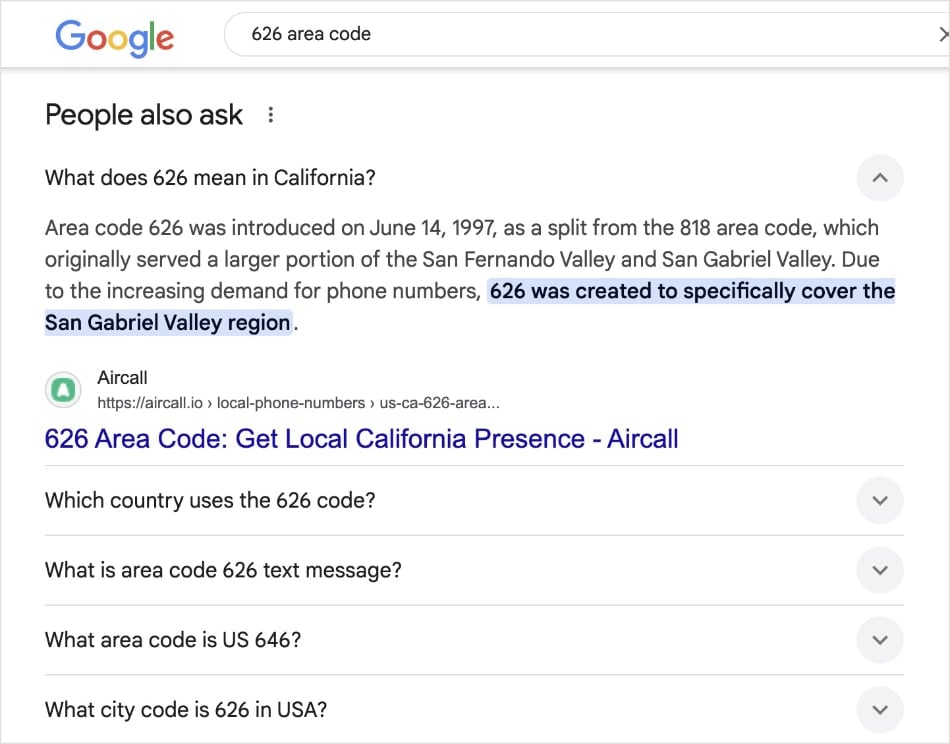
This area of the SERP provides questions related to the initial search query. Users can expand these questions to reveal the answer directly in search results.
In October 2024, Aircall had only around 600 rankings in PAA. But by April 2025, that number had skyrocketed to 8.9K rankings.
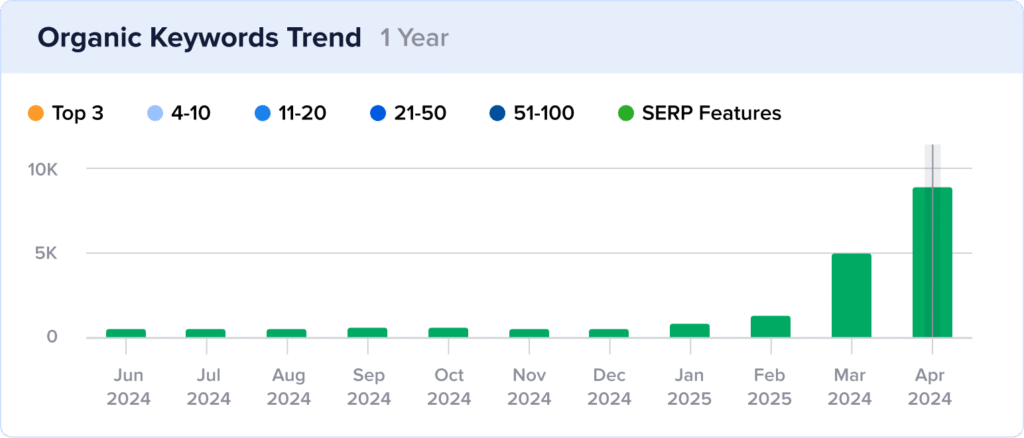
Even more impressive is that 82% of these new PAA rankings came directly from the area code landing pages, showing how effective adding FAQs with schema was for this specific content.
Why This Matters:
Using FAQs with schema markup offers several SEO advantages:
- Win People Also Ask Spots: It greatly increases your chances of appearing in the PAA box, giving you extra space in search results.
- Help Google Understand: Schema markup makes it easy for search engines to recognize questions and answers on your page.
- Answer User Questions Quickly: PAA rankings allow you to answer potential customers' questions right in the search results.
- Show Your Expertise: Ranking in PAA helps position your website as a helpful and knowledgeable source for specific topics.
Aircall's success shows that adding FAQs and using schema is a powerful way to get more visibility in search results and help users find the information they need.
How to Optimize for People Also Ask:
Want your content to show up in the People Also Ask box? Here’s how:
- Find common questions. Research questions people ask about your topics (check Google, competitor sites, or use keyword tools).
- Add FAQs to pages. Create a section on your web pages with these questions and clear, short answers.
- Use question headings. Format each question using a heading tag (like H2 or H3).
- Add FAQ schema. Use FAQ schema markup on your page to tell search engines about your Q&A content.
- Keep answers simple. Write answers that are clear, direct, and relatively short.
These steps help structure your content in a way that Google likes to feature in PAA.
For a more in-depth tutorial, check out this article: How to Optimize for Google People Also Ask.
Schema Markup Tools:
AIOSEO's Schema Generator makes adding FAQ schema to your WordPress pages easy. All you have to do is locate FAQ in the Schema Catalog, and click the plus (+) button.
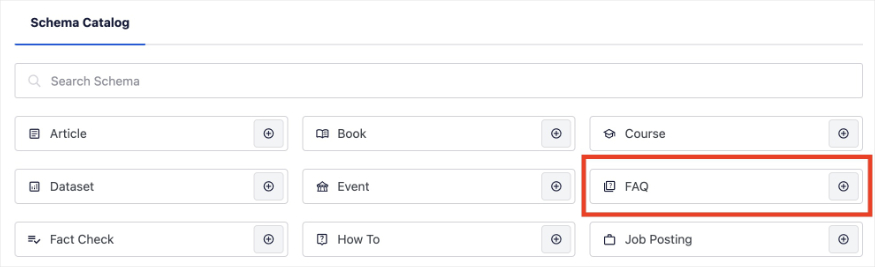
AIOSEO will automatically generate FAQ schema for your page.
You can also use FAQ blocks directly in the WordPress Editor. (I prefer this method because I find it fits into more workflow a bit easier, but they both work.)
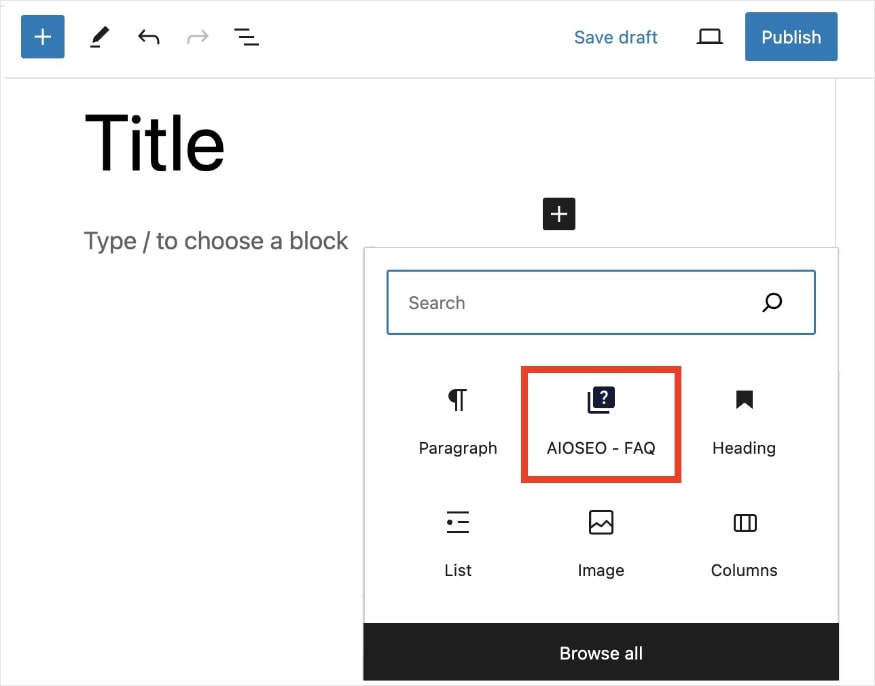
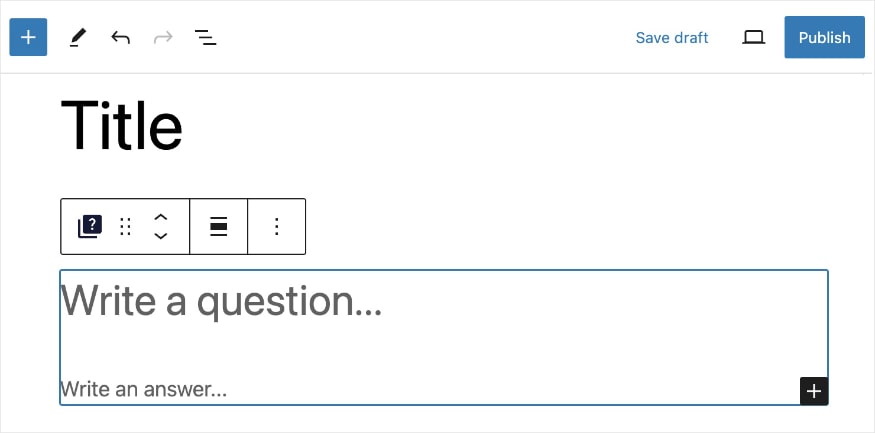
If you add the FAQ block, AIOSEO will prompt you to write your question and answer. Super simple.
Let's now explore how Aircall is also optimizing for a newer part of search results: AI Overviews.
3. High-Quality, User-Focused Content Wins AI Overviews
The way people search is changing, and Google is now showing AI-generated summaries called AI Overviews at the top of many search results.
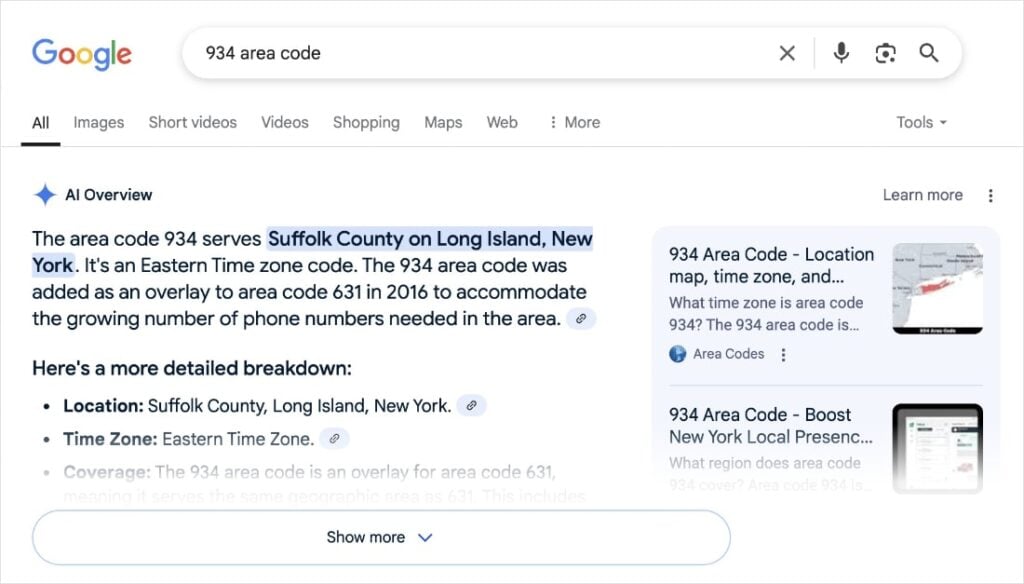
These summaries accumulate content from various sources, which users can explore by clicking Show more.
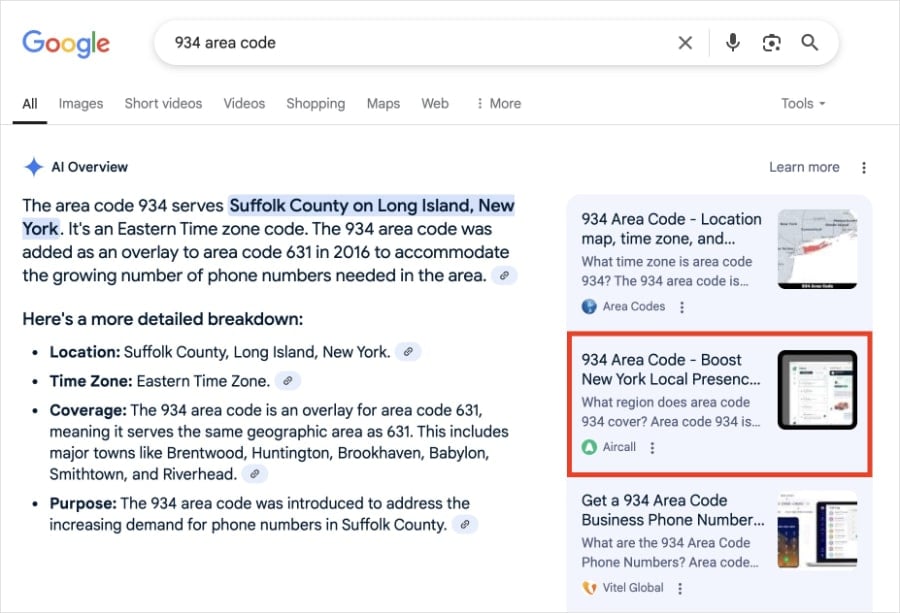
Aircall has been successful in getting their content featured in AI Overviews, with 1.7K rankings in this section by April 2025.
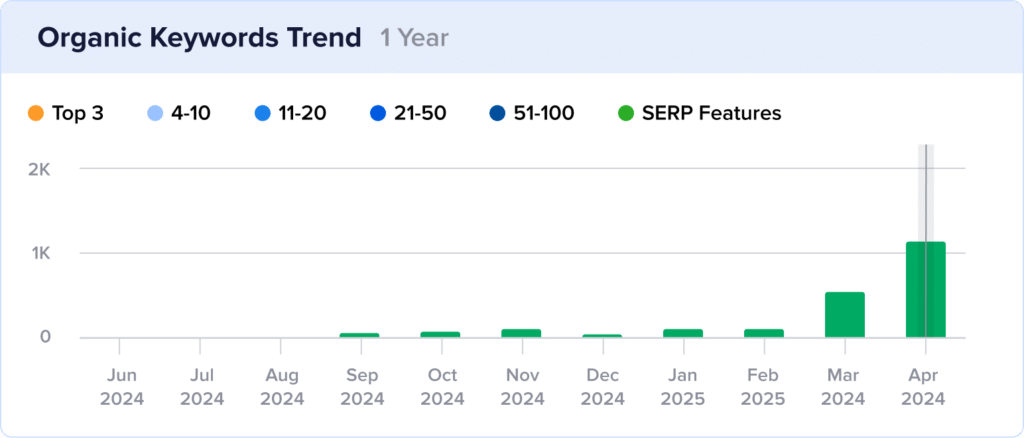
Aircall optimizes for AI Overviews by focusing on creating content that is easy for both people and AI models to understand. They do this in a few key ways:
- High-Quality Content: They create content that is accurate, complete, and trustworthy. AI models learn from good content, so Aircall aims to be a reliable source for what they cover.
- Content Matches Search Intent: Aircall makes sure their content answers what someone is searching for. If someone searches “how to get a business phone number,” the page provides a clear answer. This helps AI models find the main point and summarize it correctly.
- Focus on Readability: Aircall makes their content easy to read and understand. They use things like clear subheadings, short paragraphs, and simple language. These readability steps help AI models (and users) quickly scan the content, understand the key points, and extract the most important information.
Why This Matters:
Here’s why optimizing for AI Overviews is important for today's search landscape:
- Top of Search: AI Overviews appear right at the top, making your content highly visible if featured.
- Relevant in New Search: As Google uses more AI, optimizing for AI Overviews helps you stay relevant and seen.
- Shows Authority: Being featured can make your website look like a trusted source of information.
- Can Generate Clicks: Even if someone reads the summary, they can click your link for more details.
How to Optimize Content for AI Overviews:
Want to give your content a better chance of appearing in AI Overviews? Focus on these simple things:
- Make great content. Write accurate, helpful, and trustworthy information about your topics.
- Match what people search For. Understand why someone is searching and give them exactly the information they need.
- Write clearly. Use simple words, short sentences, and break up text with headings and lists.
- Answer questions directly. If your content answers questions, make the answers easy to spot and understand.
- Build trust. Make sure your website shows that you are an expert and a reliable source.
Good quality and easy-to-read content are your best friends for AI Overviews.
Content Optimization Tools:
AIOSEO has tools that help you create content that's good for users and AI Overviews, especially with readability.
AIOSEO's Readability Analysis (part of TruSEO) is super helpful here. You'll get a user-friendly checklist that lets you know how easy your content is to read.
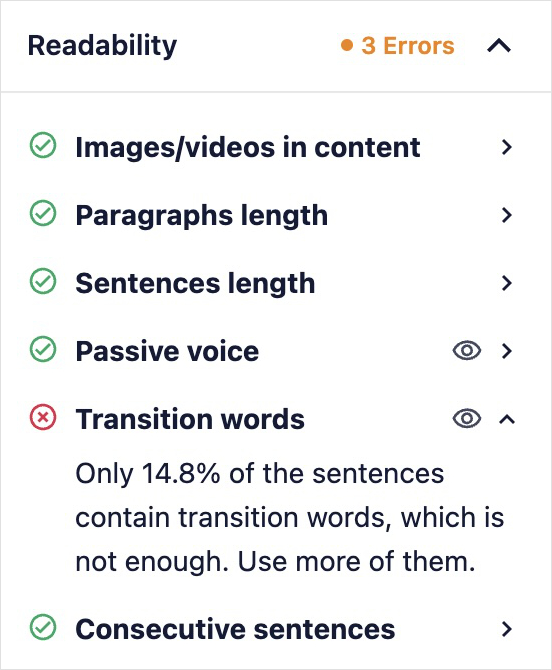
TruSEO provides real-time feedback when you're missing the mark. It also takes you exactly where you should make the adjustment in your content by clicking the eye icon.
Another great content optimization tool is AIOSEO’s AI Writing Assistant. This tool integrates with your SEOBoost account to provide SEO feedback as you write.
I really like the Overview Dashboard because it guides your content creation efforts for your specific keyword. You’ll get a grade summary that compares your content to top-ranking competitors, word counts, and readability levels.
This makes it much easier to understand what type of content Google likes to serve in search results, and maybe even land you in an AI Overview.
Standout SEO Wins
Beyond their main growth strategies, Aircall also uses another SEO best practice to help users and search engines explore their content.
Internal Links Support SEO & Conversions
Aircall takes advantage of the fact that their area code pages generate a significant amount of traffic. To turn these site visitors into potential customers, Aircall uses feature segments and internal links to introduce them to their services.
In the screenshot below, we see how an area code page has a segment that links to Aircall’s most popular features.
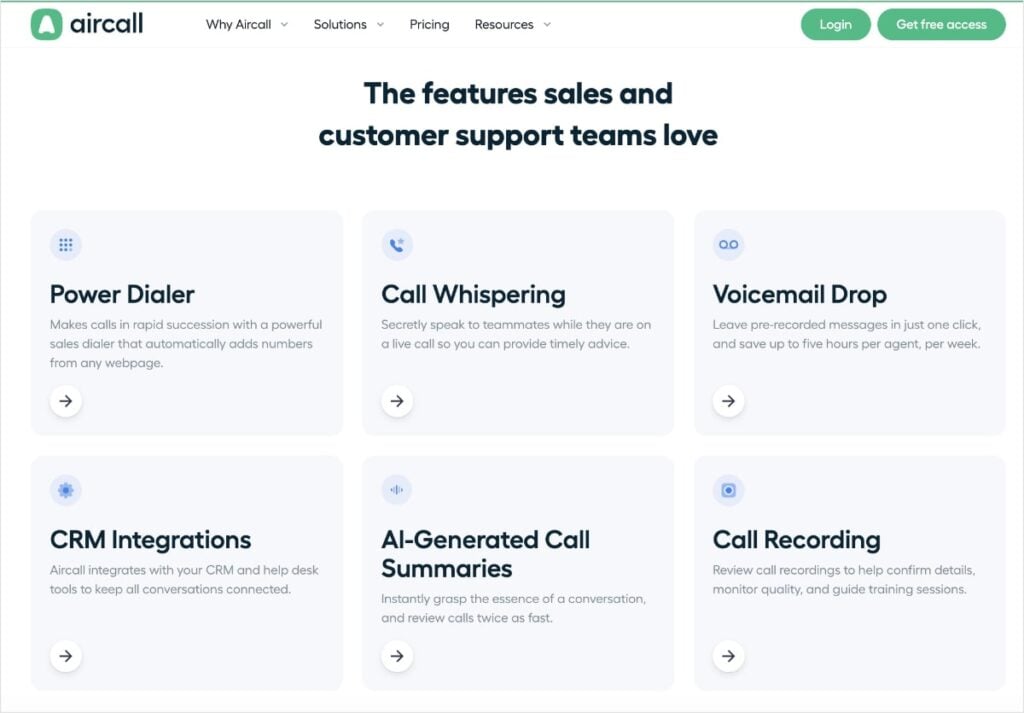
Think of this strategy like guiding someone through a store.
The area code pages are like the entrance, where lots of people come in looking for something specific (an area code).
Then internal links to gently guide these visitors to other “sections” of the store—pages that explain their product, show prices, or let you buy the service (aka, the counter.)
Adding these internal links helps in a few key ways:
- Guides the User Journey: It makes it simple for someone who landed on an area code page to explore Aircall's website and move through the steps towards becoming a customer.
- Increases Chances of Conversion: By linking directly to product, pricing, and sign-up pages, Aircall makes it easy for interested visitors to take the next step.
- Spreads SEO Power: When popular pages (like the area code pages) link to other pages, it can help those linked pages show up better in Google too. It's like sharing some of their SEO “power.”
- Helps Google Understand: Internal links help Google understand how the different pages on Aircall's website are connected and what the main topics are.
Ultimately, it's a smart internal linking strategy that's aids in search engine navigation and boosts sales.
Tool: Link Assistant helps you find and add internal links easily in WordPress. When you’re working in the WordPress Editor, scroll down and click the Link Assistant tab. Then, select Link Suggestions. AIOSEO’s AI-powered Link Assistant will you inbound and outbound internal links that you can add with the click of a button.
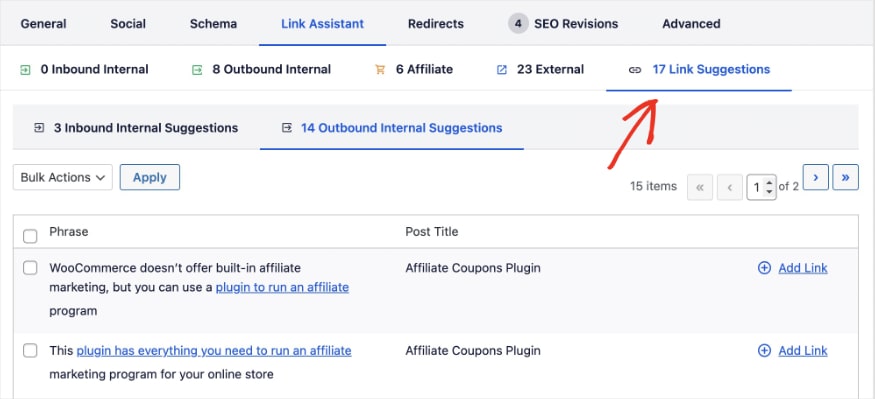
Overall, Link Assistant makes building internal links across your website faster and stress-free.
Takeaways
Our analysis of Aircall's SEO revealed growth strategies that are relatively easy to replicate.
Let's review which strategies to consider adopting for your website and others that could use improvement.
Top 3 Strategies to Emulate
- Develop hyper-targeted content by identifying your customers' needs. When creating new content, start by identifying specific problems or questions your audience has. Then, conduct keyword research to understand the terms they use when searching for solutions. Create dedicated landing pages that address these needs and incorporate keywords naturally. This approach will ensure your content creation efforts align with your audience and bring qualified traffic to your site.
- Amplify your content's visibility by leveraging FAQs with schema markup. Research common questions related to your core topics, often found in the “People Also Ask” section of search results. Integrate these questions onto relevant pages and provide clear, concise answers. (You can expand later in the copy.) Finally, implement FAQ schema to communicate this information to search engines in a way they easily understand.
- Prioritize high-quality, user-centric content above all else. Focus on delivering accurate, trustworthy information that aligns with search intent. Enhance readability by using clear subheadings, short paragraphs, and simple language, making it easy for users and search engines to grasp key information. By writing with users in mind, you will structure your content logically and naturally, leading to an improved user experience. Strong engagement metrics earn rankings and SERP features, like AI Overviews, from Google.
Bottom 3 Strategies to Reconsider
- Exceeding character limits for page titles. The title of your web page is what shows up in search results. If it's too long, Google will truncate it, meaning important words might not be seen. To avoid this issue, keep your SEO titles under 60 characters. This ensures users can see the full text and may increase clickthrough rates. I recommend using a SERP preview tool to see how your metadata looks before publishing.
- Forgetting to set H1 tags for some pages. The H1 tag is the main title of your page. It's usually the biggest heading and tells both people and Google what the page is about. It's extremely important for SEO and making your page easy to understand right away. While most of Aircall's pages have them, missing H1s on even a few pages is a missed opportunity. Make sure every important page on your website has one clear H1 title. TruSEO checks your H1 tags and notifies you if it's missing.
- Having thin content on your website. Sometimes, certain pages on a website might not have much text or information. This is referred to as “thin content.” For search engines like Google, pages with more helpful and detailed content are generally seen as more valuable. While Aircall excels with certain pages, like their area code guides, others could benefit from more text. To check for thin content, you can use AIOSEO's AI Writing Assistant. It checks the word count of top-ranking results, so you can aim for the same amount.
Steal Our Winning SEO Strategy: A Checklist for Your Website
Download A Free SEO Checklist
Access our comprehensive SEO Checklist with a single click. We'll deliver it straight to you, putting actionable items with SEO tools and tutorials right at your fingertips.
Enter your name and email to download a free SEO checklist.
Dominate Your Niche & Conquer SERPs With AIOSEO
Aircall's success story demonstrates the power of a focused and well-thought SEO strategy. By creating valuable content, optimizing for search intent, and embracing AI Overviews, they've achieved remarkable visibility.
You, too, can implement these winning strategies and unlock similar potential for your WordPress site.
And with All in One SEO, it's easier than ever.
AIOSEO is the best SEO plugin for WordPress. It has over 3 million active users and thousands of 5-star reviews. You'll get all the tools you need to create SEO-friendly content that users love and keeps you ahead in the evolving search landscape.
AIOSEO streamlines many of the strategies Aircall used, from optimizing on-page SEO to implementing schema.
Here are some customer-favorite tools that can help you implement their winning strategies:
- TruSEO Score: Level up your content and go beyond a simple pass or fail. TruSEO analyzes your on-page SEO, giving you actionable insights to maximize your content's reach.
- Rich Snippets Schema: Win more rich results with AIOSEO’s user-friendly Schema Generator. Just pick the schema type you want, and we’ll format the structured data properly for Google.
- FAQ Blocks: Add FAQs to your content to increase the likelihood of appearing in Google’s People Also Ask box. These results help boost brand awareness and increase clickthrough rates.
- AI Writing Assistant: Connect your SEOBoost account to AIOSEO to get content optimization suggestions directly in the WordPress Editor. You’ll get real-time feedback to improve your content’s visibility in search engines.
- Link Assistant: Get link suggestions, edit anchor text, and add internal links to your content in just 1 click. Link Assistant helps you effortlessly build a better linking strategy.
- Cornerstone Content: Mark your most important pages as cornerstone content to make internal linking a breeze. This tool works with Link Assistant to streamline your link-building strategy.
- Author SEO: Create powerful author bios that showcase your experience and expertise. This addon aligns your content with Google E-E-A-T guidelines and builds trust with readers.
How an Art Supplies Retailer Grew Traffic by 624% in 6 Months
https://castlearts.com/
Stats
19.9K to 143.9K Monthly Visits
Industry
Ecommerce & Retail
Niche
Art & Design
Reporting Date
February 2025
Want to know the secret to a 624% traffic boost?
Look no further than Castle Arts.
This art supplies retailer grew organic traffic from 19.9K to 143.9K monthly visits in just 6 months.

This SEO case study pulls back the curtain on the techniques they used to create a website that attracts, engages, and converts.
You'll also learn how to apply these strategies to your own website and discover the WordPress tools that can help you unlock similar SEO potential.
In This Article
The Catalyst: How Castle Arts Reached 143K Monthly Visits
1. Content is King (and Queen): Two Blog Posts Drive 77.6% of Traffic
Castle Arts understands the importance of attracting customers interested in art and creativity.
To do this, they've tapped into the power of content marketing, and their blog has become an unexpected goldmine for organic traffic.

Remarkably, two blog posts are responsible for a massive 77.6% of all website traffic in February 2025. These standout posts are:
- Coloring Pages: This blog post features over 100 free downloadable coloring pages. Initially, it contributed only 2.55% of site traffic. However, by February 2025, it exploded to become the top traffic driver, generating 45% of all site visits.
- 20 Simple Drawing Ideas: Published in October 2024, this blog post quickly gained traction. Now, it accounts for 32.6% of traffic.
The success of these blogs comes from two key things: on-page SEO and a people-first approach.
On-page SEO is the practice of optimizing web pages to rank in search results. It's about making it clear to search engines what your page is about.
Castle Arts likely focused on these simple on-page SEO steps:
- Keywords in Titles: Using words people search for (like “coloring pages”) in their post titles.
- Keywords in Content: Including their focus keyword and related terms within the body copy.
- Good Meta Descriptions: Writing short, clear descriptions for Google search results that encourage clicks.
- Simple URLs: Using easy-to-understand web addresses (URLs) that include keywords.
By doing these basic on-page SEO steps, Castle Arts made their blog posts easy to find in search engines. Here's an example:

However, it's important to note that it's not just about SEO.
These blog posts are also people-first, meaning Castle Arts created content users actually want (free coloring pages and easy drawing ideas.) This helpful content attracts visitors who are genuinely interested in art (aka, the Castle Arts customer).
(We’ll get into this people-first approach in greater detail later.)
This combination—simple SEO and helpful content—is why two blog posts drive so much traffic for Castle Arts.
Google rewarded Castle Arts with an influx of new SEO rankings, at 19.6K keywords.

Why This Matters:
Castle Arts is a prime example of an eCommerce business using a blog to reach a wider audience. Here's why this strategy works so well:
- Blogs can diversify your keyword portfolio. Blog posts can allow you to target industry-related keywords that don't fit into your product or collection pages.
- You can showcase products naturally. Blogs let you subtly feature products within the content. (Don't forget to include an internal link, too!)
- Blogs attract and engage customers. Good blog content brings in interested customers and keeps them engaged.
- High-quality content is SEO that lasts. Content-based SEO is a long-term traffic strategy that doesn't cost a dime.
How to Optimize Your Blog for Search Engines:
Want blog traffic like Castle Arts? Keep it simple:
- Know your audience. Find out what art topics your customers search for.
- Offer value. Create helpful content like free downloads or tutorials.
- Do basic SEO. Follow SEO best practices and use keywords in titles, text, and descriptions.
- Engage your community. Think of creative ways to interact with your community. (Example: Castle Arts has an online gallery where users can upload their art.)
- Keep improving. Check what type of content works best for your site. Then, improve upon it and refine your content strategy.
Related reading:
Content Optimization Tools:
Creating people-first content that’s search-friendly can sound a bit intimidating, especially when you’re short on time.
The good news is that All in One SEO, the leading SEO plugin for WordPress, has recently released an AI Writing Assistant that makes content optimizations a breeze.
This tool integrates with SEOBoost and provides real-time feedback directly in the WordPress editor.
For example, use the Optimization Wizard to get additional keyword ideas for your post or page. This will help you maximize its reach and visibility in search results.
You can also see how the top-ranking domains optimize for your focus keyword. This information is available in the Overview tab and can guide your overall content creation process.

As for on-page SEO, the TruSEO Analysis tool will check your keyword optimizations in the most critical areas. You’ll get a handy checklist that lets you know when you’ve forgotten to optimize a specific element.
These SEO tools help you make content for users and search engines.
2. Visual Appeal Amplified: Image SEO Drives Search Visibility
Castle Arts is all about serving artists. Because of this, they know it's important to grab their attention visually in search results. That's why they use image SEO to stand out in the crowded online landscape.
Image SEO optimizes your visual content for search engines. The goal is to have your images show up in Google search results as rich snippets and to rank in Google Images.
Did you know? There are over 1 billion searches in Google Images every day.
Ultimately, it helps people find your pictures—and your website.
Some of Castle Arts' image SEO techniques include:
- Using descriptive image file names: They use names for their image files that describe the picture and include keywords. Instead of “image001.jpg,” they might use “castle-arts-colored-pencils.jpg.”
- Writing natural alt text: They write keyword-rich alt text for each image. Alt text is a short description of the picture. It helps Google understand the image and also helps visually impaired users who may use screen readers.
- Implementing schema markup: They use schema markup for images. Think of schema as extra information you give Google to explain your images even better. It's like telling Google “This is a picture of art supplies” in a special way Google understands.
These optimizations have had a significant impact on Castle Art’s visibility in SERPs.
Image snippets have increased to 3.8K rankings in February 2025.

These results feature an image next to the search listing. They’re great for grabbing users’ attention and enticing them to click your result.

Castle Arts also started to appear in the Google Image Pack for the first time.

These results typically appear near the top of search results and feature a small collection of images related to the query.

Ranking in the Google Image Pack also means you’re ranking in Google Images!
Ultimately, this focus on visual content has been instrumental in boosting brand awareness and standing out in search.
Why This Matters:
Image SEO is a big win for visual brands like Castle Arts:
- More Ways to Be Found: Image SEO helps people find you through image searches, not just text searches.
- Better for Everyone: Alt text helps visually impaired users understand your images.
- More Clicks: Images in search results grab attention and get more clicks to your site.
- Show Off Your Brand: Good images build your brand's look and feel online.
- Schema Helps Google: Schema makes it even easier for Google to understand your images.
Castle Arts shows that image SEO is not just about making your website look good—it's also about getting seen in search and getting more visitors.
How to Make Your Images Search-Friendly:
Want your images to rank in Google like Castle Arts?
Here's a quick breakdown of how to do image SEO:
- Use keyword-rich file names. Name your image files with words that describe the picture.
- Write descriptive alt text. Describe your image while trying to keep it concise.
- Implement schema markup. Add schema markup to your images so search engines can easily understand their content.
- Include captions when helpful. In some instances, a caption can provide additional clarity. Use them when a reader would find captions helpful.
- Put images in context. Place images near text that is related to the picture.
- Create an image sitemap. Sitemaps help search engines crawls your images more efficiently. This can lead to increased visibility in image snippets and Google Images.
Image SEO Tools:
Image optimizations can feel tedious, but they don’t have to with the right tools.
AIOSEO has an Image SEO feature that automates some of the most important image optimizations.
You can automate writing image title, alt text, captions, and more using smart tags. These variables are customizable and generate image SEO elements for you.
Next, let's see how Castle Arts makes content that people love.
3. Content for People, Not Just Google: Making Content Users Love
Castle Arts understands that in the age of AI-generated content, being authentic is more valuable than ever. They prioritize content that their customers would genuinely enjoy and find helpful.
This people-first approach is evident in their blog. A prime example is their post on Easter egg painting ideas.

It's people-first because it has:
- Step-by-Step Guides: It breaks down painting eggs into simple steps, easy for anyone to follow.
- Real Pictures: It uses original photos for each step, showing exactly what to do.
- Tips and Product Ideas: It gives helpful tips and suggests Castle Arts products to use (and links to their shop).
- Artist Credit: It says which artist came up with each painting idea, giving credit to real people.
These things show that Castle Arts cares about making content for people, not just for Google. Their blog feels real and human, which is important when so much online content feels like it's made by AI.
Why This Matters:
Prioritizing people-first content offers significant advantages in today's SEO landscape:
- Builds Authenticity and Trust: Human-created content stands out in the age of AI-generated content.
- Keeps People Reading: Genuinely valuable content keeps people on your site longer and coming back.
- Enhances Brand Loyalty: Content for people builds a real connection between your brand and customers.
- Google Likes It Too: Google wants websites that are experts and trustworthy (E-E-A-T). People-first content helps show this.
Google E-E-A-T stands for Experience, Expertise, Authoritativeness, and Trustworthiness. It’s a framework Google’s Search Quality Raters use when evaluating websites.
How to Create People-First Content:
Make content that people love by following these steps:
- Know your users. Think about what your customers need, want, and are interested in.
- Be real. Be you. Let your brand's personality shine. Be genuine and easy to relate to.
- Show real people. Highlight the humans behind your brand. Give credit to authors and feature real people.
- Optimize for readability. Make your content clear, easy to read, and fun to look at with pictures and good layout.
- Talk to your customers. Let people comment and share feedback. Build a community.
Content that puts people first will not only rank well, but also build real connections with your audience.
Readability and Author Tools:
AIOSEO has tools to help you make people-first content.
First up, is TruSEO, which checks if your writing is easy to read. You'll get a Readability Checklist that lets you know if you need to make your sentences and paragraphs clearer.
Next, is the Author SEO add-on. This tool allows you to show who wrote your content. You can create powerful author bios that showcase the talent behind your team.
Both tools help you to create content that is engaging for users and easy for search engines to understand.
Standout SEO Wins
Beyond their core content, Castle Arts leverages social media to build their community and amplify their reach.
Social Media Engagement: Connecting with Artists
Castle Arts understands that building a brand extends beyond the website itself. They actively engage with their audience and foster community through social media marketing.

They utilize platforms like Facebook, Instagram, and Pinterest to:
- Share Customer Artwork: Regularly showcase artwork created by their customers, celebrating their community.
- Promote Academy Classes: Showcase their “Castle Arts Academy” classes, driving traffic to free resources and positioning themselves as educators in the art space.
- Run Giveaways: Organize giveaways to increase engagement and attract new followers.
By being active on social media, Castle Arts builds their brand, connects with customers, and improves their SEO.
Tool: AIOSEO offers Social Media Integration, allowing you to connect your WordPress site to all your favorite social networks. Choose from Twitter, LinkedIn, Facebook, Pinterest, and more. You can also preview your posts and thumbnails for social sharing.
Takeaways
Castle Arts demonstrates an SEO strategy rooted in content creation, eye-catching visuals, and community. Their blog is the standout element that enhances their reach and engages current customers, building a brand art lovers trust.
Here are the key takeaways for your own SEO strategy:
Top 3 Strategies to Emulate
- Leverage blog content to drive eCommerce traffic. Don't underestimate the power of a blog to broaden keywords, expand reach, and build awareness. Create engaging, valuable content that attracts your target audience and drives organic traffic. Use keyword research to find relevant topics and become a go-to resource for your customers, nurturing them towards a purchase.
- Master image SEO for visual content to capture searchers' attention. For visually-driven brands, optimize images with descriptive file names, alt text, and schema markup. This enhances visibility in image search and as rich snippets, attracting engaged users who often have higher conversion rates.
- Prioritize people-first, authentic content that builds trust and community. In the age of AI, genuine, human-created content stands out. Focus on valuable, engaging content that reflects your brand's voice and values. Encourage interaction and user-generated content to build a loyal community and differentiate your brand through authentic connection.
Bottom 3 Strategies to Reconsider
- Neglecting image title tags. While Castle Arts excels in image SEO, they appear to be missing image title tags. These tags offer another opportunity to provide context to search engines and enhance user experience on image hover. Ensure all images have descriptive and keyword-relevant title tags for maximum optimization. You can use the Image SEO feature in AIOSEO to generate image title tags automatically.
- Allowing page titles to exceed character limits. While Castle Arts demonstrates strong on-page SEO, some page titles exceed character limits. Long titles can be truncated in SERPs, reducing clickthrough rates. Aim to keep your SEO titles between 50 and 60 characters. You can use SERP preview tools to see how your titles look before publishing, allowing you to adjust as needed.
- Missing H1 tags on select pages. While generally well-optimized, a few pages on Castle Arts' website are missing H1 tags. H1 tags are crucial for signaling page topic to both users and search engines. Ensure every indexable page includes a clear and relevant H1 tag to improve SEO and user experience. The AIOSEO Headline Analyzer can help you optimize your H1s and write strong headlines that compel users.
Steal Our Winning SEO Strategy: A Checklist for Your Website
Download A Free SEO Checklist
Access our comprehensive SEO Checklist with a single click. We'll deliver it straight to you, putting actionable items with SEO tools and tutorials right at your fingertips.
Enter your name and email to download a free SEO checklist.
Carve Your Path to SEO Success With AIOSEO
Castle Arts shows how creative, content-focused SEO can transform an eCommerce site's visibility.
Now, it's your turn.
Start your journey to SEO success with All in One SEO as your trusted companion.
AIOSEO is the best WordPress plugin for SEO. It has over 3 million active users and thousands of 5-star reviews. Plus, it makes it easier to do many of the things Castle Arts did, from on-page SEO and image SEO to readability, author bios, and more.
Here are some easy-to-use AIOSEO tools to help you copy Castle Arts' strategies:
- Writing Assistant: Connect your SEOBoost account to AIOSEO to get content optimization suggestions directly in the WordPress editor. You’ll get real-time feedback to improve your content’s visibility in search engines.
- TruSEO Score: Level up your content and go beyond a simple pass or fail. TruSEO analyzes your on-page SEO, giving you recommendations to maximize your content's reach and readability.
- Image SEO: Automate the writing process for image titles and alt text using smart tag variables. You’ll save time from manual entries while helping users and search engines understand your images.
- Author SEO: Create powerful author bios that showcase your experience and expertise. This addon aligns your content with Google E-E-A-T guidelines and builds trust with readers.
- Social Media Integration: Seamlessly connect your favorite social media platforms to your site and share content with your audience. Available integrations include Facebook, Instagram, Twitter, LinkedIn, Pinterest, YouTube, and more.
- WooCommerce SEO: Streamline your eCommerce SEO to win higher rankings for your product pages and product collections. This time-saving tool helps you customize and automate meta titles and descriptions so your product stands out on the SERP.
- Rich Snippets Schema: Win more rich results with AIOSEO’s user-friendly schema generator. Just pick the schema type you want, and we’ll format the structured data properly for Google.

Stats
609.3K to 3.5M Monthly Visits
Industry
Ecommerce & Retail
Niche
Flowers & Gifts
Reporting Date
February 2025
Can a blog truly become the heart of an eCommerce website's traffic?
For Bloom & Wild, the answer is a resounding yes. This UK-based online florist has cultivated a blog strategy so successful that it now drives a staggering 96% of their organic traffic.
It's also largely responsible for their 472% traffic growth over the last year, catapulting them to 3.5 million monthly visits.

This SEO case study unearths the blog strategy that Bloom & Wild used to conquer search engine results pages (SERPs). We'll explore how they leveraged content to connect with their audience, dominate keyword rankings, and ultimately drive customers to their online flower shop.
You'll also learn how to cultivate similar growth for your own website and get WordPress tools to help you blossom online.
Let's dive in.
In This Article
The Catalyst: How Bloom & Wild Reached 3.5M Monthly Visits
1. The Blog Strategy That Conquered the SERPs: Driving 96% of Traffic
Bloom & Wild operates in the competitive eCommerce space of online flower delivery. And while their site is designed for transactions, they also know the importance of getting new customers through their virtual door.
To do this, they've leveraged their blog to attract a wider audience and reach potential customers.
On the Bloom & Wild Blog, users can learn about flower-related topics and how to write thoughtful messages for various occasions.

It’s on par with other eCommerce businesses using content marketing to drive traffic. But Bloom & Wild has taken blog-driven SEO to an exceptional level.
The numbers speak volumes: In February 2025, an astounding 48 out of Bloom & Wild's top 50 pages for organic traffic were blog posts. These blog pages are not just a minor traffic source; they are the primary engine, generating 96% of the site's total organic traffic.
It also explains their rapid growth in SEO rankings, which are over half a million keywords.

Getting these rankings was no accident.
Bloom & Wild used on-page SEO to ensure their blog content is highly visible to search engines and resonates with users actively searching for flower-related information.
They understand that while users may not initially search for “Bloom & Wild bouquets,” they are searching for information about flower types, flower care, and gifting advice.
That's why they create content that answers these very questions.
And they use on-page SEO to target the right keywords to rank for relevant search queries.
Ultimately, this strategy positions Bloom & Wild as a helpful resource early in the customer journey. (The Awareness phase, as shown in the diagram below.)

They capture search traffic for users interested in flowers, then guide them towards their eCommerce offerings when the time is right for a purchase.
The customer journey is the path a customer takes when interacting with a brand, from their initial awareness to post-purchase. Essentially, it's the sequence of steps a customer goes through when engaging with a company to purchase a product or service.
Why This Matters:
Bloom & Wild's blog strategy highlights the potential of content marketing for eCommerce businesses. Some benefits of blogging include:
- Establish a Dominant Traffic Source: A well-optimized blog can become your primary source of organic traffic. Bloom & Wild's blog proves it, outperforming product and category pages in driving visitors.
- Deepen Audience Engagement: Go beyond product listings and connect with your audience on a deeper level. A blog provides valuable content that nurtures relationships and builds loyalty.
- Expand Keyword Reach: Target a wider spectrum of keywords, including informational and long-tail phrases. Capture potential customers at all stages of their buying journey, not just those ready to purchase immediately.
- Build Brand Authority: Position your brand as a trusted expert in your niche. High-quality blog content builds credibility and establishes you as a go-to resource.
- Create a Sustainable Marketing Asset: Organic traffic from a blog is a long-term, cost-effective marketing investment. Content continues to attract visitors and generate leads over time.
How to Implement a Winning Blog Strategy:
Want to replicate Bloom & Wild's blog success? Here’s a simplified approach to building a traffic-driving blog:
- Start with keyword research. Keyword research helps you identify topics your target audience is searching for. Use these keywords in your content to rank for relevant queries in your niche.
- Create high-quality content. Develop informative, engaging, and valuable blog posts that align with search intent.
- Optimize for on-page SEO. Place your focus keyword in critical areas, like your SEO title, meta description, H1, subheadings, and body copy.
- Promote your blog. Just published a great post? Share it online. You can use social media, email newsletters, and other channels to expand its reach.
- Analyze and adapt. Track your blog's performance, and see which topics and keywords drive the most traffic. Use these insights to adjust your content strategy moving forward.
Keyword Research & On-Page SEO Tools:
All in One SEO (AIOSEO) integrates with your Semrush account to streamline keyword research within WordPress.
After setting a focus keyword, you can generate additional keyword ideas in the WordPress editor.
Furthermore, the TruSEO On-Page Analysis tool helps you optimize your content for your chosen keywords.
TruSEO On-Page Analysis checks if your focus keyword is present in key areas and flags them when they're missing. You'll get a handy checklist that makes spotting these missed opportunities easy.
Let's now examine how Bloom & Wild optimizes their blog content for users, leading to impressive results in SERP features.
2. User-Centric Content: Writing for Users, Ranking in People Also Ask
While optimizing for search engines is important, Bloom & Wild understands that for content to be truly successful—you must put users first.
That's why they craft blog posts that are comprehensive, informative, and easy to consume. (And, of course, align with search intent, which is what users really want when searching a term in Google.)
To create content for users first, Bloom & Wild optimizes for readability. This metric measures how easily users can read and understand your web page.
It's important because the easier they can digest your text, the better your user engagement metrics will be (e.g., time on page, bounce rate, etc.)
Ultimately, this can help search engines determine how helpful your content actually is and if your content is worth serving in search results. (Readable content gets more rankings.)
Let’s look at a quick example.
Take a look at the blog post below. What makes this web page easy to read?

Bloom & Wild uses a few best practices to improve the readability of its blog posts, including:
- Writing clear subheadings
- Opting for short paragraphs
- Using bold text for scannability
They also use simple language that’s accessible to a wide audience. This makes their blog content user-friendly and easy to digest.
In addition to creating a pleasant reading experience for users, Google also loves readable content.
That’s because it’s easy for them to understand the web page, too. And use this content in SERP features, like People Also Ask (PAA), which presents users with questions related to their initial query.

Over the past year, Bloom & Wild has more than tripled their rankings in this PAA box.

The PAA format aligns perfectly with Bloom & Wild's use of clear subheadings and direct answers in blogs.
Why This Matters:
Prioritizing user-centric content and readability offers significant advantages:
- Enhanced User Engagement: Readable content keeps visitors engaged and encourages longer site visits.
- Increased Content Comprehension: Clear writing ensures users understand your message effectively.
- Improved SERP Visibility: Search engines favor readable content, which can potentially help you get more SERP features.
How to Create User-Centric, Readable Content:
Creating content that is both user-friendly and SEO-effective requires a conscious effort. Here are some key strategies:
- Understand user intent. Before writing, understand what your target audience is searching for and the questions they have.
- Organize your content with appropriate subheadings. Structure your content in a logical order with a clear H1 and subheadings.
- Write concisely and clearly. Use simple language, short sentences, and paragraphs. Avoid jargon and overly complex vocabulary.
- Incorporate visuals. Break up text with relevant images, videos, and infographics to enhance visual appeal and comprehension.
- Check your readability score. Readability tools can assess your content's readability score and identify areas for improvement.
By consistently focusing on these elements, you can create content that users love to read and search engines want to rank.
Readability Tools:
The AIOSEO TruSEO tool has a built-in readability analysis feature that can help you optimize your WordPress content.
You'll get a Readability Checklist that gives you real-time feedback as you write and edit your post or page.
Plus, it provides beginner-friendly suggestions for improving your readability score.
Now, let's explore how Bloom & Wild masters search intent to capture another SERP feature: featured snippets.
3. Mastering Search Intent: Tripling Visibility in Featured Snippets
Bloom & Wild's SEO prowess extends beyond People Also Ask. They've also achieved remarkable success in capturing featured snippets.
Featured snippets, also known as “position zero” results, appear at the top of Google search results, above traditional organic listings. They have the highest clickthrough rate at 42.9%, according to SEO statistics.
Ranking here provides unparalleled visibility and can significantly boost organic traffic.

As for Bloom & Wild, they've tripled their rankings in featured snippets over the year.

And what's interesting is that 30% of these featured snippets originate from a single blog post: Birth Month Flowers Guide.
This blog post is a good example of aligning content with search intent and providing comprehensive topic coverage.
Here's how this particular article achieves this:
- Details each birth month’s flower
- Presents the flower for each month in a clear chart
- Includes FAQs to address user questions
These optimizations are tailored to user intent and provide a comprehensive take on that particular topic.
Why This Matters:
Understanding search intent is one of the most important factors in effective content creation.
This tells you exactly what users are looking for searching a word or phrase in search engines.
By determining the search intent of a keyword you want to rank for, you'll create content that resonates with users and ranks in search results.
Plus, it can help you get coveted SERP features, like featured snippets.
How to Optimize for Featured Snippets:
This tutorial takes you the step-by-step process of getting featured snippets. However, here’s a quick overview of some of the most important points:
- Use schema markup. Schema markup tells search engines about your web page in a way that's easy for them to understand. You can use schema to improve eligibility for SERP features.
- Create the best piece of content on a subject. This doesn't have to be hard. Just address all facets of a topic to satisfy search intent to the fullest. Go beyond basic answers and provide in-depth information.
- Structure your content for featured snippets. Use clear headings, lists, and tables to structure your content in a user-friendly way.
- Check out the competition. Are they ranking for any featured snippets that you could do better? Scope out the SERPs and see what ranking opportunities there are for your website.
Content Optimization Tools:
At the heart of SERP features is high-quality content. That means it's critical to focus on making the best web page for your desired topic.
Easier said than done, right?
Well, with the right SEO tools, you can streamline your content optimizations to maximize reach and win more featured snippets.
The AIOSEO Writing Assistant integrates with SEOBoost, a powerful content optimization tool, to help you improve your WordPress content's visibility in SERPs.
The Optimization Wizard gives you related keywords to ensure comprehensive topic coverage.
Then, the tool provides an analysis report of your content compared to top-ranking competitors.
These insights can help you ensure your content is SEO-friendly and fully addresses user intent.
And you know what that means… a higher change of ranking in featured snippets.
Standout SEO Wins
Beyond their core blog strategy, Bloom & Wild uses another clever SEO technique to guide customers through the marketing funnel.
Internal Linking: Connecting Blog Content to eCommerce Conversions
Bloom & Wild uses internal links within blog posts to seamlessly connect users to the eCommerce side of the website.
Internal links are hyperlinks from one page of your website to another. They're great for content discovery and aid in user navigation.
For the Bloom & Wild blog, internal links often point to product or collection pages of their online flower shop. This strategy encourages users who arrived to the site via a blog post to explore Bloom & Wild's product offerings.
For example, in an article about sunflowers, they link to their “sunflower bouquets” collection and “summer flower delivery” page.

This strategy serves several key purposes:
- Boosts Brand Awareness: Links subtly introduce blog readers to Bloom & Wild's product offerings and brand.
- Improves User Navigation: Internal links allow visitors to easily explore related products and collections.
- Drives Ecommerce Conversions: By linking from high-traffic blog posts to product pages, Bloom & Wild guides potential customers from informational content to conversion opportunities.
By weaving internal links into their blog content, Bloom & Wild bridges the gap between content marketing and eCommerce conversions. This maximizes the ROI of their blog content strategy.
Tool: Link Assistant is a valuable tool for implementing strategic internal linking within WordPress. It provides internal linking suggestions directly within the editor as you write. This saves you time from having to look for links yourself, and provides a quick way to add links to posts or pages.
Takeaways
Our analysis of bloomandwild.com reveals a powerful content strategy centered around their blog. By focusing on on-page SEO, user-centric content, and search intent, Bloom & Wild has cultivated a blog that drives the vast majority of their organic traffic.
Here are the key takeaways for your own SEO strategy:
Top 3 Strategies to Emulate
- Build a blog to drive eCommerce traffic. Don't underestimate the power of a blog for eCommerce SEO; Bloom & Wild's 96% traffic share proves its potential. Develop a content strategy focused on providing valuable, informative and genuinely helpful content. This will attract potential customers to your site naturally, boosting organic traffic and brand awareness.
- Prioritize user-centric, readable content. Create blog content that is not only SEO-optimized, but also user-friendly. Optimize for readability by using simple language, short paragraphs, and clear subheadings. This will make it easier for users to read and digest your content, which can ultimately boost engagement metrics—and rankings.
- Master search intent for featured snippets. Before you can write about a topic, you need to understand what your users are actually looking for. Determining a keyword's search intent provides these answers. You can use these insights to guide your content creation process and optimize for SERP features, like featured snippets.
Bottom 3 Strategies to Reconsider
- Missing schema markup hurts rich results. Schema markup helps search engines understand your content in detail and unlock rich results in SERPs. Bloom & Wild, despite strong content, is missing this advantage. Implementing schema, especially Article schema for their blog posts, could significantly improve their visibility and CTRs by making their search listings more informative. For your site, the AIOSEO Schema Generator offers a no-code way to easily add schema and tap into this SEO benefit.
- Unoptimized image file names are a missed signal. Descriptive image file names provide additional context to search engines about your images. Bloom & Wild uses beautiful imagery, but their generic file names are a missed SEO opportunity. Switching to keyword-rich file names, like purple-tulip-bouquet.jpg, could boost their image rankings. You can use smart tags in AIOSEO to automate these image optimizations.
- Forgetting image title tags reduces user engagement. Image titles provide extra context when users hover or interact with images, enhancing user experience. Bloom & Wild could further optimize by adding descriptive title tags that complement their alt text. These title tags offer another opportunity to reinforce keywords and improve user engagement. AIOSEO’s Image SEO module simplifies adding image titles, ensuring this element sn't overlooked.
Steal Our Winning SEO Strategy: A Checklist for Your Website
Download A Free SEO Checklist
Access our comprehensive SEO Checklist with a single click. We'll deliver it straight to you, putting actionable items with SEO tools and tutorials right at your fingertips.
Enter your name and email to download a free SEO checklist.
Bloom Your Website's Traffic and Content Strategy With AIOSEO
Bloom & Wild's success story demonstrates the transformative power of a blog-centric SEO strategy, particularly for eCommerce businesses.
By focusing on content quality, user experience, and search intent, they've cultivated a blog that drives the majority of their site traffic.
You, too, can cultivate similar growth for your WordPress site by leveraging the right tools.
All in One SEO is the best SEO plugin for WordPress. It's trusted by over 3 million website owners to improve their content's reach and visibility in SERPs. You'll get a suite of powerful yet beginner-friendly tools that make SEO easy, so you can start ranking higher in search results.
Some customer-favorite tools include:
- Semrush Keyphrase Suggestions: Perform keyword research directly in the WordPress editor. AIOSEO connects with your Semrush account to generate and serve keyword ideas for your content.
- TruSEO Score: Level up your content and go beyond a simple pass or fail. TruSEO analyzes your on-page SEO, giving you actionable tips to maximize your content's reach and readability.
- Writing Assistant: Connect your SEOBoost account to AIOSEO to get content optimization suggestions directly in the WordPress editor. You’ll get real-time feedback to improve your content’s visibility in search engines.
- Link Assistant: Get link suggestions, edit anchor text, and add internal links to your WordPress content. Link Assistant helps you effortlessly build a better linking strategy while saving valuable time.
- Rich Snippets Schema: Win more rich results with AIOSEO’s user-friendly schema generator. Just pick the schema type you want, and we’ll format the structured data properly for Google.
- Image SEO: Automate the writing process for image titles and alt text using smart tag variables. You’ll save time from manual entries while helping users and search engines understand your images.
- WooCommerce SEO: Streamline your eCommerce SEO to win higher rankings for your product pages and product collections. This time-saving tool helps you customize and automate meta titles and descriptions so your product stands out on the SERP.
How an Atlantic City Tourism Site Grew Traffic by 661% YoY
https://www.visitatlanticcity.com/
Stats
17.3K to 141.2K Monthly Visits
Industry
Travel & Tourism
Niche
Travel Guide
Reporting Date
February 2025
What if the secret to massive website traffic isn't just about creating more content, but consolidating what you already have?
Visit Atlantic City tested this very idea by bringing together several websites under the umbrella of visitatlanticcity.com.
The results?
A huge surge in organic traffic—661% year-over-year (YoY)—and a streamlined user experience.

This SEO case study explores how Visit Atlantic City leveraged existing content to transform its visibility in SERPs. You'll learn how to apply similar techniques to your website and get tools that help you achieve comparable success.
In This Article
The Catalyst: How Visit Atlantic City Reached 141K Monthly Visits
1. From Scattered to Centralized: 301 Redirects Unleash Traffic Potential
Visit Atlantic City's growth story revolves around the decision to consolidate several websites under a single domain.
Previously, they maintained multiple websites, each targeting different aspects of Atlantic City tourism.
However, in 2025, they debuted a more comprehensive online experience by centralizing all tourism topics in one place. This required redirecting traffic from several sites to the following domain: visitatlanticcity.com.
Now, here's the thing about domain migrations: they’re complex and need a well-organized strategy.
You don't want to risk losing all your hard-earned rankings or domain authority by changing URLs.
So, to execute this strategy flawlessly, one of the components Visit Atlantic City had to implement was 301 redirects. These tell search engines that you have moved content permanently.
301 redirects preserve your “link juice,” which is essentially all the good SEO-related things associated with a web page.

The most impactful domain in this consolidation was atlanticcitynj.com. At its peak, this domain attracted approximately 464K monthly visits.
By implementing 301 redirects, Visit Atlantic City effectively channeled the valuable traffic and SEO authority of atlanticcitynj.com, and other domains, to visitatlanticcity.com.
Here, we can see how that traffic fell from the former domain:

And, consequently, got picked up the primary domain:
This move ensured that visitors looking for information about Atlantic City, regardless of the domain they initially landed on, would now find themselves on visitatlanticcity.com.
Now, the other important part of redirecting traffic is giving users a new place to land. This meant migrating a lot of content to the primary domain.
One such addition was the creation of the “Things to Do” subfolder. This section address the city's most popular attractions, activities, dining options, and more.

This section has since become the biggest traffic driver for the Visit Atlantic City website. It generated 48% of all organic traffic in February.
Why This Matters:
Domain consolidations, when executed properly, can offer significant SEO advantages:
- Centralized Authority: SEO value from multiple domains is combined, boosting the primary domain's ranking potential.
- Improved User Experience: Visitors find all relevant information in one place, simplifying navigation and engagement.
- Traffic Aggregation: Organic traffic from various sources is funneled to the main website, increasing overall visibility.
- Content Focus: Resources are concentrated on a single, comprehensive website, enhancing content quality and relevance.
- Streamlined Management: Maintaining one website is more efficient than managing multiple separate sites.
Ultimately, Visit Atlantic City’s domain consolidation demonstrates the power of a unified online presence for maximizing SEO impact and user satisfaction.
How to Consolidate Domains:
If you’re considering domain consolidation, here’s a (very) simplified process to guide you:
- Audit your domains. Identify all websites you own and assess their traffic, content, and SEO value.
- Choose a primary domain. Select the domain that will become your main website. Ideally, this should be your strongest domain or the one that best aligns with your brand.
- Implement 301 redirects. Set up 301 redirects from all secondary domains to the relevant pages on your primary domain. This ensures search engines and users are seamlessly directed to the new location.
- Consolidate content. Migrate valuable content from your secondary sites to your primary domain.
- Test, monitor, and analyze. Make sure your site and redirects are working properly. Then, track your website’s traffic and rankings to ensure your strategy is yielding positive results.
Note: There’s a lot that goes into creating and executing a domain portfolio consolidation. The above steps are meant to give you a general idea of the process, but you’ll need to do additional research to perform this process to perfection.
WordPress Site Migration Tools:
If you have a WordPress site, you’re in luck. SEO plugins make website migrations much easier than having to do it all manually.
All in One SEO (AIOSEO) has a powerful Redirection Manager that allows you to move your WordPress sites to new domains.
Just go to Redirects, then click Full Site Redirect and enter your old and new site address.
Redirection Manager will implement permanent redirects automatically for you, sending traffic from the old site to the new one.
For a more detailed explanation of this process, check out this tutorial on full site redirects in WordPress.
2. Beyond Text: Driving SEO Success with Visual Content
Visit Atlantic City uses visuals to showcase the points of interest of their city. The site is rich with high-quality photography, creating an appealing user experience.
They also optimize their visuals for search engines.
This is important because search engines can't “see” images like us. So, Visit Atlantic City uses image SEO best practices to make sure search engines can understand their content.
Some examples of these optimizations include:
- Writing descriptive alt text
- Using schema markup
- Sending strong on-page signals (clear subheadings, metadata, etc.)
Let’s look at an example.
Here’s an image from a blog post about things to do in Smithville, New Jersey:

And here are some of the earlier mentioned optimizations for this image:
- Alt text: Smithville
- Schema markup: ImageObject
- On-Page SEO: “Things to Do in Historic Smithville, NJ”
These signals allow Google to infer that the image is of Smithville.
By implementing image SEO, Visit Atlantic City has boosted their presence in the highly visible Google Image Pack.
This section of the SERP features a handful of images related to the user's query. Ranking here is an excellent way to capture attention and drive traffic to your site.

By February 2025, Visit Atlantic City had achieved an impressive 2.4K keyword rankings within the Image Pack.

Why This Matters:
Optimizing images for search provides numerous benefits, such as:
- Enhanced Visibility: Ranking in the Image Pack expands your reach beyond traditional text-based search results.
- Increased Clickthrough Rates: Eye-catching images attract user attention and encourage clicks.
- Improved User Engagement: Visual content enhances UX and keeps visitors engaged on your pages.
- Brand Building: Consistent use of high-quality imagery reinforces brand identity and creates a positive impression.
- Diversified Traffic Sources: Image search provides an additional avenue for organic traffic, diversifying your sources and reducing reliance on text-based searches alone.
Visit Atlantic City’s focus on image SEO highlights the importance of visual content in a comprehensive SEO strategy.
How to Optimize Images for Search:
Want to replicate Visit Atlantic City’s image SEO success? Here’s a guide to optimizing your visuals:
- Choose high-quality images. Use clear, visually appealing, and relevant images. High resolution is important, but optimize file size for page speed.
- Use descriptive file names. Use keyword-rich and descriptive file names instead of generic names like “image1.jpg.” For example, “atlantic-city-beach-sunrise.jpg.”
- Write detailed alt text. Write concise and descriptive alt text for every image. Accurately describe the image and include relevant keywords naturally.
- Optimize relevant surrounding text. Embed images within content that is contextually relevant. Ensure the text around the image supports and enhances its meaning.
- Implement schema markup. Schema markup helps search engines understand the content of a page. You can use ImageObject schema for images.
- Have an image sitemap. Create and submit an image sitemap to Google Search Console to help search engines discover and index your images.
By implementing these image SEO techniques, you can significantly improve your website’s visibility in visual search and attract a wider audience.
Image SEO Tools:
AIOSEO has image SEO features directly in WordPress. You can use smart tags to generate alt text, image titles, and captions automatically. This allows you to save time and use consistent optimizations across all images.
3. Answering the Web: Readability Dominates People Also Ask
Visit Atlantic City prioritizes clear and easy-to-understand content on their website. They recognize that readability is crucial for both users and search engines.
Readability refers to how easy it is for users to read and comprehend written text.
Websites with high readability tend to keep users engaged longer. This reduces bounce rates and improves overall user experience.
Search engines also favor readable content as it indicates quality and user-friendliness.
Visit Atlantic City employs several techniques to enhance content readability:
- Clear Subheadings and Descriptive Titles: Using well-structured headings and subheadings (H2, H3 tags) to break up text and guide readers through the content. Titles are descriptive and informative.
- Short Sentences and Paragraphs: Writing in concise sentences and keeping paragraphs short to prevent overwhelming readers with large blocks of text.
- Strategic Use of Imagery: Incorporating images and other visuals to break up text, illustrate points, and maintain visual interest.
By focusing on these readability best practices, Visit Atlantic City has not only created a more pleasant reading experience for their visitors but has also been rewarded by search engines.
Notably, they have achieved 2.3K keyword rankings in Google’s People Also Ask (PAA) section by February 2025.

The People Also Ask box features questions related to the user’s initial query. Websites that provide clear, concise, and readable answers are more likely to be featured in this prominent SERP feature.

Why This Matters:
Prioritizing content readability yields significant benefits for SEO and user engagement:
- Improved User Experience: Easy-to-read content keeps users engaged and on your site.
- Enhanced SERP Visibility: Readable content is favored by search engines and increases the likelihood of ranking in SERP features.
- Increased Content Comprehension: Clear writing ensures users understand your message effectively.
- Better Accessibility: Readable content is more accessible to a wider audience.
How to Improve Your Readability:
Enhancing your website’s content readability is an ongoing process. Here are key steps to focus on:
- Use clear and concise language. Avoid jargon, complex vocabulary, and overly technical terms. Opt for simple and direct language.
- Write short sentences and paragraphs. Keep sentences and paragraphs brief and focused on a single idea.
- Break up text. Use headings, subheadings, bullet points, lists, and white space to make your content visually digestible.
- Incorporate multimedia. Use images, videos, and infographics to break up text, illustrate points, and enhance engagement.
- Read your content aloud. Reading your content aloud helps you identify awkward phrasing and overly complex sentences.
By using these techniques, you can work toward a more user-friendly and SEO-friendly website.
Content Readability Tools:
Readability tools are a great way to assess the readability level of your content and identify areas for improvement.
AIOSEO’s TruSEO tool comes equipped with a Readability Checklist that’s easy to follow. It gives you recommendations and lets you know where to make the adjustment (just click the eye icon to go to that specific area of your page).
Once complete, each item should have a green check mark.
Standout SEO Wins
Beyond these core strategies, Visit Atlantic City also implements another SEO best practice:
Sitemaps for Enhanced Navigation and Crawlability
Visit Atlantic City uses both XML and HTML sitemaps on their website.
XML sitemaps are designed for search engines. They act as a roadmap of your website, listing all important pages and help crawlers find and index your content. This is crucial for ensuring all valuable pages are discovered and included in search engine results.
Here’s what one looks like:
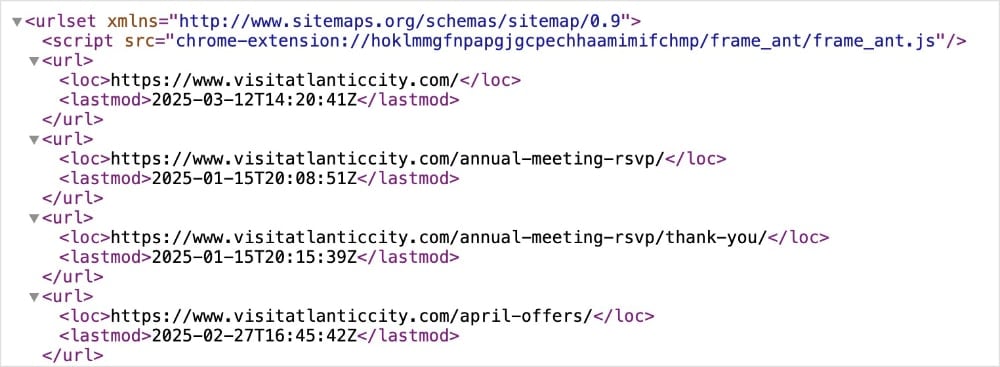
HTML sitemaps, on the other hand, are designed for users. These sitemaps are customer-facing and provide a clear, hierarchical list of pages on the website. Each item in the list contains an internal link, so users can easily navigate to that particular page.
They’re more visually-appealing than their XML counterpart, as you can see below.
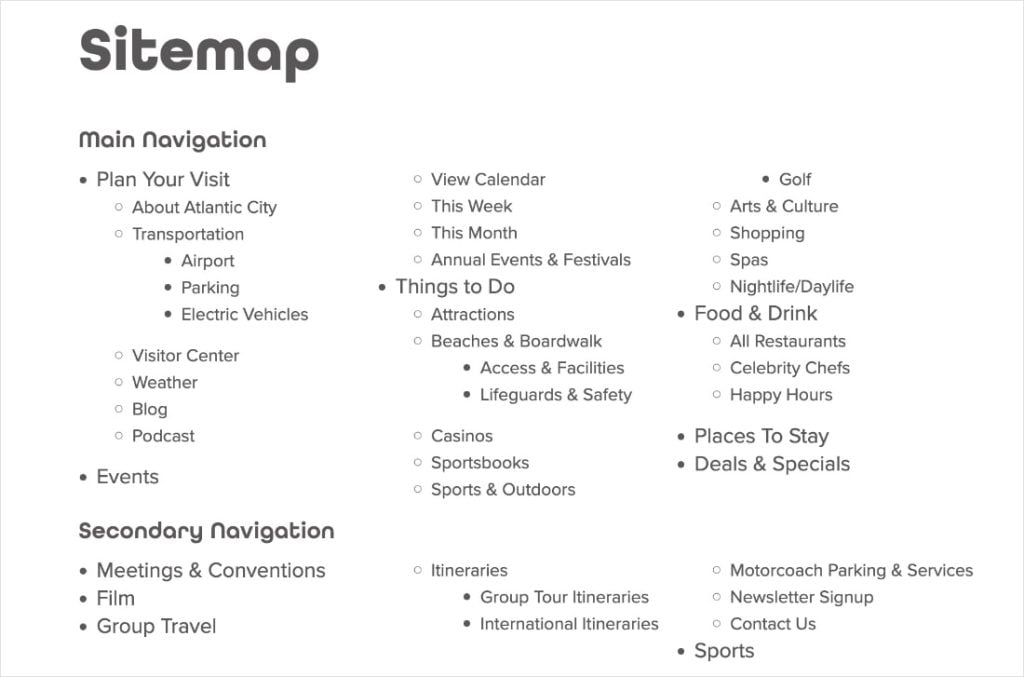
By using both HML and HTML sitemaps, Visit Atlantic City caters to users and search engines. This strategy underlines the importance of details when it comes to optimizing your website for best performance.
Tool: AIOSEO make it incredibly easy to generate both XML and HTML sitemaps. XML sitemaps are generated automatically while you can customize HTML sitemaps and how they appear to users.
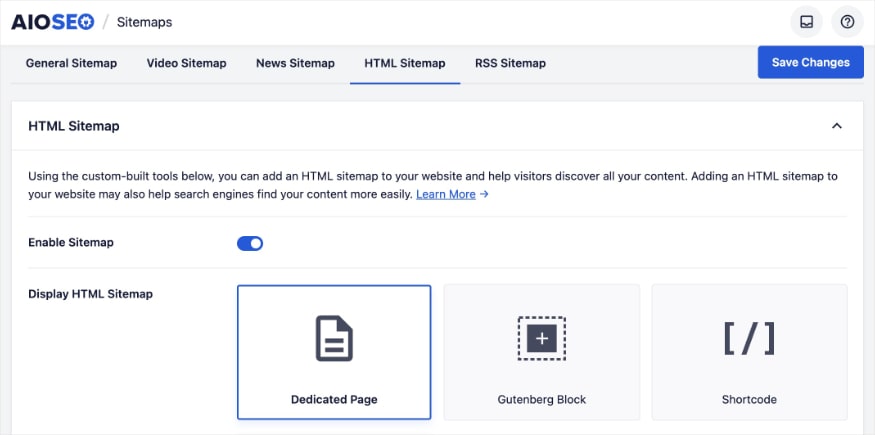
Takeaways
At this stage, we've discovered the key strategies to contributed to Visit Atlantic City's success.
Now, it's time to transform these strategies into actionable to-dos for your website.
Top 3 Strategies to Emulate
- Leverage 301 redirects to preserve SEO equity during URL changes. Whether you're consolidating domains, restructuring your website, or updating URLs, 301 redirects are essential for maintaining SEO rankings. By permanently redirecting old URLs to new, relevant pages, you ensure that search engines transfer the SEO value. It also ensures users are guided to the correct content. This is crucial for websites undergoing changes or moving content.
- Optimize images for visual search. Don't overlook image SEO. Use high-quality images, descriptive alt text, and keyword-rich file names to improve your visibility in Google Image Search and the Image Pack. Visual content is increasingly important in search and can help your site stand out from the competition.
- Prioritize content readability for engagement and SERP features. Make your content easy to read and understand by using clear language, short paragraphs, subheadings, and visuals. Readable content improves user experience and can increase your chances of ranking in SERP features like People Also Ask.
Bottom 3 Strategies to Reconsider
- Forgetting to set an H1 tag. An H1 tag is the primary heading of your web page, signaling the main topic to both users and search engines. While Visit Atlantic City has well-structured content, overlooking H1 tags on some pages can make it difficult to grasp the main theme. For your site, you should make it a habit to include a clear H1 tag on every indexable page. The AIOSEO Headline Analyzer can even help you optimize your H1 tags to be both user-friendly and keyword-rich.
- Omitting canonical tags. Canonical tags tell search engines which version of a page is the preferred version (aka, which one you want them to serve in search results). They're essential for managing duplicate content issues and consolidating link equity. Visit Atlantic City appears to be missing canonical tags on some pages, which is a missed opportunity for technical SEO. You can easily set canonical URLs in the AIOSEO settings of WordPress.
- Allowing metadata to exceed character limits. Meta titles and meta descriptions are text snippets that appear in SERPs. They're your website's first impression to users and directly influence clickthrough rates. When you exceed character limits, your result will be truncated. This can decrease their efficacy. To avoid this issue, use a SERP preview tool to check that your metada fits within the limited SERP space.
Steal Our Winning SEO Strategy: A Checklist for Your Website
Download A Free SEO Checklist
Access our comprehensive SEO Checklist with a single click. We'll deliver it straight to you, putting actionable items with SEO tools and tutorials right at your fingertips.
Enter your name and email to download a free SEO checklist.
Take Your SEO to the Next Level With AIOSEO
Visit Atlantic City's journey showcases that impactful SEO often boils down to mastering the basics.
With All in One SEO (AIOSEO), you can take control of your website's SEO and achieve real results.
From managing redirects to optimizing images, you'll get everything you need to implement these core strategies effectively—and easily.
AIOSEO is the best WordPress plugin for SEO. You’ll get tons of features that make SEO beginner-friendly and help you reach your online goals. Some customer-favorite tools include:
- Rich Snippets Schema: Win more rich results with AIOSEO’s user-friendly schema generator. Just pick the schema type you want, and we’ll format the structured data properly for Google.
- Redirection Manager: Prevent humans and bots from getting lost when you move content or domains. Our Redirection Manager helps you select and implement the best redirect type that preserves SEO.
- Image SEO: Turn on automatic image alt text and title attributes with a single click. You’ll save time from manual entries while helping users and search engines understand your images.
- TruSEO Score: Level up your content and go beyond a simple pass or fail. TruSEO analyzes your on-page SEO, giving you actionable tips to maximize your content's reach and readability.
- Smart Sitemaps: Easily generate HTML, XML, and RSS sitemaps with the help of AIOSEO. These dynamic sitemaps ensure all your content is crawled and indexed efficiently for faster rankings.
- Headline Analyzer: Get more clicks with compelling and keyword-rich headlines. This tool analyzes your H1 tag and helps you improve it for better engagement.
How an Outdoor Performance Brand Grew Traffic by 4,461% in 3 Months
https://cascadedesigns.com/
Stats
5.2K to 236.8K Monthly Visits
Industry
Ecommerce & Retail
Niche
Sporting Goods
Reporting Date
February 2025
What happens when a company dismantles its digital silos and unites its brands under one roof?
Cascade Designs Inc., a leading manufacturer of outdoor gear and equipment, found out—and the results were explosive. They didn't just see a slight uptick in traffic; they experienced a dramatic surge practically overnight.

This SEO case study breaks down the strategies they used to execute this domain migration to perfection.
We'll also explore additional SEO growth techniques for making the most of SERP real estate and standing out from the competition.
In This Article
The Catalyst: How Cascade Designs Reached Over a Quarter-Million Monthly Visits
1. Consolidating Brand Power: Strategic Domain Migration Unifies UX
The #1 reason for Cascade Designs' recent traffic growth is their decision to consolidate brands under a single domain.
Instead of maintaining separate websites for each of the following brands:
- MSR
- Therm-a-Rest
- Platypus
- PackTowl
- SealLine*
Cascade Designs migrated them all under their primary domain, cascadedesigns.com.
This process involved a few critical factors for a seamless transition:
1. Creating Brand-Specific Pages: Cascade Designs dedicated a web page to each brand within the main website. This approach provides a distinct and branded user experience for each brand's customers. (Example: https://cascadedesigns.com/pages/thermarest)

2. Implementing 301 Redirects: 301 redirects tell search engines you've moved content permanently. Cascade Designs used redirects to send traffic from the old sites to their new corresponding URLs on the primary domain.

3. Unifying User Experience (UX): Customers can now shop across all brands with a single cart. This creates a more streamlined shopping experience and additional opportunities for cross-promotion.

Most of these migrations started in December 2024 (*apart from SealLine, which was already redirecting to Cascade Designs).
And the results speak for themselves.

Cascade Designs successfully transferred organic traffic, keyword rankings, and domain authority to cascadedesigns.com.
Why This Matters:
Cascade Designs' domain consolidation wasn't just a website redesign; it was a strategic SEO power-up. Some benefits include:
- Boosted Domain Authority: Consolidating strengthens your main domain, improving rankings across all brands.
- Eliminated Keyword Conflicts: One site, one strategy—no more competing with yourself for keywords.
- Enhanced User Experience: A unified shopping experience keeps customers engaged and increases conversions.
- Simplified SEO: Managing one site is easier than managing many, freeing up resources.
- Increased Cross-Promotion: Expose customers to more of your brands at once.
Overall, it’s a big move that can come with an equally big pay-off for your SEO.
How to Do a Website Migration:
There’s a lot that goes into website migrations. After all, you don’t want to lose any of the hard work or SEO value you put into the original domain.
Checklists can be a great way to execute a site migration without missing a beat.
WPBeginner has a thorough website migration checklist that includes the following tasks:
- Putting your site in maintenance mode
- Creating a backup of your site
- Setting up and testing redirects
- Checking for 404 errors
- And more
I highly recommend reading the above article for a full breakdown of how to do each task. It has a ton of tutorials and guides linked throughout the article to help you execute your domain migration flawlessly.
Tools for Full Site Redirects:
If you’re a WordPress user, you’re in luck.
All in One SEO (AIOSEO) has made domain migrations and full site redirects faster and easier than ever.
Just navigate to the Redirection Manager, and click on the Full Site Redirect tab. Then, enter the URLs of your old and new domains.
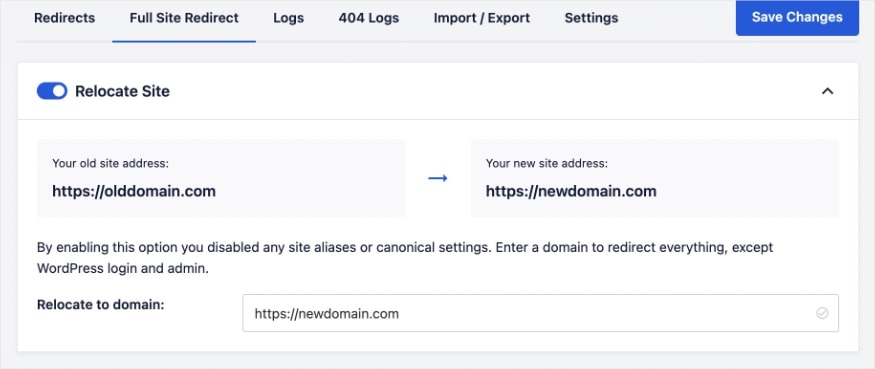
AIOSEO will implement permanent redirects for you, ensuring all link juice is passed on to the new domain.
For a detailed walkthrough of this process, check out the following tutorial: How to Do a Full Site Redirect in WordPress.
2. Star-Powered SERPs: Schema Markup Transforms Online Visibility
Cascade Designs didn't stop at domain consolidation. They also leveraged the power of schema markup to enhance their visibility in search engine results pages (SERPs).
Specifically, they focused on product schema, which allows them to share important product details with search engines.
Schema markup is a form of structured data that helps search engines better understand the content of a web page. It provides context and meaning, allowing search engines to more easily index your site and serve it for relevant queries.
Here’s what product schema looks like in the source code of one of Cascade Design’s web pages:

Cascade Design uses JSON-LD to communicate product details with crawlers, which is Google’s preferred method for implementing structured data.
Besides making it easier for search engines to understand your content, schema markup also often comes with an SEO-favorite bonus: rich snippets.
Rich snippets are enhanced search listings that feature additional elements directly in SERPs.
Take a product rich snippet, for example.

This enhanced listing shows details like:
- Price
- Stock availability
- Average customer rating
- Return and shipping information
It also has an image of the product, which could be the distinguishing factor between a potential customer clicking on your site or the competition’s.
All these elements appear in Cascade Design’s product schema markup.
This strategy has yielded impressive results, particularly in image snippets.
By implementing product schema, Cascade Designs saw a significant boost in image rankings, with an impressive 10.5K rankings by February.

This visual prominence has undoubtedly contributed to increased clickthrough rates and organic traffic.
They also received over 2K review snippets, which shows customers’ average rating in the form of stars.
These types of search results are an excellent way to build user trust, as they act like social proof for your products or service.
Why This Matters:
Here's how product schema works and why it's so effective:
- Rich Snippets: Schema markup provides search engines with structured data, making it easier for them to understand the content of a page. This leads to the display of rich snippets, which are more visually appealing than standard search results.
- Enhanced Visibility: Rich snippets stand out in the SERPs, attracting more attention and clicks.
- Improved Clickthrough Rates (CTR): The added information and visual elements in rich snippets can improve your CTR. More clicks equals more traffic for your site.
- Image Optimizations: Schema markup also helps search engines understand your product images. This can lead to ranking in Google Images search.
By implementing product schema, you can make your eCommerce listings more enticing to users. This strategy reflects the importance of using structured data to maximize visibility and win more traffic for your site.
How to Add Product Schema Markup:
This tutorial teaches you how to add product schema without a plugin. It uses JSON-LD and provides 3 methods for implementing it on your site.
Here are some tools that will help you with this process:
Schema Markup Tools:
If that last section made your heart rate go up, don’t worry. I’ve got another solution that’s easier and doesn’t require a single line of code (from you, anyways).
AIOSEO has a rich snippet schema generator that makes adding schema markup painless and code-free.
When you’re working on a WordPress post or page, just scroll down to the Schema tab of the AIOSEO settings. Once you click Generate Schema, you’ll get a catalog that looks like this:
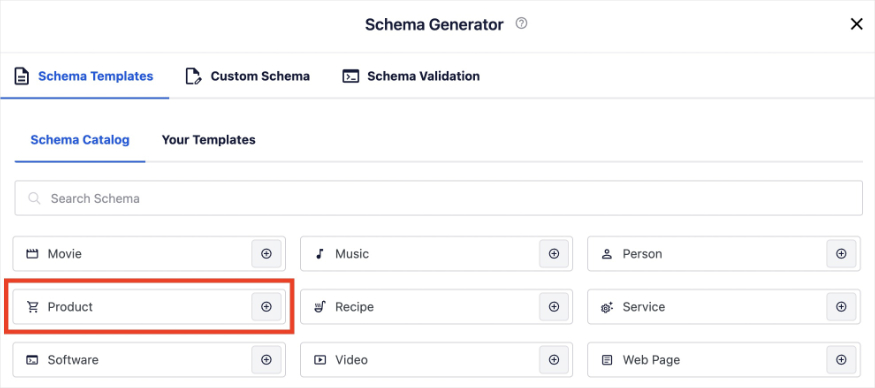
If you have an eCommerce site like Cascade Designs, go ahead and select Product. AIOSEO will walk you through a few additional fields for adding your product details.
You can also upload an image, and the plugin will format the structured data appropriately.
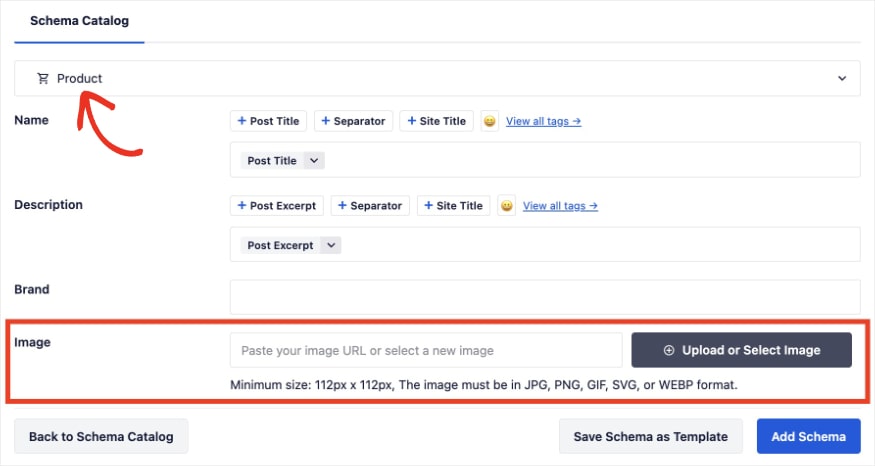
Once you’re done, click Add Schema. AIOSEO will implement the schema markup for your web page, and you’ll be one (big) step closer to rich snippets in SERPs.
3. Content Clarity: Readability Wins for Users & Search Engines
In addition to technical SEO, Cascade Designs also focused on user experience by optimizing for readability.
Readability measures how easily users can read and understand your content. It uses various factors to calculate this metric, including:
- Sentence length
- Paragraph length
- Vocabulary
- Transition words
- And more
The higher your readability score, the easier it for readers to understand the text. The lower the score, the more difficult.

For Cascade Designs, blog posts have been the main focus of readability optimizations.
Some techniques they use include:
- Clear Subheadings: They use descriptive subheadings to break up the text and guide readers through the content.
- Short Paragraphs: They keep paragraphs concise, making the content easier to digest.
- Bulleted Lists: They utilize bulleted lists to present information in a clear and organized manner.
- Original Imagery: They incorporate high-quality, original images to enhance visual engagement.
- Embedded YouTube Videos: When relevant, they embed YouTube videos to provide additional value and engage users.
This strategy has yielded impressive results, particularly in Google's People Also Ask (PAA) feature.
This section of the SERP features questions related to the user's initial search query. Users can expand the results to view the answer and source.

Overall, Cascade Designs readability optimizations were fruitful.
Google rewarded them with almost 600 rankings in the PAA box by February.

Why This Matters:
Good readability scores can deliver the following benefits:
- Improved User Engagement: Readable content keeps users engaged and encourages them to spend more time on the website.
- Enhanced SEO: Search engines favor content that is easy to understand and navigate.
- Increased People Also Ask Rankings: By providing clear and concise answers to user queries, it's easy for search engines to feature copy in the PAA box.
How to Optimize for Readability:
This guide shows you how to improve your readability score. Here are a few of the main steps that are featured in the article and Cascade Design’s optimizations:
- Use simple language.
- Aim for short sentences and paragraphs.
- Break up text with white space and multimedia.
- Organize your content with clear subheadings.
- Include transition words for improved flow.
These steps will help you write natural content that’s easy for both users and search engines to understand.
Content Readability Tools:
Readability can sound a bit abstract, but the reality is, it’s just about creating a piece of content that’s easy and enjoyable to read.
And with the right tools, you’ll find that improving your score only takes a few minutes.
Take the AIOSEO TruSEO tool, for example.
This WordPress tool analyzes your content’s on-page SEO and readability optimizations. You’ll get a handy Readability Checklist that makes it quick and simple to improve your content’s score.
I like how you can also click the eye icon to go exactly where the plugin recommends making an adjustment. This is a huge time-saver when you’re working on long articles or pages.
Standout SEO Wins
Before we wrap up, I’d like to highlight a final SEO strategy at Cascade Designs. This strategy didn’t directly impact their recent traffic growth, but it’s a good reminder of a core SEO best practice.
Internal Links Fuel Content Discovery & User Engagement
Cascade Designs demonstrates a strong understanding of the importance of internal linking.
Internal links connect different pages of your website, helping users and crawlers navigate your site with ease.
This strategy is most evident in Cascade Designs' blog posts. (That's not to say it isn't present on their eCommerce pages, but it's more intentional and less expected in blogs.)
For instance, in this article about choosing replacement snowshoe bindings, the author linked all the product pages in the last column. This move allows users to determine the correct replacement bindings for their snowshoe and shop it with a click.

I also noticed that Cascade Designs' authors tend to include related posts at the end of blogs. This is a small but smart move. It presents an additional opportunity for internal linking while encouraging readers to continue exploring their content.

Ultimately, by linking across the site, Cascade Designs makes it easier for users and search engines to navigate the site.
This can lead to more efficient crawling and improved user engagement metrics, which tells Google users find your site valuable.
Tool: Link Assistant provides internal linking suggestions directly in WordPress. This means you don’t have to manually scour your site for linking opportunities. Once you see one you want to add, click Add Link and the tool will update your content.
Takeaways
After analyzing Cascade Designs' traffic growth, it's clear that a few key strategies were at play.
Now, let's translate their success into actionable to-dos for your website.
Top 3 Strategies to Emulate
- Master the art of permanent redirects. Whether you're moving a single page or an entire website, 301 redirects are essential for preserving traffic and SEO. A 301 redirect tells search engines you moved content permanently. They help prevent users from getting page-not-found errors and ensure a seamless UX. Permanent redirects also safeguard your hard-earned SEO rankings and link equity, so it's important to get them right.
- Make your products shine in search with schema markup. Product schema markup can transform standard search listings into eye-catching rich snippets. These enhanced search results showcase star ratings, images, and product details. Users are attracted to this type of results, leading to more clicks and organic traffic. Plus, they help search engines more easily understand your web pages, which can improve your rankings.
- Answer user queries with clear, concise content. Optimizing for People Also Ask means creating content that directly addresses user questions. Use short paragraphs, bulleted lists, and clear subheadings to make information easily digestible. This approach can improve your readability score while also helping you earn valuable PAA rankings. This area of the SERP typically has high clickthrough rates, making it valuable for your business.
Bottom 3 Strategies to Reconsider
- Exceeding SEO title character limits. Some of Cascade Designs' SEO titles exceed the recommended limit of 60 characters. This can lead to truncated titles in search results, which may be less effective than titles of the appropriate length. To avoid this issue, run your meta titles through a SERP preview tool before publishing. This will allow you to catch and fix your titles beforehand. AIOSEO has a built-in Google snippet preview to help you do this process in WordPress.
- Omitting meta descriptions on certain pages. While many of Cascade Designs' pages have well-crafted meta descriptions, some don't have any. This is a missed opportunity to provide keyword-rich summaries that drive clicks. Plus, today there are AI SEO tools that can write them for you. Take the meta description generator from AIOSEO, for example. This tool writes engaging meta descriptions with the click of a button.
- Forgetting alt text for images. Cascade Designs could be more consistent with their implementation of image alt text. Alt text is an HTML element that describes an image. Search engines and screen readers can use this text to understand an image's content and context within a page. This can improve user accessibility and image rankings. The Image SEO feature in AIOSEO can automate the writing process of image alt tags. You can customize it using smart tags, which generate the alt text for you.
Steal Our Winning SEO Strategy: A Checklist for Your Website
Download A Free SEO Checklist
Access our comprehensive SEO Checklist with a single click. We'll deliver it straight to you, putting actionable items with SEO tools and tutorials right at your fingertips.
Enter your name and email to download a free SEO checklist.
Streamline Your SEO Efforts & Rank Higher With AIOSEO
Cascade Designs' growth journey is a testament to the power of strategic SEO. From planning domain migrations to optimizing readability for users, every move you make can help you stand out to search engines.
We're also well-aware of the fact that implementing and managing these strategies can be overwhelming. Or simply take too much time.
That's why AIOSEO was designed with small business owners in mind. We've got beginner-friendly tools that can help you execute the most effective strategies in less time.
All in One SEO is the best SEO plugin for WordPress. It has over 3 million active users who trust it to improve their SEO and grow their visibility in SERPs. Here are some customer-favorite tools:
- Image SEO: Automate the writing process for image titles and alt text using smart tag variables. You’ll save time from manual entries while helping users and search engines understand your images.
- Redirection Manager: Prevent humans and bots from getting lost when you move content or domains. Our Redirection Manager helps you select and implement the best redirect type that preserves SEO.
- Rich Snippets Schema: Win more rich results with AIOSEO’s user-friendly schema generator. Just pick the schema type you want, and we’ll format the structured data properly for Google.
- TruSEO Score: Level up your content and go beyond a simple pass or fail. TruSEO analyzes your on-page SEO, giving you actionable tips to maximize your content's reach and readability.
- Link Assistant: Get link suggestions, edit anchor text, and add internal links to your WordPress content. Link Assistant helps you effortlessly build a better linking strategy while saving valuable time.
- AI Title & Description Generator: Save time writing SEO titles and meta descriptions with the help of AI. With the click of a button, you can generate unique metadata for any page on your website.
How a Math & Reading Program Grew Traffic by 733% in 3 Months
https://www.dreambox.com/
Stats
226.9K to 1.9M Monthly Visits
Industry
Education
Niche
Learning Platform
Reporting Date
February 2025
What if the right content could unlock a 733% surge in your website traffic?
DreamBox, an online math and reading platform, discovered theirs, and exploded monthly visits from 226.9K to 1.9 million.

This wasn't just luck; it was a deliberate SEO move driven by identifying and expanding content that resonates with their audience.
As a small business owner or DIY website builder, you likely crave real, tangible growth of the same magnitude.
This SEO case study dissects the proven tactics DreamBox used, revealing how you can apply them to your website and turn it into a traffic magnet.
Let's get started.
In This Article
The Catalyst: How DreamBox Reached 1.9M Monthly Visits
1. From Brand to Broad: The Power of Targeted Content Creation
DreamBox's traffic growth was largely fueled by strategic and aggressive content creation.
Initially, they relied heavily on branded queries, which drove 68% of organic traffic. These types of queries contain “dreambox” (or some variation of it) within the search.
Branded queries are good when you have a high brand awareness and strong online presence. However, they limit your reach to users who are already familiar with you.
This ultimately inhibits your growth potential and online visibility.
Recognizing this limitation, DreamBox tapped into a wider audience searching for math-related solutions.
This led to the introduction of a new section of the website in September titled “Math Resources.”

Under the /math subdirectory, DreamBox shares helpful skills and guides to improve students’ understanding of mathematical concepts.
This subfolder became the focus of DreamBox’ recent SEO efforts.
In just a few months, they increased the amount of content in this subfolder from around 44 to 183 URLs.
Today, the /math subdirectory represents 76.9% of all their site content and generates 78.1% of all U.S. traffic.
This concentration on a specific area of the site was highly intentional.
By identifying keywords related to math education, DreamBox created pages that directly answered their audience's questions.
This allowed them to rank for non-branded keywords and attract users who were actively seeing math-related information (aka, their target audience), even if they weren't familiar with the DreamBox brand.
And the effects on traffic were dramatic.
In November, only 32% of DreamBox's organic traffic came from non-branded searches.
By February, this figure has skyrocketed to 92%, demonstrating a complete shift in their traffic acquisition.

It also explains their rapid growth in keyword rankings, as it opened the doors to thousands of new, non-branded keywords.
By February, DreamBox ranked for over 155.9K keywords.

Ultimately, this strategy highlights the power of creating content that breaks free from brand limitations while connecting with your ideal audience.
DreamBox targeted keywords their users would look for in search engines and made content to match.
Why This Matters:
Growing your website's content, especially around a specific topic, is a powerful way to become a leader in your field.
When you create helpful content that matches what people are searching for, you attract more visitors and become a trusted source of information. This can help you establish niche authority and get a boost in rankings from search engines.
And when you rank higher, more people are likely to find your site, giving you a better a chance to turn those visitors into customers.
How to Find Non-Branded Keywords:
Identifying the right non-branded keywords is crucial for attracting a wider audience. Here's a quick overview of the process:
- Brainstorm: Start with broad topics related to your niche.
- Research: Use tools like LowFruits or Semrush to find related keywords.
- Analyze: See what keywords your competitors are targeting.
- Explore: Check out “People Also Ask” and related searches on Google.
- Understand: Ensure you know the search intent behind the keywords to tailor your content accordingly.
For a more detailed guide, check out this tutorial on how to do keyword research.
Keyword Research Tools:
Did you know you can do keyword research in WordPress?
All in One SEO (AIOSEO) makes it possible by connecting with your Semrush account.
Here’s how it works:
After entering a focus keyword into your WordPress post or page, click Get Additional Keyphrases.
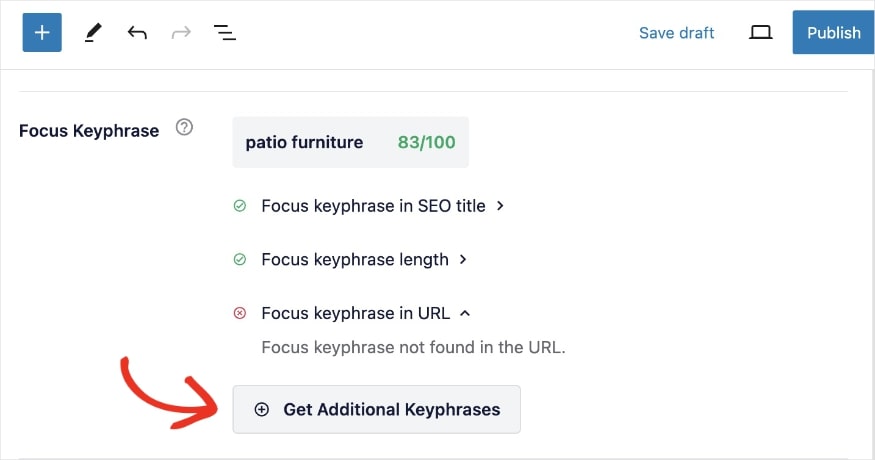
AIOSEO will fetch related keywords from Semrush and present them in a pop-out window, like the one below.
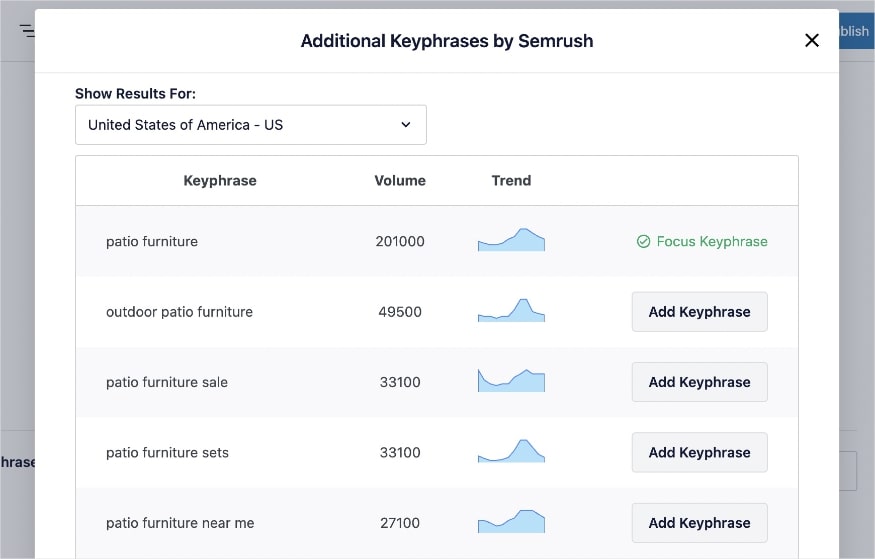
From here, select any non-branded keywords and click Add Keyphrase.
Once you’ve updated your content to reflect your chosen keyword(s), the TruSEO On-Page Analysis tool will check your optimizations.
2. Beyond Position 1: The Value of Readability on SERP Features
DreamBox understands that driving traffic goes beyond securing high ranking positions in SERPs.
They also optimize for SERP features, like People Also Ask (PAA) and featured snippets, to enhance their visibility in search.
To achieve this, they focus on creating informative content with good readability scores. This approach allows them to provide a positive page experience for users while making it easy for search engines to understand their content.
Readability measures how easy it is for users to read and understand your content.
Here are some of their most effective optimizations:
- Question Subheadings: DreamBox uses question-based subheadings to address common user queries. This approach increases the likelihood of appearing in PAA boxes.
- Clear Organization: Their articles are structured with clear subheadings and a logical flow, making it easy for users and search engines to find information.
- Simple Language: DreamBox avoids jargon and complex terminology, opting for simple language that is accessible to a wide audience.
- Short Paragraphs and White Space: They break up long blocks of text with short paragraphs and ample white space, making the content visually appealing and less intimidating to read.
Let’s see how these optimizations have affected DreamBox’s SERP features, starting with People Also Ask results.
In February, DreamBox received 11.6K rankings in the PAA box.

Fun Fact: Of these 11.6K rankings, only 288 of them came from URLs outside the /math subfolder. That means Math Resources generates 97.5% of all PAA rankings.
This section of the SERP provides users with questions (and answers) related to their initial query.

And in the screenshot below, we see how DreamBox made it easy for search engines to use their content in this PAA result by:
- Writing a question-based subheading
- Using clear, simple language to answer the question

Furthermore, DreamBox received over 3K rankings in featured snippets.

This is one of the most coveted areas of the SERP due to its prominence.
Featured snippets appear above all organic listings, making them one of the first things users see.

And despite providing the answer to a user’s query directly on the SERP, SEO statistics reveal that featured snippets have the highest clickthrough rate (CTR) at 42.9%.
Why This Matters:
Making your content easy to read has a significant impact on the user experience and your website's success.
Google loves to feature clear and concise content in SERP features, so it's important to align your content with their various formats.
Including questions and FAQs is a great way to rank in People Also Ask and featured snippets, like DreamBox.
By using these elements, you can increase your likelihood of ranking in prominent SERP features and improve your organic CTR.
Additionally, readable content encourages visitors to stay on your page longer. This leads to better user engagement metrics, like reduced bounce rates, and can boost your search engine rankings.
How to Improve Your Content Readability:
Creating readable content is crucial for both user experience and SEO. Here's how to make your content more accessible and engaging:
- Use clear and concise language.
- Write short paragraphs.
- Incorporate descriptive headings and subheadings.
- Add visual elements like images and videos.
- Use bullet points and lists.
For a thorough explanation of each step, visit this article on how to improve your readability score.
Readability Tools:
Remember the TruSEO tool I briefly mentioned in our last section?
In addition to checking your keywords optimizations, it also analyzes the readability of your WordPress post or page.
You’ll get a Readability Checklist that provides real-time feedback to improve your score.
It’s very easy to use and can make the difference between ranking as a standard search listing or landing a SERP feature.
3. Visual Victories: Leveraging Image SEO for Traffic Growth
In addition to written text, DreamBox uses visual content to enhance the user experience—and their online visibility.
They include images throughout their content to illustrate math concepts and key points.
Take this multiplication chart, as an example.

This image showcases how students can use times tables to multiply numbers. It's helpful within the context of the article, which explains how to do multiplication.
A reader could view this image (and download a PDF of it) to successfully multiply numbers between 1 and 20.
This example illustrates a positive user experience.
Furthermore, DreamBox makes the image search-friendly with the following optimizations:
- Keyword-Optimized File Names: DreamBox uses relevant keywords in their image file names.
- Descriptive Alt Text: DreamBox adds descriptive alt text to images, though they could be more consistent.
- Clear Subheadings and On-Page Signals: They use clear subheadings and on-page SEO to provide context for images.
- Schema Markup: DreamBox uses ImageObject schema markup to give search engines more information about their images.
These optimizations have proved effective, with search engines featuring DreamBox’s images in search results.

Image snippets are a powerful tool for stopping users from scrolling and getting them to click.
After all, if there were a search listing with a relevant image and one without, which would you choose?
The answer is clear.
And traffic metrics support it.
In February, DreamBox had 4.3K image snippets, which generated 46.2K monthly visits.

Image SEO also helped DreamBox to rank in the Google Image Pack, which appears at the top of search results.

These results provide users with images related to their search query.
Did you know? Ranking in the Image Pack means you’re also ranking in Google Images. There are over 1 billion searches every day here, making it an extremely valuable channel for driving traffic to your site.

Ultimately, image SEO has been monumental in DreamBox’s recent organic success.
They ranked in the Image Pack for 1.4K keywords in February alone.

Why This Matters:
Optimizing images for search engines can boost your website's visibility and drive traffic.
When you use image SEO best practices, you make it easier for search engines to understand and index them. This can lead to your images appearing in search results in both traditional search and Google Images.
Additionally, image SEO enhances the user experience by making your content more engaging and accessible.
How to Optimize Images for Search Engines:
Optimizing images for search engines is a crucial aspect of SEO.
Here's how to make your images more search-friendly:
- Use descriptive file names with relevant keywords.
- Write concise and descriptive alt text.
- Choose the right file format (JPEG or PNG).
- Optimize image size by compressing them.
- Use ImageObject schema markup.
- Place images near relevant text and use captions for context.
By following these tips, you can improve your image SEO and drive more organic traffic to your website.
Image SEO Tools:
AIOSEO has several tools that can help with your image optimizations.
For starters, the image SEO feature streamlines your most critical image elements. You can use smart tags to automate writing image titles, alt text, and captions.
As for schema markup, the schema generator is as easy as selecting your desired schema type from a catalog.
Many of these options will have additional attributes that are available for you to include, such as images.
In the example below, we see how product schema has a field for uploading or selecting an image.
Once you’ve uploaded your image, the plugin will format your ImageObject (and initial) schema for search engines.
Standout SEO Wins
Before we wrap up, there's an additional SEO best practice DreamBox uses to aid in user and search engine navigation:
Mastering Sitemaps: A Two-Pronged Approach with HTML and XML
DreamBox understands the importance of sitemaps for both users and search engines. They provide two types of sitemaps: HTML and XML.
An HTML sitemap is like a table of contents for your website. It's designed for people to easily find and navigate to different pages on your site. This improves user experience and helps visitors quickly find what they're looking for.
(It’s also great for internal linking.)
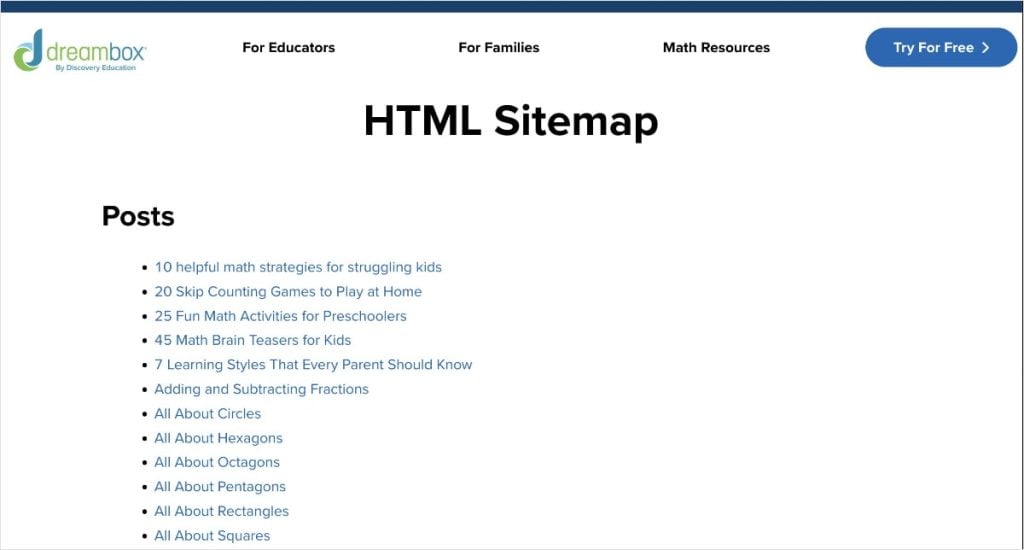
An XML sitemap, on the other hand, is designed for search engines. It's a file that lists all the important pages on your website, making it easier for search engines like Google to discover and understand your site structure. It also shares when they were last updated.
Ultimately, XML sitemaps can lead to a boost in rankings because search engines have an easier time of crawling and indexing your site.

While sitemaps might not directly cause a sudden increase in traffic, they are a crucial foundation for good SEO.
Think of them as a roadmap that guides both users and search engines through your website.
Tool: AIOSEO can automatically create both HTML and XML sitemaps for your WordPress website.
For HTML, just click the HTML Sitemap tab from the Sitemap settings. Then, toggle the switch on.
For XML sitemaps, it’s a similar process, but you don’t have to navigate to a new tab after reaching the Sitemaps settings. The first screen you see, General Sitemap, is designed for XML sitemaps and the default setting is on.

Takeaways
In our analysis of DreamBox, we've uncovered the strategies that contributed to their traffic growth.
Let's recap these strategies and transform them into actionable takeaways for your website.
Top 3 Strategies to Emulate
- Become a topical expert and write in your niche. DreamBox used targeted content creation to expand their content offering and establish themselves as a trusted resource in math education. They focused their efforts on the Math Resources subdirectory, which allowed them to rank for non-branded keywords and expand their reach. You can replicate this by creating more content about specific topics relevant to your audience and niche. This will help you attract more visitors and show Google you're an expert in your field.
- Make content easy to read and understand. DreamBox prioritized readability in their content, using elements like clear language, logical subheadings, and short paragraphs to keep readers engaged. You can follow their lead by focusing on similar elements to improve your content's readability. This approach can boost user engagement metrics, like time on page and bounce rates. Furthermore, it can help you rank in SERP features like People Also Ask boxes and featured snippets.
- Don't forget about image SEO. DreamBox makes their images search-friendly by optimizing image file names, writing descriptive alt text, and using schema markup. This makes it easier for search engines to understand and index their visual content. It also helps them display DreamBox's images in search results, leading to higher clickthrough rates and more traffic. You can replicate this success by optimizing your images with similar techniques. This will not only make your content more accessible but also help you tap into the traffic potential of image search.
Bottom 3 Strategies to Reconsider
- Exceeding SEO title character limits. Some of DreamBox's SEO titles exceed 60 characters, which can lead to truncation in search results and reduce clickthrough rates. To avoid this issue, run your metadata through a SERP preview tool before publishing. The AIOSEO Headline Analyzer will also tell you if you've exceeded character limits, allowing you to fix it before a post goes live.
- Forgetting alt text on images. While DreamBox utilizes alt text for some images, they could be more consistent. Missing alt text can hinder accessibility and limit visibility in image search results. The AIOSEO Image SEO feature allows you to automate image elements, like alt text and captions. This ensures no image is overlooked and not optimized.
- Neglecting author bios. Currently, DreamBox showcases authors on each article, but they don't have bios. This is a missed opportunity to align content with Google E-E-A-T guidelines, which want to see experience and expertise. By showcasing an author's relevant background, DreamBox could establish their website as more authoritative and trustworthy, leading to better rankings. For your site, you can easily create and show author bios using the Author SEO feature. This tool allows you to create strong bios that showcase your team's expertise.
Steal Our Winning SEO Strategy: A Checklist for Your Website
Download A Free SEO Checklist
Access our comprehensive SEO Checklist with a single click. We'll deliver it straight to you, putting actionable items with SEO tools and tutorials right at your fingertips.
Enter your name and email to download a free SEO checklist.
Dominate the SERPs With All In One SEO
Ready to experience explosive growth like DreamBox?
AIOSEO can help you unlock your site's full SEO potential.
Imagine effortlessly optimizing your content for readability, automatically generating image alt text, and creating sitemaps with just a few clicks.
AIOSEO empowers you to implement the strategies that fueled DreamBox's growth, without the need for technical expertise or countless hours of manual effort.
AIOSEO is the best SEO plugin for WordPress. With thousands of 5-star reviews and over 3 million active users, you'll join a community of website owners who are achieving their SEO goals.
Here are a few customer-favorite tools:
- Semrush Keyphrase Suggestions: Perform keyword research directly in the WordPress editor. AIOSEO connects with your Semrush account to generate and serve keyword ideas for your content.
- Author SEO: Create powerful author bios that showcase your experience and expertise. This addon aligns your content with Google E-E-A-T guidelines and builds trust with readers.
- TruSEO Score: Level up your content and go beyond a simple pass or fail. TruSEO analyzes your on-page SEO, giving you actionable insights to maximize your content's reach.
- Image SEO: Turn on automatic image alt text and title attributes with a single click. You’ll save time from manual entries while helping users and search engines understand your images.
- Smart Sitemaps: Easily generate HTML, XML, and RSS sitemaps with the help of AIOSEO. These dynamic sitemaps ensure all your content is crawled and indexed efficiently for faster rankings.
- Headline Analyzer: Get more clicks with compelling and keyword-rich headlines. This innovative tool uses various factors to determine the efficacy of your headline. Plus, you'll get actionable insights to improve it.
How an AI Infographic Maker Grew Traffic by 332% in 6 Months
https://piktochart.com/
Stats
830K to 3.6M Monthly Visits
Industry
Artificial Intelligence (AI)
Niche
Design & Data Visualization
Reporting Date
January 2025
Imagine quadrupling your website's traffic in half a year.
That's the reality for Piktochart, a popular graphic design tool for making infographics.
They experienced a 332% surge in organic traffic, building on an already solid foundation of 830K visits to 3.6 MILLION.

This SEO case study explores the strategies that got Piktochart to the top of Google search results and which keywords put them there.
By understanding and implementing these tactics, you, too, can unlock similar growth for your website.
In This Article
The Catalyst: How Piktochart Reached 3.6M Monthly Visits
1. Dominating Color Keywords: Massive Content Push Grows Rankings
Piktochart's explosive growth can be largely attributed to a strategic and aggressive content expansion focused on color-related topics.
Between July 2024 and January 2025, the team published a staggering 2,145 new blog posts within their /tips subfolder.
These posts discuss color analysis, palettes, design tips, and more.

This approach yielded remarkable results.
By January, 7 out of Piktochart's top 10 performing pages were dedicated to color-related tips, driving 71.2% of the site's total traffic.
Furthermore, this content creation significantly enhanced their search engine rankings for color keywords.

These new blog posts accounted for almost half of their entire U.S. rankings, at 99.7K keywords.
It also explains how they reached a new record of 214.5K keywords by January.

Why This Matters:
Piktochart's success with color-focused content demonstrates the potential of a niche content strategy. By focusing on a specific topic and creating a high volume of relevant content, you can:
- Establish Authority: Become a go-to resource for a particular subject, building trust and credibility with your audience.
- Dominate Keyword Rankings: Capture a significant share of relevant keywords, driving targeted traffic to your site.
- Drive Substantial Traffic: Create a powerful engine for organic traffic growth by focusing on high-performing topics.
- Increase Site-Wide Visibility: Even niche content can boost overall site authority, benefitting other pages and content.
Ultimately, prioritizing relevant content and strategic keyword optimizations is crucial to reach your SEO goals.
How to Build a Winning Content Strategy for Your Site:
Piktochart's success highlights the importance of a well-defined content strategy. Here's a simplified process to get you started:
- Identify your niche. Focus on a specific area relevant to your audience and business, just like Piktochart did with color-related content.
- Conduct keyword research. Use tools like LowFruits or Semrush to find valuable keywords within your niche.
- Create high-quality content. Focus on providing value to your audience with informative and engaging content.
- Optimize for SEO. Ensure your content is optimized for your target keywords and overall search engine visibility.
- Promote your content. Share your content across relevant channels to reach a wider audience.
- Track and analyze. Monitor your content's performance and make adjustments as needed.
By following these steps, you can create an SEO content strategy that attracts your target audience, boosts your rankings, and drives sustainable growth.
Content Creation Tools:
Creating high-quality, SEO-optimized content can be time-consuming.
Tools like All in One SEO (AIOSEO) can help streamline the process.
The AIOSEO Writing Assistant integrates with SEOBoost to help you generate topic reports in WordPress.
You’ll get competitor insights that shape your content creation process to outrank other websites.
The Optimization Wizard will also help you identify related terms to maximize your content’s reach.
Overall, it’s a beginner-friendly content optimization tool that can make a real difference for your rankings and organic traffic.
2. Unlocking Google Images: Visual Optimizations Bring More Visibility
As a graphic design tool, Piktochart understands that SEO isn't just about text; it's about visuals too.
By implementing image SEO best practices, they improved search engines' understanding of their visual content.
This includes:
- Uploading high-resolution images
- Writing descriptive alt text
- Sending clear on-page SEO signals
These efforts paid off.
By January 2025, Piktochart acquired an impressive 37.7K rankings with image snippets, showcasing their visuals in SERPs.

Here’s an example:

Moreover, they broke into the Google Image Pack for the first time, securing 12.5K rankings within this highly visible section.

Image Packs excel at boosting brand awareness and driving traffic to your website due to their prominence in search results.

Ranking in this section of the SERP also means you’re ranking in Google Images, where there are over 1 billion searches daily.
Why This Matters:
Piktochart's image SEO success underscores the importance of optimizing visual content for search. By implementing image SEO best practices, you can:
- Improve Visibility: Increase your chances of appearing in image search results and Google Image Packs.
- Improve Accessibility: Help visually impaired users understand your images with descriptive alt text.
- Boost Brand Awareness: Increase your brand's visibility in search results.
- Diversify Traffic Sources: Tap into the massive potential of Google Images and reduce reliance on text-based search.
Optimizing your images is crucial to maximize your website's SEO performance and reach a wider audience.
How to Make Your Images Search-Friendly:
Want to replicate Piktochart's success in Google Images? Here's how to optimize your visuals for search:
- Choose high-quality images. Use visually appealing, high-resolution images relevant to your content.
- Use descriptive filenames. Instead of “image1.jpg,” use descriptive filenames like “red-living-room-ideas.jpg.”
- Write detailed alt text. Describe the image accurately and concisely, including relevant keywords where appropriate. This helps search engines understand the image's content and improves accessibility.
- Optimize image size. Compress your images to improve page load speed without sacrificing quality. Tools like Compress JPEG can help.
- Add image structured data. Implement schema markup to provide search engines with more context about your images.
- Create image sitemaps. Submit an image sitemap to Google Search Console to ensure all your images are indexed.
By following these steps, you can make your images more discoverable in search results.
Image SEO Tools:
Optimizing images for search can be tedious, but tools like AIOSEO can simplify your workflow.
AIOSEO offers a range of powerful image SEO features, including automatic alt text generation and image sitemaps.
Here, you can see how to use smart tags to write alt text automatically:
And getting a sitemap is as easy as flipping a switch:
These optimizations put some of your image SEO on autopilot, freeing up valuable time to focus on other high-value tasks.
3. Answering User Queries: Content Readability Secures SERP Features
Piktochart recognizes the importance of presenting information in a way that's easy for users and search engines to understand.
Optimizing for readability allows them to create engaging content that keeps users on the page.
Readability measures how easy it is for users to read and understand written text.
Some ways they do this are:
- Using a clear structure for blog posts
- Including descriptive subheadings
- Writing simple sentences with clear language
- Breaking up text with white space and images
This focus on user experience led to impressive results in SERP features.
By January 2025, Piktochart achieved 31.5K rankings in Google People Also Ask.

This area of the SERP provides users with questions related to their original query. Answers are available by clicking the arrow button next to each result.

Piktochart also ranked for more featured snippets than ever, at about 1K rankings.

Featured snippets are one of the most coveted SERP features due to their visibility.
These organic results appear at the top of search results, before any other organic listings.

Ultimately, optimizing for readability goes well beyond the user experience on your web page.
It can also have a dramatic influence on your site's visibility in SERP features, like People Also Ask and featured snippets.
Why This Matters:
Piktochart's success with SERP features highlights the importance of prioritizing content readability. By making your content easy to understand and digest, you can:
- Improve User Experience: Keep users engaged and on your page longer, reducing bounce rates and increasing conversions. (All of which can contribute to higher search engine rankings.)
- Enhance Visibility in Search Results: Increase your chances of appearing in valuable SERP features.
- Boost Credibility and Trust: Establish your website as a reliable source of information, building trust with your audience.
- Drive More Organic Traffic: Attract more clicks from search results with prominent placements in SERP features.
Prioritizing readability is not just about good writing; it's a crucial SEO tactic that can significantly impact your website's visibility and success.
How to Improve Your Readability Score:
This tutorial outlines how to improve your readability score. Here’s a quick breakdown of the process:
- Avoid using complex language.
- Opt for easy-to-understand and simple sentences.
- Keep paragraphs relatively short.
- Add images and videos.
- Use clear subheadings to break up sections.
- Write in active voice instead of passive.
- Include transition words.
These steps will help you create content that’s pleasurable to read and simple for search engines to understand.
Readability Tools:
The AIOSEO TruSEO tool has a built-in readability checker. You’ll get a handy checklist that provides real-time feedback on your WordPress post’s readability.
You can also click the eye icon to navigate directly to the area of your post that needs improving. This small but mighty feature makes readability optimizations that much faster.
Standout SEO Wins
While analyzing Piktochart's growth strategy, I noticed their generous use of internal links.
And while the results of these efforts are more difficult to measure, it's still worth noting it as a contributor to their recent success.
Let's explore this strategy in more detail.
The Power of Internal Linking: Boosting SEO and User Experience
Internal linking is the practice of linking to other pages within your own website.
Piktochart excels at this strategy by placing links within their blog posts to connect relevant content.
Take a look at the following example:

In the introduction and first section alone, Piktochart includes 5 internal links to other areas of its website.
And what makes these internal links worth highlighting is the following factors:
- They’re natural. They fit into the sentence and greater context of the article.
- They have descriptive anchor text. This texts acts like a preview of the linked page. It’s important for it to be accurate.
- Piktochart doesn’t overdo it with links. It’s possible to go overboard when internal linking, but it’s not a great user experience. Keep your linking strategic and organic for the best results.
By incorporating a similar strategy on your website, you can make it easier for users and search engines to navigate your content.
Tool: With the AIOSEO Link Assistant, you’ll get internal linking suggestions directly in WordPress. This tool also selects appropriate anchor text, which you can customize to your preferences. It’s a fast and effective way to add links without having to scour your site manually for them.
Takeaways
In our analysis of Piktochart.com, we uncovered the strategies that fueled their organic traffic growth.
Now, let's review how you can use these tactics to unlock similar growth on your website.
Top 3 Strategies to Emulate
- Dominate a niche with high-volume content creation. Focus on a specific topic relevant to your audience and create a substantial amount of high-quality content around it. This establishes authority, captures valuable keywords, and drives targeted traffic. You can use topic clusters to develop your content strategy, ensuring all angles of the topic are covered on your site.
- Optimize visuals for user accessibility and search engines. Visuals are an important component of the user experience. However, some visually impaired users require additional assistance to understand their content. Writing descriptive alt text can help these users decipher an image's content and how it fits into the rest of the page. Image SEO can help search engines understand your visuals and rank them in search results.
- Aim for a strong readability score. Readability measures how easy it is for users to read and understand your content. It's important to make sure you have a good score for it because readability helps users stay engaged with your content. This leads to improved user engagement metrics, such as time on page and reduced bounce rates. Ultimately, these metrics tell search engines that users find your content engaging, which can positively influence your rankings.
Bottom 3 Strategies to Reconsider
- Don’t skip schema markup. Piktochart doesn't use schema markup on its website, which helps search engines understand the content of a web page. This is a huge technical SEO oversight. Schema markup is instrumental for winning SERP features, like rich results and featured snippets. It's also super easy to include on your WordPress site with schema generator plugins. AIOSEO has rich snippets schema that's as easy as picking your desired schema from a catalog. The plugin will format it properly for search engines, meaning you don't have to code.
- Don't forget to set an H1 tag. An H1 is the title of your web page. It's often the first thing users see when reaching a page, meaning it can significantly impact bounce rates. Some of Piktochart's web pages don't use H1 tags, which can make it difficult for users and search engines to determine the main topic of a page. Granted, they'll use an H2 tag to communicate a title — it's still not the best approach. For your website, make it a habit to include an H1 for every indexable page. The AIOSEO Headline Analyzer will even give you a score, so you can tweak it to perfection.
- Don’t overlook image filenames. Despite Piktochart's recent success with visual content, I noticed that they don't optimize their image file names. This is a missed opportunity for their image SEO. Descriptive file names can help search engines understand your images. And the easier they can understand your visual content, the better your chances of ranking in search results. It's also a super easy optimization to make when using an image SEO plugin, like AIOSEO. You can use smart tags to generate image file names automatically, so you never miss an image optimization opportunity again.
Steal Our Winning SEO Strategy: A Checklist for Your Website
Download A Free SEO Checklist
Access our comprehensive SEO Checklist with a single click. We'll deliver it straight to you, putting actionable items with SEO tools and tutorials right at your fingertips.
Enter your name and email to download a free SEO checklist.
Turn Your Website Into the Next Success Story With AIOSEO
Piktochart's journey from 830K to 3.6M monthly organic visits is a testament to the power of a well-executed SEO strategy.
But achieving such remarkable growth doesn't have to be a daunting task.
With AIOSEO, you can implement the same winning tactics and propel your website to new heights.
AIOSEO is the best SEO plugin for WordPress. And you don’t just have to take my word for it — over 3 million website owners and marketers trust it for their SEO needs. Plus, with thousands of 5-star reviews on WordPress, you’ll be in good company as you take on the SERPs.
Here are some customer-favorite tools:
- Headline Analyzer: Get more clicks with compelling and keyword-rich headlines. This innovative tool uses various factors to determine the efficacy of your headline. Plus, you'll get actionable insights to improve it.
- Writing Assistant: Connect your SEOBoost account to AIOSEO to get content optimization suggestions directly in the WordPress editor. You’ll get real-time feedback to improve your content’s visibility in search engines.
- Image SEO: Turn on automatic image alt text and title attributes with a single click. You’ll save time from manual entries while helping users and search engines understand your images.
- TruSEO On-Page Analysis: Get a snapshot view, or go into detail, of your content’s on-page SEO with this innovative tool. TruSEO analyzes your content optimizations and gives you actionable insights to maximize its reach.
- Link Assistant: Get link suggestions, edit anchor text, and add internal links to your content in just 1 click. Link Assistant helps you effortlessly build a better linking strategy.
- Rich Snippets Schema: Win more rich results with AIOSEO’s user-friendly schema generator. Just pick the schema type you want, and we’ll format the structured data properly for Google.
- Smart Sitemaps: Easily generate HTML, XML, and RSS sitemaps with the help of AIOSEO. These dynamic sitemaps ensure all your content is crawled and indexed efficiently for faster rankings.
How a Rewards Program Grew Traffic by 1,567% in 6 Months
https://brandclub.com/
Stats
6.3K to 105.1K Monthly Visits
Industry
Web & Tech
Niche
Mobile App
Reporting Date
January 2025
What's the secret to driving record-breaking organic traffic?
Brandclub, a cash-back rewards app, cracked the code in January 2025, welcoming an impressive 105K visitors—their highest organic traffic to date.

This SEO case study pulls back the curtain on their winning formula.
Learn the strategies that propelled their growth, discover how you can adapt these tactics for your own website, and explore the essential WordPress tools to get you started.
In This Article
The Catalyst: How Brandclub Reached 105K Monthly Visits
1. Automating Content Creation: The Power of Programmatic SEO
Brandclub's impressive traffic surge in January 2025 wasn't a matter of luck; it was the result of a strategic and scalable approach to SEO. A key element of their success was the implementation of programmatic SEO.
Programmatic SEO uses automated tools and software to create a large number of landing pages rapidly. It relies on a template and data to product this content.
For Brandclub, instead of manually crafting individual pages for each product offered by their retail partners, they used programmatic SEO to automate the process.
This strategy allowed them to create hundreds of thousands of new product pages—fast.

They extracted product descriptions from the retailer's website to generate unique, SEO-friendly product pages on the Brandclub platform.
Let’s look at an example.
For the above product (Dyson hair dryer), Brandclub has the following description on its website:

This matches Sephora’s website, which is where Brandclub extracted its copy:

It’s also where Brandclub send its users to convert (via the Sephora link).
This is just one example of Brandclub using automation in its content creation process..
Over the past 6 months, Brandclub generated over 300K new product pages.
(To give this number some context, Brandclub only had about 3.5K URLs on its website in July 2024.)
The result?
A dramatic increase in Brandclub's content offering and online visibility.
Why this matters:
This programmatic approach offers several advantages:
- Scale: Brandclub could generate hundreds, even thousands, of landing pages in a fraction of the time it would take to create them manually. This scalability was essential for covering the extensive product catalogs of their retail partners.
- Efficiency: Automating content creation freed up valuable time, allowing Brandclub's team to focus on other aspects of their SEO strategy.
- Relevance: By using existing product data, Brandclub ensured that each landing page was optimized for specific product searches.
- Freshness: Search engines love fresh content. Brandclub's introduction of new products kept the site relevant and up to date for today's online shoppers.
How to leverage automation on your site:
Brandclub's success with programmatic SEO highlights the power of automation. Want to achieve similar results?
Here's how you can leverage automation on your own site:
- Identify opportunities. Look for areas where content creation can be automated. Think product pages, category pages, or blog posts.
- Choose the right tools. Several tools can help with automating SEO tasks. Explore options like SEO plugins to speed up content creation and streamline certain on-page SEO tasks.
- Test and track. Don't just set it and forget it. Continuously monitor the performance of your pages and make adjustments as needed. Track key metrics like traffic, rankings, and conversions.
Finally, it's important to note that content quality still matters. While automation is powerful, don't sacrifice your writing quality. Ensure your pages provide real value to users, especially in the age of AI-generated content.
This will help you stand out to users and search engines, earning more trust and authority in your niche.
WordPress Automation Tools:
All in One SEO (AIOSEO) is the best SEO plugin for automating repetitive SEO tasks. Take internal linking, for example.
With Link Assistant, you can get automatic linking suggestions directly in the WordPress editor. This tool finds relevant content on your website, determines where it can fit into your existing post or page, and provides relevant anchor text for the link.
All you have to do is click Add Link.
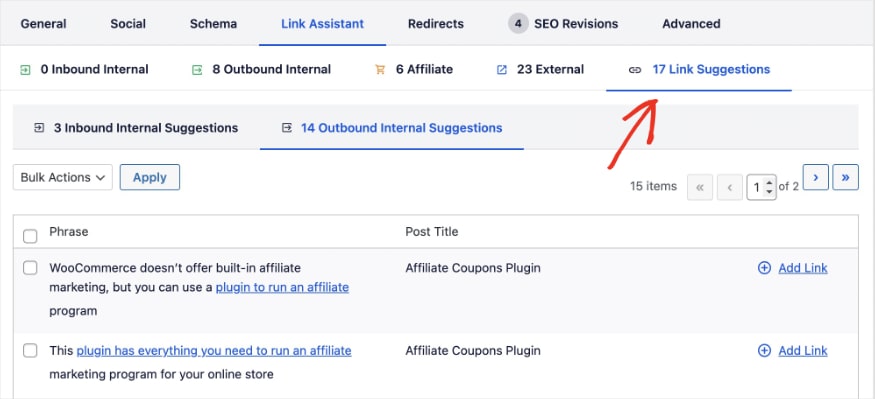
Another good example of automating SEO tasks is the AIOSEO Schema Generator.
Instead of having to manually create and add structured data to your website, this tool formats schema markup automatically for you.
Schema markup is code that you add to your website to provide search engines with more information about your content. Think of it as a way to give search engines a clear understanding of what your page is about, beyond just the text on the page.
You just have to select the schema type you want from the catalog, and AIOSEO will format it for search engines.
Now, let’s see how Brandclub optimizes its new product pages to rank in search engine results pages (SERPs).
2. Unearthing Hidden Ranking Gems: Long-Tail Keyword Strategy
Brandclub's programmatic SEO strategy wasn't just about creating a large volume of pages—it was also about targeting the right keywords.
A crucial element of their approach was a focus on long-tail keywords.
Long-tail keywords are longer, more specific phrases that searchers use when they're closer to making a purchase. Unlike short, generic keywords (e.g., “shoes”), long-tail keywords are more descriptive (e.g., “women's blue running shoes size 9”).
These longer phrases often have lower search volume individually, but collectively they make up a significant portion of all search traffic.
Here, we see how all of Brandclub’s top keywords are long-tail:

Why are long-tail keywords so important?
- Higher Conversion Rates: People searching with long-tail keywords are typically more specific about what they want. This means they're more likely to find exactly what they're looking for on a well-optimized page, increasing the chances of a conversion.
- Less Competition: Long-tail keywords are often less competitive than shorter, more generic keywords. This makes it easier to rank for these phrases, especially for smaller websites or newer pages.
- Improved Targeting: Long-tail keywords allow you to target very specific audiences. By focusing on these niche phrases, you can attract highly qualified traffic to your website.
Brandclub understood the power of long-tail keywords and incorporated them into their product page optimizations. By using the product descriptions from the retailers, they were naturally including many of these longer phrases.
They also targeted their focus keyword in the following areas:
- H1 tag
- SEO title
- URL slug
- Images
Ultimately, these optimizations had a huge impact on Brandclub’s keyword rankings.
By January, rankings were up to 646.9K keywords. (Brandclub only had 7.7K rankings just 6 months ago, providing the efficacy of their on-page SEO strategy.)

Why this matters:
Brandclub's long-tail keyword strategy drove explosive growth by attracting the right traffic. Focusing on specific search phrases led to:
- Higher Conversions: More specific searches mean more purchase-ready users.
- Reduced Competition: Easier ranking for niche keywords.
- Improved ROI: Attracting qualified traffic maximizes SEO investment.
- Scalable Growth: More products mean more long-tail keywords and traffic.
- Real Results: Keyword rankings soared from 7.7K to 646.9K in 6 months.
Essentially, Brandclub's strategy proves the power of targeted keywords for significant SEO success.
How to find long-tail keywords:
Brandclub's success underscores the value of long-tail keywords, but how do you find them for your own website?
Here are some effective strategies:
- Brainstorming: Start by thinking about your target audience and the specific products or services you offer. Consider the different ways people might search for those offerings. Get specific! Instead of “coffee maker,” think “blue vintage nespresso coffee maker.”
- Competitor Analysis: See what long-tail keywords your competitors are ranking for. Tools like LowFruits and Semrush can help you identify these keywords.
- Customer Feedback: Pay attention to the language your customers use when they talk about your products or services. Look at reviews, surveys, and customer support interactions for valuable long-tail keyword ideas.
- Google Autocomplete: Start typing a broad keyword into Google and see what suggestions pop up. These suggestions are often long-tail keywords that people are actually searching for.
- Question-Based Keywords: Think about the questions your target audience might ask. These questions can be great long-tail keyword opportunities (e.g., “how to make drip coffee” or “best nespresso alternative pods”).
Long-Tail Keyword Research Tools:
Did you know All in One SEO can connect with your Semrush account in WordPress?
This makes finding relevant keywords for your content easy.
To use this feature, you’ll start by setting a focus keyphrase for your post or page.
Then, click Get Additional Keyphrases.

AIOSEO will fetch keyword ideas from Semrush and populate results in a pop-out window. You’ll find that many results are long-tail keywords, like in the example below.

You can use these keyword insights to further optimize your content and increase its reach in search results.
Speaking of enhancing a content’s reach, let’s see how Brandclub uses images to stand out in organic search.
3. Enhancing Visibility in SERPs: Image Optimizations
Brandclub's SEO strategy wasn't limited to text; they also recognize the importance of image optimizations.
Image SEO is the practice of optimizing images on your website to rank in search results.
While often overlooked, image SEO can be a powerful way to drive additional traffic to your site.
There are a few different areas images can appear in Google.
- As an image snippet in traditional search results (shown below).
- In the Google Image Pack, which appears at the top of search results.
- In Google Images, where there are over 1 billion searches every day.
Each venue is a prime opportunity to stand out from the competition and get more visitors to your site.

For BrandClub, image snippets were their most common occurrence with 146.1K rankings in January.

So, how’d they get them?
Brandclub used the following techniques:
- Wrote descriptive alt text. Alt text (alternative text) is a description of an image that is read by screen readers and displayed if the image fails to load. It also provides valuable information to search engines about the image's content. Brandclub consistently uses descriptive alt text that accurately reflects what the image depicts and incorporates relevant keywords.
- Leveraged on-page SEO signals. Brandclub understands that images don't exist in isolation. They integrate their images within their on-page content, ensuring that the surrounding text is relevant to the image. This contextual information helps search engines understand the relationship between the image and the overall topic of the page.
(There are also additional optimizations I would have liked to have seen from Brandclub, but I’ll get into those shortly.)
Why this matters:
Brandclub's image optimization efforts showcase the power of visuals in SEO:
- Increased Visibility: They tapped into image search, expanding their reach beyond text results.
- Better User Experience: Alt text improved accessibility for users with visual impairments.
- Higher Clickthrough Rates: Eye-catching images attract more clicks.
- Diversified Traffic: Image search provides a valuable alternative traffic source.
- Brand Building: Strong images reinforce brand identity.
Brandclub's strategy proves that an effective SEO strategy should include visual optimizations for maximum impact.
How to do image SEO:
This tutorial shows you how to optimize WordPress images, but here’s a quick recap of the process:
- Use keyword-rich image file names.
- Write descriptive alt text.
- Include image title tags.
- Add captions when appropriate.
- Create an image sitemap.
Several of these optimizations could have helped Brandclub win even more image rankings than it has already. Two of the most impactful would have been using optimized image file names and title tags, which appear when users hover or click on an image.
Image SEO Tools:
AIOSEO has a user-friendly image SEO tool for WordPress. It also ties in some of the earlier automated processes, like writing image alt text for you.
To use this feature, just select the smart tag variables you want the plugin to use to generate your alt tag. The tool will then create the appropriate alt text for your images, with no work from your end.
Standout SEO Wins
Now that we've explored the key drivers of Brandclub's recent growth, let's look at a final, noteworthy SEO technique:
Breadcrumbs for a Better User Journey
Brandclub uses breadcrumb navigation to improve the user journey and support content discovery.
Breadcrumb navigation is a trail of links that shows users their current location within the site structure. For example, on a Brandclub product page, the breadcrumb trail might look like this:
Headphones > Over-Ear Headphones

This simple navigation element offers several benefits:
- Improved User Experience: Breadcrumbs make it easy for users to understand where they are on the siteand navigate to related categories. This clear path enhances user experience and can reduce bounce rates by providing clear navigation options.
- Internal Linking Structure: Breadcrumbs provide a clear internal linking structure, which helps search engines understand the hierarchy and relationship between different pages. This can improve crawlability and overall site architecture.
- Keyword-Rich Anchor Text: The links in breadcrumb trails often incorporate relevant keywords, providing additional context to search engines about the page's content.
Brandclub's use of breadcrumbs demonstrates their attention to detail and commitment to providing a user-friendly website that is also optimized for search engines.
Tool: In AIOSEO, you can enable WordPress breadcrumbs for easy site navigation. It’s as simple as toggling the switch on. You can also pick how you want to display the breadcrumb trail on the front end of your website to users.
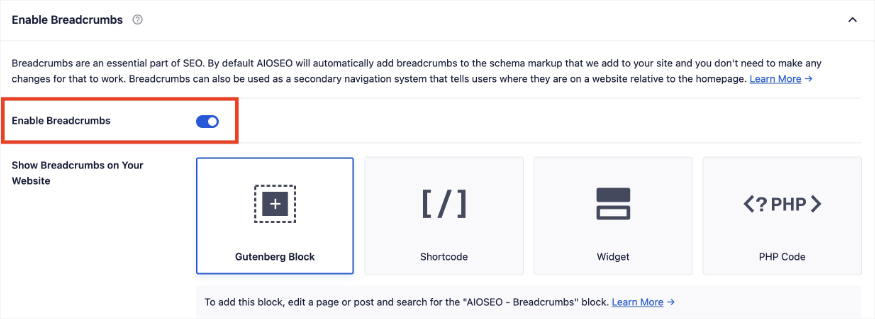
Takeaways
In our analysis of Brandclub's website, we uncovered the SEO strategies that fueled their traffic growth. Their success provides valuable lessons for any website owner looking to boost their organic visibility and attract more qualified visitors.
Here are the key takeaways:
Top 3 Strategies to Emulate
- Automate key SEO tasks. While programmatic SEO might not be suitable for every business, Brandclub's approach highlights the power of automation. Identify repetitive SEO tasks that can be automated, such as generating meta descriptions, optimizing images, or building internal links. Tools like AIOSEO can help streamline these processes and free up valuable time for other SEO efforts.
- Target long-tail keywords. Don't just focus on broad, competitive keywords. Brandclub's success with long-tail keywords demonstrates the power of targeting specific, niche search queries. Conduct thorough keyword research to identify long-tail opportunities relevant to your audience and incorporate these keywords strategically throughout your content. This approach will improve your visibility in search results and bring qualified traffic to your site.
- Optimize your images for search engines. Image SEO is often overlooked, but Brandclub's results prove its value. Optimize your images with descriptive alt text, keyword-rich file names, and appropriate title tags. These simple steps can significantly enhance your visibility in Google Images and help you stand out in traditional search results.
Bottom 3 Strategies to Reconsider
- Neglecting image title tags. Brandclub is missing out on an opportunity to provide additional context to search engines by not including image titles. These tags, while not as important as alt text, can still contribute to image SEO. Image titles appear when users hover or click on an image. AIOSEO's Image SEO module can automatically generate image titles, ensuring that every image on your site is optimized for search.
- Omitting meta descriptions from optimizations. While Google doesn't always use meta descriptions in search results, they still play a valuable role in attracting clicks. Brandclub could improve their clickthrough rate (CTR) by crafting compelling meta descriptions for each page. AIOSEO's TruSEO tool helps you optimize your meta descriptions for maximum impact. You can also use a meta description generator to write them for you.
- Forgetting to set canonical URLs. Canonical URLs help prevent duplicate content issues by specifying the preferred version of a page. Unfortunately, Brandclub doesn't appear to use them on their website. You can set canonical URLs easily in AIOSEO's advanced settings. This feature allows you to customize your canonical tags for improved indexing.
Steal Our Winning SEO Strategy: A Checklist for Your Website
Download A Free SEO Checklist
Access our comprehensive SEO Checklist with a single click. We'll deliver it straight to you, putting actionable items with SEO tools and tutorials right at your fingertips.
Enter your name and email to download a free SEO checklist.
Unlock Explosive Growth With AIOSEO
Brandclub's journey to 105K monthly visits showcases the power of a well-executed SEO strategy. By embracing automation, targeting long-tail keywords, and optimizing images, they achieved remarkable results.
But their success story also highlights the importance of ongoing optimizations.
Don't let your SEO efforts become a burden.
AIOSEO can help you streamline your workflow, automate key tasks, and unlock the full potential of your website. From generating schema markup to optimizing images and managing breadcrumbs, AIOSEO provides the tools you need to achieve your SEO goals.
Here are a few customer favorites:
- Link Assistant: Get link suggestions, edit anchor text, and add internal links to your content in just 1 click. Link Assistant helps you effortlessly build a better linking strategy.
- Rich Snippets Schema: Win more rich results with AIOSEO’s user-friendly schema generator. Just pick the schema type you want, and we’ll format the structured data properly for Google.
- Semrush Keyphrase Suggestions: Perform keyword research directly in the WordPress editor. AIOSEO connects with your Semrush account to generate and serve keyword ideas for your content.
- Image SEO: Turn on automatic image alt text and title attributes with a single click. You’ll save time from manual entries while helping users and search engines understand your images.
- Breadcrumbs: Create a trail for users and search engines to understand where they are in your site hierarchy. Breadcrumbs are a great way of facilitating navigation and can generate sitelinks in SERPs.
- TruSEO On-Page Analysis: Get a snapshot view, or go into detail, of your content’s on-page SEO with this innovative tool. TruSEO analyzes your content optimizations and gives you actionable insights to maximize its reach.